File Details |
|
| File Size | 2.0 MB |
|---|---|
| License | Freeware |
| Operating System | Windows 2000/Server 2003/XP |
| Date Added | November 4, 2011 |
| Total Downloads | 65,808 |
| Publisher | Ray Adams |
| Homepage | ATI Tray Tools |
Publisher's Description
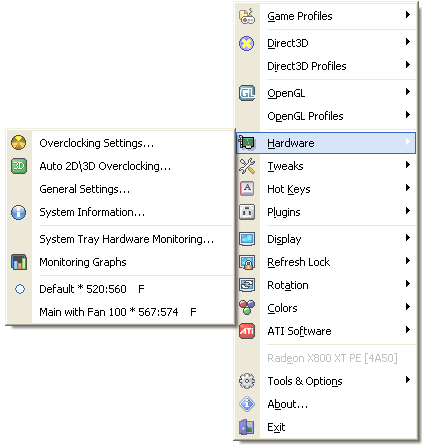
ATI Tray Tools is a free utility that runs in the system tray and provides easy right-click access to all of your ATI video card's crucial settings. You can change anisotropic filtering + antialiasing levels in Direct3D and OpenGL, adjust image quality, turn on/off special driver features, or simply just fool around with clock settings (core and memory speeds). It uses minimal system resources and isn't intrusive.
Latest Reviews

NyaR reviewed v1.7.9.1573 Beta on Jun 12, 2014
This program hasn't been updated since 2011 and does not work with newer cards.
That said, it was great, in 2011. Not sure why you decided to post it in 2014 when it hasn't worked for some years.

Somnambulator reviewed v1.6.9.1459 Beta on Jan 11, 2010
Previous version disables the Steam overlay when it's running in the background. hopefully this version fixes it. besides that it's a great utility.

Sativarg reviewed v1.6.9.1391 Beta on Jul 29, 2009
in order to reap the real benefits of using this tool one might want to "goto"
ATI Tray Tools Official WEB Forum on Guru3D I am not a member of Windows Live Space though so perhaps even better info is located there.
here is the ATI Tray Tools Public Beta Section linky.
ATT beta version (UNICODE support)
Ray Adams wrote:
[+] New game profiles option. "Disable CrossFire". This option can help you to disable CF temporarily for selected game without disabling CF at hardware level.
Your second board will not be used in this mode. After game end , CrossFire mode will be restored.
[+] new ini file option opt_use_soft_clk_read. Set it to 1 to enabled Software clocks reading method. Can help when your board not yet fully supported.
1 day ago

anomoly reviewed v1.6.9.1386 Beta on Apr 10, 2009
Fixed about if nothing else
Somnambulator reviewed v1.6.9.1382 Beta on Feb 26, 2009
LOVE LOVE LOVE his program. ive been an ATI guy for most of my PC life but when they started slacking off severerely i went with nvidia. from 8800GT to 9800GTX to GTX260, but im finally back in ATI camp and LOVE ATI Tray Tools. it's one of the biggest reasons i love ATI cards...RivaTuner is a nice app (works with many ATI cards now, too), but it just doesnt compare to ATT. lovin a previous beta with my 4870x2, though it was a little buggy cause it was an old build. didnt know Ray Adams was still developing this

Ryusennin reviewed v1.5.9.1290 Beta on Sep 11, 2008
The latest ATT beta is always available from Ray's Windows Live Space (in the public folder):
http://ray-att.spaces.live.com/

P5-133XL reviewed v1.4.7.1193 Beta on Jun 2, 2008
No joy!
I have two Sapphire 3870's used for folding. I wanted to OC them manually rather than depending on ATI's Overdrive that comes with the new Catalyst CCC.
First, there is no way of ID'ing multiple cards so I have no idea which card or both the settings are being applied to. Then there is the problem that when I tried to shutdown the machine (default settings) I got continious application errors (illegal memory addressed). I had told it to auto-start the monitoring application, however when it restarted no monitoring application. After that, I just junked it as something not ready for prime time and went back to ATI's overdrive

Adrian79 reviewed v1.4.7.1193 Beta on May 28, 2008
nice.. biannual updates

hook_ reviewed v1.3.6.1066 Beta on Oct 30, 2007
Last three releases have give me error: "can't detect bios" or something like that. 1.3.6.1056 is working on my ATI 2900 XT fine, all the other releases after that gives me headache. Weird.
Adrian79 reviewed v1.3.6.1066 Beta on Oct 29, 2007
great stuff!

NyaR reviewed v1.7.9.1573 Beta on Jun 12, 2014
This program hasn't been updated since 2011 and does not work with newer cards.
That said, it was great, in 2011. Not sure why you decided to post it in 2014 when it hasn't worked for some years.
Somnambulator reviewed v1.6.9.1459 Beta on Jan 11, 2010
Previous version disables the Steam overlay when it's running in the background. hopefully this version fixes it. besides that it's a great utility.
Sativarg reviewed v1.6.9.1391 Beta on Jul 29, 2009
in order to reap the real benefits of using this tool one might want to "goto"
ATI Tray Tools Official WEB Forum on Guru3D I am not a member of Windows Live Space though so perhaps even better info is located there.
here is the ATI Tray Tools Public Beta Section linky.
ATT beta version (UNICODE support)
Ray Adams wrote:
[+] New game profiles option. "Disable CrossFire". This option can help you to disable CF temporarily for selected game without disabling CF at hardware level.
Your second board will not be used in this mode. After game end , CrossFire mode will be restored.
[+] new ini file option opt_use_soft_clk_read. Set it to 1 to enabled Software clocks reading method. Can help when your board not yet fully supported.
1 day ago
anomoly reviewed v1.6.9.1386 Beta on Apr 10, 2009
Fixed about if nothing else
Somnambulator reviewed v1.6.9.1382 Beta on Feb 26, 2009
LOVE LOVE LOVE his program. ive been an ATI guy for most of my PC life but when they started slacking off severerely i went with nvidia. from 8800GT to 9800GTX to GTX260, but im finally back in ATI camp and LOVE ATI Tray Tools. it's one of the biggest reasons i love ATI cards...RivaTuner is a nice app (works with many ATI cards now, too), but it just doesnt compare to ATT. lovin a previous beta with my 4870x2, though it was a little buggy cause it was an old build. didnt know Ray Adams was still developing this
Ryusennin reviewed v1.5.9.1290 Beta on Sep 11, 2008
The latest ATT beta is always available from Ray's Windows Live Space (in the public folder):
http://ray-att.spaces.live.com/
P5-133XL reviewed v1.4.7.1193 Beta on Jun 2, 2008
No joy!
I have two Sapphire 3870's used for folding. I wanted to OC them manually rather than depending on ATI's Overdrive that comes with the new Catalyst CCC.
First, there is no way of ID'ing multiple cards so I have no idea which card or both the settings are being applied to. Then there is the problem that when I tried to shutdown the machine (default settings) I got continious application errors (illegal memory addressed). I had told it to auto-start the monitoring application, however when it restarted no monitoring application. After that, I just junked it as something not ready for prime time and went back to ATI's overdrive
Adrian79 reviewed v1.4.7.1193 Beta on May 28, 2008
nice.. biannual updates
hook_ reviewed v1.3.6.1066 Beta on Oct 30, 2007
Last three releases have give me error: "can't detect bios" or something like that. 1.3.6.1056 is working on my ATI 2900 XT fine, all the other releases after that gives me headache. Weird.
Adrian79 reviewed v1.3.6.1066 Beta on Oct 29, 2007
great stuff!

Floodland reviewed v1.3.6.1058 Beta on Oct 16, 2007
Life saver for sad DAAMIT victims. I cannot understand how ATI staff continue developing that crappy .NET infected CCC. This little tool does more than CCC (for free) and shows no bloated interface.
The only but is that with some configurations ATT is not as stable as I wish. But overall, it is pretty impressive! Ati, learn from these guys: License this beauty or hire the developers if your programmers are just .NET st00pid dummies.

tazandpig reviewed v1.3.6.1058 Beta on Oct 16, 2007
Hmm.
Much as I usually like ATI tools, this time it bombed.
BSOD the instant it started.

hell0 reviewed v1.3.6.1056 Beta on Sep 18, 2007
ATT is made of pure awesome.
used next to the ATI/AMD "Driver only" package - this really does an awesome job of configuring, and beyond that, a great tool for tweaking and overclocking.