File Details |
|
| File Size | 3.4 MB |
|---|---|
| License | Freeware |
| Operating System | Windows 7/2000/Server 2003/Vista/XP |
| Date Added | October 15, 2010 |
| Total Downloads | 1,862 |
| Publisher | AVERT Software |
| Homepage | AVERT |
Publisher's Description
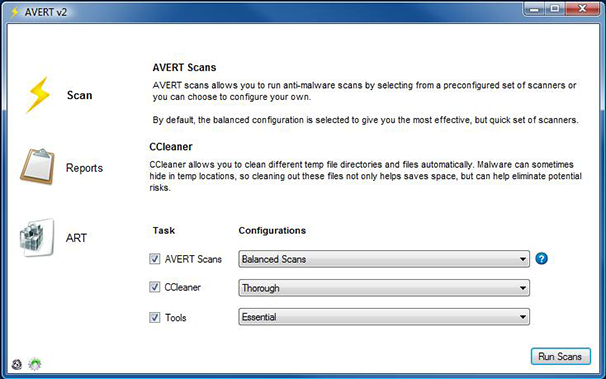
AVERT is an application designed to help facilitate the removal of malware on an already infected machine. It comes loaded with tons of features and more are constantly added: 7 Scanners from some of the top security companies; Automatic everything - Scanning, logging, quarantine/removal; Simple and easy to use; Customizable; Auto updates; Temp file cleaning with Piriform's CCleaner.
Latest Reviews

SarahQ2 reviewed v2.0 on Oct 29, 2010
I was a little confused at first, but it works great

bearbottoms reviewed v2.0 on Oct 24, 2010
I had problems:

Input Overload reviewed v2.0 on Oct 18, 2010
Nice program for the toolbox should a rainy day arrive for your 'friends'? Thanks.
Spammers go away, only a moron would buy from you.

zzark reviewed v2.0 on Oct 16, 2010
I installed to hard drive, then downloaded the separate virus programs one-by-one. That worked fine. AVERT works as it should.
I'll give it a 4.
version 2.1 from Avert site
Well, I can't get anything to work properly. I selected to download all the scanners, and only Asquared downloaded. I tried custom scan with Asquared, and it gave a error message and died. Avert did not reappear.
This was done from a USB drive. I'll try to install on hard drive later.

jackyboy2 reviewed v2.0 on Oct 16, 2010
Not bad, not bad. I used to use multi av scan back when it was supported, but it wasn't near as good as this. Multi av scan made you download everything on your own and it was just awful.
I'm lovin this though!
thanks for the software

weirddemon reviewed v2.0 on Oct 16, 2010
Hi,
I'm the developer of AVERT. I just wanted to clear up some information about.
On October 15th, 2010, Bobad posted a comment about AVERT and how it downloads large definition files to your user profile and it keeps them there forever.
That is absolutely incorrect. The local application data folder is where Microsoft suggests developers save files to, so there's nothing wrong with saving files there. But, regardless, AVERT deletes the files afterwards so that they do not take up unnecessary space. In fact, it cleans up all of it's files after each scan.
The only files that stay on your machine are the reports, which are tiny XML files and registry backups, which can be deleted from AVERT's ART tool at any time.
As for the scanners, most of them are some of the best scanners you can get, Asquared, ClamWin, Trend Mico, Panda, Sophos, and Avira are all well known and very good.
But, that's besides the point. No one scanner is perfect. Even just 3 or 4 of these scanners, not to mention all 8, running together to much better than one. And it's all automatic! If you chose to not use AVERT and use, say 4, other scanners, you'd have hope it even installs and if it does, wait for it to update, then run the scanner, uninstall and repeat 3 more times. Plus, you never no when each scanner will finish. With AVERT, once you click, "Run Scans", just walk away.
With v2.1, which I just released, I added support for scanners that are installed on your machine. At the moment, only AVG is available, but more are coming. The main point for AVERT, is to be portable, so I'm limited to what scanners I can use because of the portability factor.
And finally, about the internet issue part, I understand his concern completely. But, there are two things about that. First, AVERT has built in tools, and more are coming, that help resolve internet issues. So if malware has blocked your internet, AVERT could possibly fix it automatically. But, I do understand the need to be able to download the signature files independently so that they can be added to a flash drive and then ported over to the infected machine and I'm working on that.
If there are any issues, concerns, or suggestions, please email me at avertsoftware@gmail.com. Especially if you're going to post a negative review without knowing all of the information first ;)
Thanks

bobad reviewed v2.0 on Oct 15, 2010
The good thing about this program is, it's no install. That's about all I can think of. When you run a scan, it downloads very large definition files into your User folder. If I hadn't investigated, I would have never known it, and the files would have stayed there forever. The developer should have warned about that. I'm not real impressed with the scanners. either. Aside from Sophos and Panda, they aren't exactly heavy hitters. Many viruses and Trojans all but block your Internet access, so good luck downloading the definitions. Recommended not so much, there are better after-the-fact scanners.

JohnDorian reviewed v2.0 on Oct 15, 2010
Awesome software!

CyberDoc999 reviewed v2.0 on Oct 15, 2010
works great

SarahQ2 reviewed v2.0 on Oct 29, 2010
I was a little confused at first, but it works great
bearbottoms reviewed v2.0 on Oct 24, 2010
I had problems:
Input Overload reviewed v2.0 on Oct 18, 2010
Nice program for the toolbox should a rainy day arrive for your 'friends'? Thanks.
Spammers go away, only a moron would buy from you.
zzark reviewed v2.0 on Oct 16, 2010
I installed to hard drive, then downloaded the separate virus programs one-by-one. That worked fine. AVERT works as it should.
I'll give it a 4.
version 2.1 from Avert site
Well, I can't get anything to work properly. I selected to download all the scanners, and only Asquared downloaded. I tried custom scan with Asquared, and it gave a error message and died. Avert did not reappear.
This was done from a USB drive. I'll try to install on hard drive later.
jackyboy2 reviewed v2.0 on Oct 16, 2010
Not bad, not bad. I used to use multi av scan back when it was supported, but it wasn't near as good as this. Multi av scan made you download everything on your own and it was just awful.
I'm lovin this though!
thanks for the software
weirddemon reviewed v2.0 on Oct 16, 2010
Hi,
I'm the developer of AVERT. I just wanted to clear up some information about.
On October 15th, 2010, Bobad posted a comment about AVERT and how it downloads large definition files to your user profile and it keeps them there forever.
That is absolutely incorrect. The local application data folder is where Microsoft suggests developers save files to, so there's nothing wrong with saving files there. But, regardless, AVERT deletes the files afterwards so that they do not take up unnecessary space. In fact, it cleans up all of it's files after each scan.
The only files that stay on your machine are the reports, which are tiny XML files and registry backups, which can be deleted from AVERT's ART tool at any time.
As for the scanners, most of them are some of the best scanners you can get, Asquared, ClamWin, Trend Mico, Panda, Sophos, and Avira are all well known and very good.
But, that's besides the point. No one scanner is perfect. Even just 3 or 4 of these scanners, not to mention all 8, running together to much better than one. And it's all automatic! If you chose to not use AVERT and use, say 4, other scanners, you'd have hope it even installs and if it does, wait for it to update, then run the scanner, uninstall and repeat 3 more times. Plus, you never no when each scanner will finish. With AVERT, once you click, "Run Scans", just walk away.
With v2.1, which I just released, I added support for scanners that are installed on your machine. At the moment, only AVG is available, but more are coming. The main point for AVERT, is to be portable, so I'm limited to what scanners I can use because of the portability factor.
And finally, about the internet issue part, I understand his concern completely. But, there are two things about that. First, AVERT has built in tools, and more are coming, that help resolve internet issues. So if malware has blocked your internet, AVERT could possibly fix it automatically. But, I do understand the need to be able to download the signature files independently so that they can be added to a flash drive and then ported over to the infected machine and I'm working on that.
If there are any issues, concerns, or suggestions, please email me at avertsoftware@gmail.com. Especially if you're going to post a negative review without knowing all of the information first ;)
Thanks
bobad reviewed v2.0 on Oct 15, 2010
The good thing about this program is, it's no install. That's about all I can think of. When you run a scan, it downloads very large definition files into your User folder. If I hadn't investigated, I would have never known it, and the files would have stayed there forever. The developer should have warned about that. I'm not real impressed with the scanners. either. Aside from Sophos and Panda, they aren't exactly heavy hitters. Many viruses and Trojans all but block your Internet access, so good luck downloading the definitions. Recommended not so much, there are better after-the-fact scanners.
JohnDorian reviewed v2.0 on Oct 15, 2010
Awesome software!
CyberDoc999 reviewed v2.0 on Oct 15, 2010
works great