File Details |
|
| File Size | 7.3 MB |
|---|---|
| License | Commercial Demo |
| Operating System | Windows 2000/Server 2003/Server 2008/Vista/XP |
| Date Added | April 21, 2015 |
| Total Downloads | 12,258 |
| Publisher | Usov Lab |
| Homepage | Allway Sync |
Publisher's Description
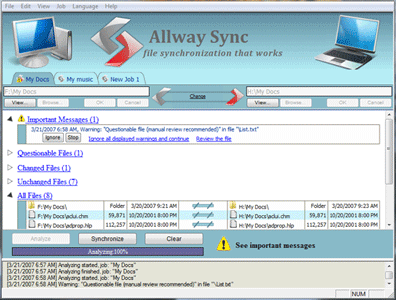
Allway Sync is a free file and directory synchronizer that works on local, network or removable devices. Use it to synchronize your data between PCs, laptops, USB drives and more.
Free for Private Use.
Latest Reviews

reviewer reviewed v11.3.0 on Jun 20, 2011
This is not free. It locks you out of your files and demands that you pay to upgrade if it thinks you have "excessive usage".

djrnz reviewed v9.1.7 on May 7, 2011
Downloaded and tested Allway Sync this afternoon. I found it excellent and perfect for my needs. The user interface is excellent, and I put it through tests and it was flawless. I am a programmer myself , and have been into computers since the 1970's. It is rare for me to ever have such a pleasant experience with new software. I did not see the program's usage limitation at all, so I am glad I read this forum!! But I would gladly pay for it. Following others recommendations of Unison, I researched that, as it is what i need for our bigger server application. But I was not successful in downloading a clean and easy install exe, and did not want to download and compile and configure it. . After a bit of hunting around, I found one, but the download froze and I gave up after three trys.

adamw reviewed v9.1.7 on Feb 27, 2011
Same problem as other reviewers stated - it failed half way through backing up My Documents folder and demanded money. Stay away.

Gripweed reviewed v9.1.7 on Dec 29, 2010
I took the time to read the EULA about the program being free after I downloaded the file to try out. It clearly states that if you process more than 40,000 files in a 30 day period you have to purchase the program. Knowing what I was going to use it for I knew I would have to pay for it since I was going to be dealing with that much or more files in any given month. I tried out the program and it did everything I wanted it to do and more unlike the other program I had previously bought, GoodSync. I purchased Allway Sync in a day after trying it out and I have no regrets whatsoever still.

River7 reviewed v9.1.7 on Dec 26, 2010
I agree with the last two posters. Allway Sync looks good, but it let me down halfway through a task when I'd exceeded the limit. More annoying than not having it at all. I had quite a lot of files to synchonise, but isn't that the point of using it. MS Synctoy and Dsynchronize both work fine. Avoid Allway, cos it'll bite you when you least need it to.

Slrmanjim reviewed v9.1.7 on Mar 13, 2009
They claim to be free. But after you use the program for a short time, they suddenly say you are using it too much and must upgrade to the paid version. What a scam. They probably cannot be trusted in other areas, too. No way would I ever use anything from this bunch of crooks.

wodez reviewed v8.5.1 on Dec 9, 2008
Use DSynchronize instead. Does all the things this program does and more + it's free.

eddycurrents reviewed v8.4.2 on Nov 4, 2008
False advertising. Their website says free for personal use, but after 3 weeks I got a warning "this doesn't look like personal use, you must buy the full program". Next time it told me "this is the last time, you are cut off".
I sync'ed 3 partitions four or five times over about three months. Basically, I backed up my hard drive about once every other week. I was at home. This was definitely personal use.
This felt like a scam. Basically it's shareware, not freeware. It's a limited time trial. I uninstalled it and went to Microsoft's synctoy, which does almost everything this program does and it really is free.

pforbes reviewed v8.3.0 on Sep 8, 2008
Excellent. BTW not valid for 9x.

cadiz reviewed v8.3.0 on Sep 6, 2008
It works very good and it is free for private usage. Tested some other tools, also free MS tool for sync files, but this does not work, file on destination should be deleted failed on other sync tools, this works really good and stable. Thank your for this nice tool!

reviewer reviewed v11.3.0 on Jun 20, 2011
This is not free. It locks you out of your files and demands that you pay to upgrade if it thinks you have "excessive usage".
djrnz reviewed v9.1.7 on May 7, 2011
Downloaded and tested Allway Sync this afternoon. I found it excellent and perfect for my needs. The user interface is excellent, and I put it through tests and it was flawless. I am a programmer myself , and have been into computers since the 1970's. It is rare for me to ever have such a pleasant experience with new software. I did not see the program's usage limitation at all, so I am glad I read this forum!! But I would gladly pay for it. Following others recommendations of Unison, I researched that, as it is what i need for our bigger server application. But I was not successful in downloading a clean and easy install exe, and did not want to download and compile and configure it. . After a bit of hunting around, I found one, but the download froze and I gave up after three trys.
adamw reviewed v9.1.7 on Feb 27, 2011
Same problem as other reviewers stated - it failed half way through backing up My Documents folder and demanded money. Stay away.
Gripweed reviewed v9.1.7 on Dec 29, 2010
I took the time to read the EULA about the program being free after I downloaded the file to try out. It clearly states that if you process more than 40,000 files in a 30 day period you have to purchase the program. Knowing what I was going to use it for I knew I would have to pay for it since I was going to be dealing with that much or more files in any given month. I tried out the program and it did everything I wanted it to do and more unlike the other program I had previously bought, GoodSync. I purchased Allway Sync in a day after trying it out and I have no regrets whatsoever still.
River7 reviewed v9.1.7 on Dec 26, 2010
I agree with the last two posters. Allway Sync looks good, but it let me down halfway through a task when I'd exceeded the limit. More annoying than not having it at all. I had quite a lot of files to synchonise, but isn't that the point of using it. MS Synctoy and Dsynchronize both work fine. Avoid Allway, cos it'll bite you when you least need it to.
Slrmanjim reviewed v9.1.7 on Mar 13, 2009
They claim to be free. But after you use the program for a short time, they suddenly say you are using it too much and must upgrade to the paid version. What a scam. They probably cannot be trusted in other areas, too. No way would I ever use anything from this bunch of crooks.
wodez reviewed v8.5.1 on Dec 9, 2008
Use DSynchronize instead. Does all the things this program does and more + it's free.
eddycurrents reviewed v8.4.2 on Nov 4, 2008
False advertising. Their website says free for personal use, but after 3 weeks I got a warning "this doesn't look like personal use, you must buy the full program". Next time it told me "this is the last time, you are cut off".
I sync'ed 3 partitions four or five times over about three months. Basically, I backed up my hard drive about once every other week. I was at home. This was definitely personal use.
This felt like a scam. Basically it's shareware, not freeware. It's a limited time trial. I uninstalled it and went to Microsoft's synctoy, which does almost everything this program does and it really is free.
pforbes reviewed v8.3.0 on Sep 8, 2008
Excellent. BTW not valid for 9x.
cadiz reviewed v8.3.0 on Sep 6, 2008
It works very good and it is free for private usage. Tested some other tools, also free MS tool for sync files, but this does not work, file on destination should be deleted failed on other sync tools, this works really good and stable. Thank your for this nice tool!

Ruf reviewed v7.1.2 on Mar 27, 2008
Works perfect. I don't know what the previous reviewer is talking about because Allway Sync does not permanently delete files unless you instruct it to. You have the option of sending deleted files to the Recycle Bin, the _SYNCAPP folder or to any other location defined by the user. Same goes for modified files.
I've tried Microsoft's SyncToy but Allway is far superior and much more intuitive. The interface is better as well. Allway is ideal if you have several USB drives that you need to keep synchronized on multiple computers. Allway syncs in both directions not just one unlike other backup utilities. I bought the Pro version to help support the developer but the free version is just as capable. Once you get your drives and folders sync'ed I suggest using TrueCrypt to get them encrypted. IMO, Allway Sync is the best of the lot.

pcofran reviewed v7.1.2 on Mar 7, 2008
At first I was happy. Great looking interface, easy to use, and quick. But only my second day in it made a mistake. Allway Sync didn't see new files I added. It kept telling me the source was the same as the destination and I know for a fact its wrong. I restart the program thinking its just a glitch and it still makes the same mistake.
This was a deal breaker because if I didn't catch it, then when synced in the other direction it would have deleted those new files. For me this was unacceptable. You can't have a sync program work work "most" of the time. Maybe for someone who can easily replace the files they're syncing it wouldn't be a big deal. I take photos of events that can't be retaken if deleted by a syncing error.
I switched to Unison, its interface is primitive and configuration involves manually editing a text file but reliability is a must and Unison delivers that and delta comparison that is it only updates parts of the file that have changed.

JarHead100 reviewed v7.1.2 on Mar 1, 2008
It's IS Free for personal use and isn't crippled in any way that I can find. Check out the website and it is abundantly clear about it being Free for personal use and the circumstances under which you should register/buy the software. If you register/buy it, it only cost a few bucks and it seems it basically is done as a way of supporting the developer and confirming your basic honesty. Besides, this is one slick piece of software that has saved me a lot of time. Try it and you'll be glad you did....