File Details |
|
| File Size | 0.8 MB |
|---|---|
| License | Freeware |
| Operating System | Windows 7/8/Vista/XP |
| Date Added | April 25, 2015 |
| Total Downloads | 8,237 |
| Publisher | DiSTANTX |
| Homepage | Alternative Flash Player Auto-Updater |
Publisher's Description
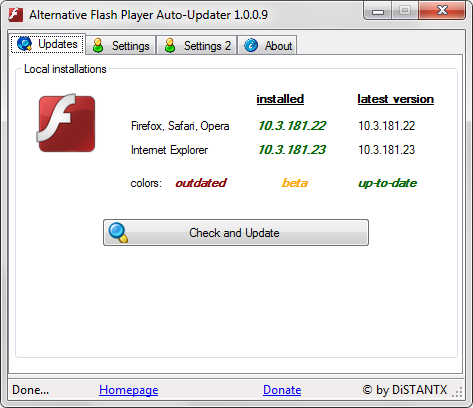
Alternative Flash Player Auto-Updater let's you download and install the Flash Player without having to download Adobe's download manager - it downloads the latest version and asks you whether it should be installed or not. You can choose to let it run at the start of Windows, this way you can be sure that your system will never run an outdated and extremely dangerous version of Flash Player.
Latest Reviews

CyberDoc999 reviewed v1.1.0.7 on Apr 27, 2015
full of spyware adware

Music4Ever reviewed v1.1.0.4 on Aug 12, 2013
The most pointless program ever - Look on this site once a week for updates
CyberDoc999 reviewed v1.0.2.0 on Jun 4, 2012
avoid this
spyware and adware
use
http://ninite.com/
for automatic update of flash

Cuelebre reviewed v1.0.2.0 on Jun 4, 2012
Useless software. Full installers available at Adobe Website without need of Adobe Download Manager.
http://www.adobe.com/pro...ayer/distribution3.html
Music4Ever reviewed v1.0.1.9 on Apr 17, 2012
There is enough junk that has to run in the background of any Windows PC without having to resort to further clogging a system up with the likes of this ~
Totally unneeded & 'probably' ad-ware.

AlphaBetaGamma reviewed v1.0.1.6 on Oct 25, 2011
This works well, and is a much easier way to install Flash on both IE and Firefox (and others). There is one error message about permissions on start up, but just click past that and it works.
If you don't want the adware, then don't install it.

nilst2006 reviewed v1.0.1.4 on Aug 29, 2011
I really don't understand the use of this when Flash on and off tell You when there is an update.

mdmower reviewed v1.0.0.9 on Jun 9, 2011
Useless software. Just download the manual installers directly from Adobe:
http://kb2.adobe.com/cps...ml#main_ManualInstaller
CyberDoc999 reviewed v1.0.0.9 on Jun 8, 2011
avoid this
spyware and adware
use
http://ninite.com/
for automatic update of flash

DrTeeth reviewed v1.0.0.7 on Mar 17, 2011
This program bundles OpenCandy in a rather underhand way. It is mentioned in the licence agreement, BUT there is no offer to install other software that OC usually does. Also, on first run after install, Opencandy runs again. ESET AV blocks these connections.
Also, the program keeps on asking to load on Windows startup every time it is loaded.
TBH, it is easier to install the Adobe downloader, d/l flash and then delete the 'loader.
This crap gives programming a bad name.

CyberDoc999 reviewed v1.1.0.7 on Apr 27, 2015
full of spyware adware
Music4Ever reviewed v1.1.0.4 on Aug 12, 2013
The most pointless program ever - Look on this site once a week for updates
CyberDoc999 reviewed v1.0.2.0 on Jun 4, 2012
avoid this
spyware and adware
use
http://ninite.com/
for automatic update of flash
Cuelebre reviewed v1.0.2.0 on Jun 4, 2012
Useless software. Full installers available at Adobe Website without need of Adobe Download Manager.
http://www.adobe.com/pro...ayer/distribution3.html
Music4Ever reviewed v1.0.1.9 on Apr 17, 2012
There is enough junk that has to run in the background of any Windows PC without having to resort to further clogging a system up with the likes of this ~
Totally unneeded & 'probably' ad-ware.
AlphaBetaGamma reviewed v1.0.1.6 on Oct 25, 2011
This works well, and is a much easier way to install Flash on both IE and Firefox (and others). There is one error message about permissions on start up, but just click past that and it works.
If you don't want the adware, then don't install it.
nilst2006 reviewed v1.0.1.4 on Aug 29, 2011
I really don't understand the use of this when Flash on and off tell You when there is an update.
mdmower reviewed v1.0.0.9 on Jun 9, 2011
Useless software. Just download the manual installers directly from Adobe:
http://kb2.adobe.com/cps...ml#main_ManualInstaller
CyberDoc999 reviewed v1.0.0.9 on Jun 8, 2011
avoid this
spyware and adware
use
http://ninite.com/
for automatic update of flash
DrTeeth reviewed v1.0.0.7 on Mar 17, 2011
This program bundles OpenCandy in a rather underhand way. It is mentioned in the licence agreement, BUT there is no offer to install other software that OC usually does. Also, on first run after install, Opencandy runs again. ESET AV blocks these connections.
Also, the program keeps on asking to load on Windows startup every time it is loaded.
TBH, it is easier to install the Adobe downloader, d/l flash and then delete the 'loader.
This crap gives programming a bad name.

slinkys_delsol reviewed v1.0.0.7 on Mar 16, 2011
ESET pick this up as a Virus / Malware threat (Below). Good idea, but seems to be Malicious.
-----------------------------------------------
http://horriblejapanearthquake.info/
JS/TrojanClicker.Agent.NBN trojan
-----------------------------------------------
To see Screen Print of Firewall Block Alert: http://www.divshare.com/direct/14332830-8aa.png

some guy reviewed v1.0.0.2 on Sep 10, 2010
good stuff worked like it should on Windows7 64 bit

thartist reviewed v1.0.0.2 on Sep 10, 2010
Whenever i inadvertedly got the Adobe Manager installed in my pc, i just let it install Flash and then removed the AM afterwards. Quite simple.
Don't need another crap-tility to do that.
But, it's a 4.