File Details |
|
| File Size | 13.6 MB |
|---|---|
| License | Open Source |
| Operating System | Windows 2000/Vista/XP |
| Date Added | December 2, 2009 |
| Total Downloads | 10,863 |
| Publisher | W3C |
| Homepage | Amaya |
Publisher's Description
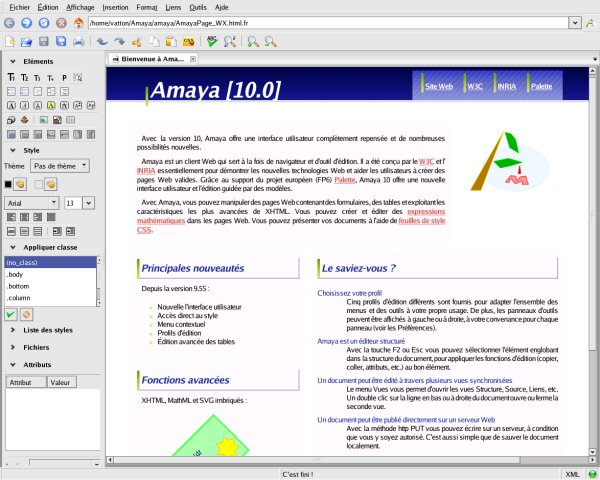
Amaya is a browser/authoring tool that allows you to publish documents on the Web. It is a complete web browsing and authoring environment and comes equipped with a "WYSIWYG style" of interface, similar to that of the most popular commercial browsers. With such an interface, users can easily generate HTML and XHTML pages, as well as CSS style sheets, MathML expressions, and SVG drawings (full support of SVG is not yet available, though). Includes a collaborative annotation application based on Resource Description Framework (RDF), XLink, and XPointer.
Latest Reviews

pjafrombbay reviewed v11.3 on Dec 2, 2009
This is my second review of the software; I think I'm becoming obsessive. However, its still a really good product. I use HTML (and Amaya) as my default word processor. I have a HTML file I call "normal.html" and have it set as Amaya's home page. The finished documents are just as good as any from MS Word of OOo but without the bloat and anyone with a browser can read them.
Regards,
Peter

DudeBoyz reviewed v11.3-pre on Sep 9, 2009
This is a decent effort, though I do wish that there were more obvious ways to force HTML version compatibility, which might help the new-ish users that they seem to target.
There are some WYSIWYG oddities, such as having to click in the "display pane" to see changes you have typed in the "source code pane" - something that might be a bit confusing when you are adding a series of manual code changes one after the other.
There were also some strange bits regarding the initial page / tab that is in place when you first start the application. It did not respond very well when I tried to specify a new location and file name to replace the default. You should not have to create your own blank and go to the EDIT > PREFERENCES menu to specify a "Home Page". Even the good old AOL PRESS application handled that type of thing smoother than this app does, and a few others as well.
When Split View is active and you have entered the Code pane to make manual changes and then click on the table in the WYSIWYG pane, sometimes it does not let you click on empty rows / columns to type text in those. In order to get that to function, I had to actually close the Code pane and manually select one of the empty cells in the table in order to be able to type an entry into those cells. That is something that I should not have to do.
What's the benefit of split windows if you cannot have it automatically update whatever pane you are updating from the opposite pane? You go to the WYSIWYG pane and type in a few comments - they should automatically appear in the Code pane and vice-versa.
This app could really benefit from Context (Right-Click) Menus. Anywhere on the WYSIWIG page, you should be able to right click and see the formatting / setting options for the item below the cursor. If you Right-Click over a table, you should see relevant settings there. Same for empty background or text, etc. Would seriously improve usability, I would think.
Overall, it is not too bad, but it is certainly not special either. It needs more work in order for it to grow into something that can compete well with other such tools. It does show promise, but it's just not there yet.

horsecharles reviewed v11.0 on Dec 17, 2008
Of all the html editors, Amaya has always been the most intuitive, "most wysiwyg"...
One example-- a simple copy / paste & edit of a page containing multiple rows and columns from one website into the application and back into the same or other website can wind up looking very different when utilizing other editors... even when only editing the text and nothing else.
Amaya is ideal to use for someone who has little time to invest & even less desire to become an html geek.
pjafrombbay reviewed v11.0 on Dec 16, 2008
I love this software. I have a "homepage" setup with all my preferred CSS styles and use Amaya as my default word processor. Documents are HTML (XHTML) and so are free of nasty macros and are quite small and easy to e-mail. Everyone (at least all those with a web browser) can read my documents.
Keep up the good work.
Regards,
Peter

twood reviewed v10.1-pre5 on Nov 17, 2008
I looked into this as a possible website editor for the website a friend and I were working on and didn't get the feel for it. I tried for the life of me to get a simple black background on the page, after half an hour I wanted to bang my head against the wall. I'd much rather use KompoZer or Quanta Plus over this for the sake of handling webpages with a much more fluid grace. and easier to use interfaces.

tickleonthetum reviewed v10.0-pre on Feb 1, 2008
It would help if they used a screenshot showing the latest version of the User Interface, which is much better than the one shown.

cricri_pingouin reviewed v9.99-4 Beta on Dec 18, 2007
It's not perfect, but I recommend it to anyone who does not have sufficient knowledge to build their pages from scratch with a text editor. I find it appaling that so many people still think that Frontpage is a good tool to create web pages.
Thus, I find it a very recommendable free tool (because if I'm going to push people to stop using Frontpage, I can't expect them to cough up some cash), especially if like me you want to create XHTML compliant pages that are not overloaded with useless junk.
I still use a text editor myself, but I'll rate this a 4 for being a good effort.
pjafrombbay reviewed v9.99-3 Beta on Nov 16, 2007
This is one of my favorite pieces of software. I no longer bother with bloat-ware word processors but use Amaya and produce neatly formatted and physically small XHTML based documents. I am helped by using a customised 'home page' called normal.html which has all the CSS formatting I need.
A very neet piece of software - thanks Amaya!
Regards,
Peter

Ted Guild reviewed v9.55.3 on Oct 5, 2007
In 2003 Amaya stopped being a W3C Activity but continues as an Open Source project, more information on http://www.w3.org/Amaya/Activity.html
Amaya is a WSIWYG authoring tool that creates valid markup.
Please see the Amaya homepage for more information and how to contribute in it's development http://www.w3.org/Amaya/

DJHasis reviewed v9.55-pre3 on Jun 14, 2007
Very useful software, checks the code and helps to make code cleaner.
Sad is the interface. It's a bit rough and hard to get used to.

pjafrombbay reviewed v11.3 on Dec 2, 2009
This is my second review of the software; I think I'm becoming obsessive. However, its still a really good product. I use HTML (and Amaya) as my default word processor. I have a HTML file I call "normal.html" and have it set as Amaya's home page. The finished documents are just as good as any from MS Word of OOo but without the bloat and anyone with a browser can read them.
Regards,
Peter
DudeBoyz reviewed v11.3-pre on Sep 9, 2009
This is a decent effort, though I do wish that there were more obvious ways to force HTML version compatibility, which might help the new-ish users that they seem to target.
There are some WYSIWYG oddities, such as having to click in the "display pane" to see changes you have typed in the "source code pane" - something that might be a bit confusing when you are adding a series of manual code changes one after the other.
There were also some strange bits regarding the initial page / tab that is in place when you first start the application. It did not respond very well when I tried to specify a new location and file name to replace the default. You should not have to create your own blank and go to the EDIT > PREFERENCES menu to specify a "Home Page". Even the good old AOL PRESS application handled that type of thing smoother than this app does, and a few others as well.
When Split View is active and you have entered the Code pane to make manual changes and then click on the table in the WYSIWYG pane, sometimes it does not let you click on empty rows / columns to type text in those. In order to get that to function, I had to actually close the Code pane and manually select one of the empty cells in the table in order to be able to type an entry into those cells. That is something that I should not have to do.
What's the benefit of split windows if you cannot have it automatically update whatever pane you are updating from the opposite pane? You go to the WYSIWYG pane and type in a few comments - they should automatically appear in the Code pane and vice-versa.
This app could really benefit from Context (Right-Click) Menus. Anywhere on the WYSIWIG page, you should be able to right click and see the formatting / setting options for the item below the cursor. If you Right-Click over a table, you should see relevant settings there. Same for empty background or text, etc. Would seriously improve usability, I would think.
Overall, it is not too bad, but it is certainly not special either. It needs more work in order for it to grow into something that can compete well with other such tools. It does show promise, but it's just not there yet.
horsecharles reviewed v11.0 on Dec 17, 2008
Of all the html editors, Amaya has always been the most intuitive, "most wysiwyg"...
One example-- a simple copy / paste & edit of a page containing multiple rows and columns from one website into the application and back into the same or other website can wind up looking very different when utilizing other editors... even when only editing the text and nothing else.
Amaya is ideal to use for someone who has little time to invest & even less desire to become an html geek.
pjafrombbay reviewed v11.0 on Dec 16, 2008
I love this software. I have a "homepage" setup with all my preferred CSS styles and use Amaya as my default word processor. Documents are HTML (XHTML) and so are free of nasty macros and are quite small and easy to e-mail. Everyone (at least all those with a web browser) can read my documents.
Keep up the good work.
Regards,
Peter
twood reviewed v10.1-pre5 on Nov 17, 2008
I looked into this as a possible website editor for the website a friend and I were working on and didn't get the feel for it. I tried for the life of me to get a simple black background on the page, after half an hour I wanted to bang my head against the wall. I'd much rather use KompoZer or Quanta Plus over this for the sake of handling webpages with a much more fluid grace. and easier to use interfaces.
tickleonthetum reviewed v10.0-pre on Feb 1, 2008
It would help if they used a screenshot showing the latest version of the User Interface, which is much better than the one shown.
cricri_pingouin reviewed v9.99-4 Beta on Dec 18, 2007
It's not perfect, but I recommend it to anyone who does not have sufficient knowledge to build their pages from scratch with a text editor. I find it appaling that so many people still think that Frontpage is a good tool to create web pages.
Thus, I find it a very recommendable free tool (because if I'm going to push people to stop using Frontpage, I can't expect them to cough up some cash), especially if like me you want to create XHTML compliant pages that are not overloaded with useless junk.
I still use a text editor myself, but I'll rate this a 4 for being a good effort.
pjafrombbay reviewed v9.99-3 Beta on Nov 16, 2007
This is one of my favorite pieces of software. I no longer bother with bloat-ware word processors but use Amaya and produce neatly formatted and physically small XHTML based documents. I am helped by using a customised 'home page' called normal.html which has all the CSS formatting I need.
A very neet piece of software - thanks Amaya!
Regards,
Peter
Ted Guild reviewed v9.55.3 on Oct 5, 2007
In 2003 Amaya stopped being a W3C Activity but continues as an Open Source project, more information on http://www.w3.org/Amaya/Activity.html
Amaya is a WSIWYG authoring tool that creates valid markup.
Please see the Amaya homepage for more information and how to contribute in it's development http://www.w3.org/Amaya/
DJHasis reviewed v9.55-pre3 on Jun 14, 2007
Very useful software, checks the code and helps to make code cleaner.
Sad is the interface. It's a bit rough and hard to get used to.

h377r1d3r reviewed v9.55 pre2 on Jun 4, 2007
Totally cool editor.

FataL reviewed v9.55 Beta on Mar 29, 2007
Main purposes of Amaya are editing and publishing, not browsing wild Web.

Lare2 reviewed v9.55 Beta on Mar 29, 2007
Useless Program