File Details |
|
| File Size | 18.0 MB |
|---|---|
| License | Shareware, $39.95 |
| Operating System | Windows (All) |
| Date Added | December 18, 2023 |
| Total Downloads | 3,596 |
| Publisher | Jetico, Inc. |
| Homepage | BCWipe |
Publisher's Description
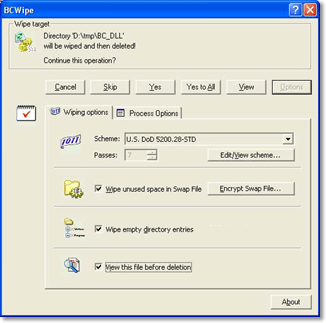
BCWipe is designed to securely delete files from your hard drive. Standard file deletion leaves the contents of the "deleted" file on your disk. Unless it has been overwritten by files subsequently saved, it can be recovered using standard disk utilities. Working quickly and integrated with Windows Shell, it shreds data in files so that they can not be recovered by any means.
Latest Reviews

kstev99 reviewed v6.09 on Aug 4, 2016
This was ok when it was free, but just too pricey for what it does. I use Sdelete from sysinternals / microsoft It is a command line utlity that can be used from a simple batch file, and it's Free.

Karol Mily reviewed v6.08.6 on May 3, 2016
Any tips for good alternative?

GrailKnight reviewed v5.00.3 Beta on Dec 18, 2010
There are better free eraser utilities available.

Input Overload reviewed v5.00.3 Beta on Dec 18, 2010
A bit pricey for an eraser.

gharibyan00 reviewed v3.11 on Mar 20, 2009
Think before downloading this program.
Virustotal report – http://www.virustotal.co...c603fe0b19c5e08eaba3596
I’ve tested over 10 programs and BCWipe on virustotal and most of them were infected; only a few programs were absolutely clean (ex. History Killer Pro and Evidence Eliminator. Btw I found a 40% off coupon for History Killer Pro( http://www.historykillerpro.com ) EMER-G91X-RMEN.

christoofar reviewed v3.10 on Feb 16, 2007
sorry but $40 for this app is way too much, especially since Eraser is freeware.
Pass.

httpd.confused reviewed v3.06.4 on Feb 13, 2005
BCWipe will not trash your hard drive, or any contents you don't tell it to. Of course, if you're a careless nitwit, anything can happen--with BCWipe, or any other powerful utility.
As it is, BCWipe works very well. I do wish it had a normal windowed interface, like Eraser does. (Yes, I know about the "BCWipe Task Manager", but that leaves much to be desired.) Also, there is (currently) no way to have BCWipe overwrite while showing a progress dialog, while also not suspending progress and prompting on in-use files.
I prefer Eraser, mainly because it's easier to use. BCWipe's interface (including its command line options) just aren't as convenient. Some parts of the BCWipe interface are also just plain stupid. For example, if you create a 3-pass overwriting scheme, then select it, it still gives you the option to specify the number of passes to use, from 1 pass right on up. But... Huh? What does it mean to select 1 pass on a 3-pass wiping scheme?

Johnoost reviewed v3.06.4 on Jan 26, 2005
Trashed my whole harddisk when the program stalled. Absolutely not stable. Make a backup before use! Turn off your virusscanner before use because chances are that your data will be completely corrupt / lost after running a clean free space.

keystroke reviewed v3.03.5 on Oct 17, 2002
I wouldn't use a PC without it :)

kstev99 reviewed v6.09 on Aug 4, 2016
This was ok when it was free, but just too pricey for what it does. I use Sdelete from sysinternals / microsoft It is a command line utlity that can be used from a simple batch file, and it's Free.
Karol Mily reviewed v6.08.6 on May 3, 2016
Any tips for good alternative?
GrailKnight reviewed v5.00.3 Beta on Dec 18, 2010
There are better free eraser utilities available.
Input Overload reviewed v5.00.3 Beta on Dec 18, 2010
A bit pricey for an eraser.
gharibyan00 reviewed v3.11 on Mar 20, 2009
Think before downloading this program.
Virustotal report – http://www.virustotal.co...c603fe0b19c5e08eaba3596
I’ve tested over 10 programs and BCWipe on virustotal and most of them were infected; only a few programs were absolutely clean (ex. History Killer Pro and Evidence Eliminator. Btw I found a 40% off coupon for History Killer Pro( http://www.historykillerpro.com ) EMER-G91X-RMEN.
christoofar reviewed v3.10 on Feb 16, 2007
sorry but $40 for this app is way too much, especially since Eraser is freeware.
Pass.
httpd.confused reviewed v3.06.4 on Feb 13, 2005
BCWipe will not trash your hard drive, or any contents you don't tell it to. Of course, if you're a careless nitwit, anything can happen--with BCWipe, or any other powerful utility.
As it is, BCWipe works very well. I do wish it had a normal windowed interface, like Eraser does. (Yes, I know about the "BCWipe Task Manager", but that leaves much to be desired.) Also, there is (currently) no way to have BCWipe overwrite while showing a progress dialog, while also not suspending progress and prompting on in-use files.
I prefer Eraser, mainly because it's easier to use. BCWipe's interface (including its command line options) just aren't as convenient. Some parts of the BCWipe interface are also just plain stupid. For example, if you create a 3-pass overwriting scheme, then select it, it still gives you the option to specify the number of passes to use, from 1 pass right on up. But... Huh? What does it mean to select 1 pass on a 3-pass wiping scheme?
Johnoost reviewed v3.06.4 on Jan 26, 2005
Trashed my whole harddisk when the program stalled. Absolutely not stable. Make a backup before use! Turn off your virusscanner before use because chances are that your data will be completely corrupt / lost after running a clean free space.
keystroke reviewed v3.03.5 on Oct 17, 2002
I wouldn't use a PC without it :)