
File Details |
|
| File Size | 2.1 MB |
|---|---|
| License | Freeware |
| Operating System | Windows 7/8/10/Vista/XP |
| Date Added | February 18, 2021 |
| Total Downloads | 32,293 |
| Publisher | SingularLabs |
| Homepage | CCEnhancer |
Publisher's Description
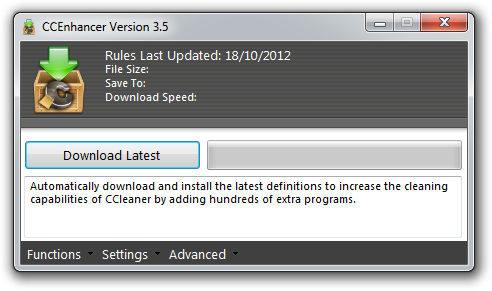
CCEnhancer is a small tool which adds support for over 450 new programs into the popular program CCleaner. The tool uses the winapp2.ini system built into CCleaner to easily add new rules and definitions for programs. The rules were sourced mainly from the Piriform Support Forum, with several sourced from other places around the internet.
Latest Reviews

Zootopia3001 reviewed v4.5.3 on Oct 4, 2018
Overkill, by far, and causes CCleaner to sloooowly load.

Uriel reviewed v4.4.2.1 on Jul 15, 2017
The bad reviews are likely from people who make a living on tracking your surfing habits, law enforcement, and black hat hackers. Keeping a clean machine is like keeping a clean house. They are both nice and tidy and clutter free.

Aegis69 reviewed v4.3.1 on Jul 6, 2015
All this deleting stuff is rarely necessary. Most programs have a limit to how much they will cache, so when it hits that limit then it will start deleting the old stuff, like browsers do. If you delete the cache then the first thing the program will do next time you run it is start fulling up the cache again. Most of the things deleted by CC are silly, and in some cases will make it so you can no longer uninstall or update some applications.
And 99% of the time when I see someone swearing by a program like CC, they are the dumbest mutherfukker computer users in the universe.

Blaxima reviewed v4.2 on Nov 27, 2014
The only change is the "Download Latest" button is now flat and eye bleedingly bright blue. Yet the progress bar remains a gradient!? Other than the cosmetics to align with the ugly Windows 8, it does the exact same thing as the previous version which is, enhance CCleaner

Music4Ever reviewed v3.9 on Feb 17, 2014
Simply adds the winapp2 rules to CCleaner & Bleach Bit - Great program.

barrytbutler reviewed v3.8 on Jan 29, 2014
great tool that i use on a regular basis. need to know what you're doing with it though!

Stoerpser reviewed v3.6 on Oct 24, 2012
@HeilNizar
Does not sound bad!
However, since you are applying yourself here your program and my firewall Commodore says
that your program contains malware....
I'm trust of course Piriform rather than you.
Sorry!

knownware reviewed v3.5 on Jul 24, 2012
Pretty good tool that I use a lot actually.

HeilNizar reviewed v3.4 on Jul 7, 2012
Good, but here is an even better one by me that will update both Winapp2 and CCleaner itself..
http://heilnizar.deviant...napp2-Updater-312311257
And no need to donate :P
Music4Ever reviewed v3.3 on Apr 30, 2012
As Microsoft in their Infinite wisdom log each & every action you do which is totally unnecessary this is a good & needed add-on ~
Maybe, just maybe MS make take on-board Unbuntu 12's idea of 'No Logging' (duh) unless you want it - Of course that will never happen ~

Zootopia3001 reviewed v4.5.3 on Oct 4, 2018
Pros:
Cons:
Bottom Line: Overkill, by far, and causes CCleaner to sloooowly load.
Uriel reviewed v4.4.2.1 on Jul 15, 2017
Pros: Cleans lots of stuff for your privacy. It even enables ccleaner to clean stuff that will foil trackers on the web.
Cons: Some settings are advanced. It can change, for example, your folder view settings on you when ever you run ccleaner. But can be easily changed if you know what setting you are looking for.
Bottom Line: The bad reviews are likely from people who make a living on tracking your surfing habits, law enforcement, and black hat hackers. Keeping a clean machine is like keeping a clean house. They are both nice and tidy and clutter free.
Aegis69 reviewed v4.3.1 on Jul 6, 2015
All this deleting stuff is rarely necessary. Most programs have a limit to how much they will cache, so when it hits that limit then it will start deleting the old stuff, like browsers do. If you delete the cache then the first thing the program will do next time you run it is start fulling up the cache again. Most of the things deleted by CC are silly, and in some cases will make it so you can no longer uninstall or update some applications.
And 99% of the time when I see someone swearing by a program like CC, they are the dumbest mutherfukker computer users in the universe.
Blaxima reviewed v4.2 on Nov 27, 2014
The only change is the "Download Latest" button is now flat and eye bleedingly bright blue. Yet the progress bar remains a gradient!? Other than the cosmetics to align with the ugly Windows 8, it does the exact same thing as the previous version which is, enhance CCleaner
Music4Ever reviewed v3.9 on Feb 17, 2014
Simply adds the winapp2 rules to CCleaner & Bleach Bit - Great program.
barrytbutler reviewed v3.8 on Jan 29, 2014
great tool that i use on a regular basis. need to know what you're doing with it though!
Stoerpser reviewed v3.6 on Oct 24, 2012
@HeilNizar
Does not sound bad!
However, since you are applying yourself here your program and my firewall Commodore says
that your program contains malware....
I'm trust of course Piriform rather than you.
Sorry!
knownware reviewed v3.5 on Jul 24, 2012
Pretty good tool that I use a lot actually.
HeilNizar reviewed v3.4 on Jul 7, 2012
Good, but here is an even better one by me that will update both Winapp2 and CCleaner itself..
http://heilnizar.deviant...napp2-Updater-312311257
And no need to donate :P
Music4Ever reviewed v3.3 on Apr 30, 2012
As Microsoft in their Infinite wisdom log each & every action you do which is totally unnecessary this is a good & needed add-on ~
Maybe, just maybe MS make take on-board Unbuntu 12's idea of 'No Logging' (duh) unless you want it - Of course that will never happen ~
Music4Ever reviewed v3.2 on Mar 27, 2012
Good add-on, but use with care although I haven't had any issues.
Uriel reviewed v3.0.1 on Feb 27, 2012
Version 3 now supports Bleach Bit.
Uriel reviewed v2.5.1 on Dec 31, 2011
Nice add on for Ccleaner. Helps me to get rid of more of the tracks that the RIAA would love to get their hands on.

Input Overload reviewed v2.5.1 on Dec 29, 2011
No issues, actually clearing garbage out of your browser does increase the speed of that browser whatever it is.
Also you may have ‘private’ not illegal or porn data in your history you may not wish to share with others who use your PC.
I have history, cookies, history etc to do with my work I don't want others to access & are actually highly confidential. There is nothing sinister about that - CyberDoc999 I fail to see why you get wound up regarding that.
@guru_v - It takes 3 seconds to remove old data, why don't you write an app that removes old data & share it as freeware?

CyberDoc999 reviewed v2.5.1 on Dec 29, 2011
what's all this crap about crap cleaner
cleaning a computer does nothing.... it does not make it faster..
go buy a faster CPU... if you want speed....

guru_v reviewed v2.5 on Dec 14, 2011
This is a nice program, but it needs to not remove previous additions automatically. There is a method of removing customizations as part of the setup, but it is superfluous, as all customizations are removed whenever this is executed.
Be careful to back up what you have, because if you don't, it will be gone after this runs. Poor programming. Idea gets 5 stars, execution drops it to 3.

grum36 reviewed v2.4 on Jul 6, 2011
for windows x64 users you must copy he file in your C:\Program Files\CCleaner befor use it

Diam0nd reviewed v2.4 on Jul 6, 2011
A must-have addition to CCleaner!

westor reviewed v2.2 on Mar 20, 2011
Very good for users that want extra cleaning for CCleaner !
Input Overload reviewed v2.2 on Mar 19, 2011
Makes CCleaner the best cleaner there is paid or free. As for issues of messing PC's up & other foreboding crap by a regular poster I have yet to have an issue with CCleaner or CCEnhancer or both together.
And as I've put it on dozens of PC's I think I would have had some (angry - very) feedback by now. :-)

E.T reviewed v2.2 on Mar 19, 2011
GREAT! but it rely on .NET Framework 3.5 which I hate it so much...
Could the author make it without .NET Framework???
Uriel reviewed v2.2 on Mar 18, 2011
Couldn't do without it. This really enhances Ccleaner's effectiveness. Great addon for Ccleaner.
Input Overload reviewed v2.1 on Dec 5, 2010
Both CCleaner & Enhancer are excellent.

boaz reviewed v2.0 on Nov 21, 2010
CCleaner is a very good & useful system cleaner in itself. but CCEnhancer adds to CCLeaner's capabilities. Allows you to add a lot more items to clean, by selection.

Hilbert reviewed v2.0 on Nov 20, 2010
CCEnhancer makes CCleaner almost useful.
But shame it doesn't improve CCleaner's still-useless registry cleaning function.
Input Overload reviewed v2.0 on Nov 20, 2010
Great little applications, never had any issues with it whatsoever.

windowsjim reviewed v1.5 Beta on Nov 1, 2010
Yeahbit sytemkeep is very good software ,speed up my pc
Uriel reviewed v1.5 Beta on Oct 30, 2010
Great addon. CCEnhancer is experiencing issues with CCleaner 3.0 on x64 systems right now and is why it is a beta release. Once the bugs are ironed out it will be the lean machine it always is.

stevvie reviewed v1.5 Beta on Oct 30, 2010
just kept telling me that custom rules were not present, even though I have a WinApp2.ini in the ccleaner folder. I also tried placing this program in the ccleaner folder but the SAME thing.
Input Overload reviewed v1.5 Beta on Oct 30, 2010
No problems, a nice added touch to the best cleaner on earth.
CyberDoc999 reviewed v1.5 Beta on Oct 30, 2010
this should be alpha

TomA102210 reviewed v1.5 Beta on Oct 29, 2010
davana said:
"Bad stuff. Had to pay to fix my computer after using."
--------------------------------------------------------------------------------------------
Particularly when working with beta it's always a good idea to set a restore point. That way you're not putting out unnecessary money to have a computer fixed that got hosed because you didn't inform yourself regarding anything that is in beta.

some guy reviewed v1.5 Beta on Oct 29, 2010
davana you got to be a real D.B now open your AOL browser and go else where

lang999 reviewed v1.4 on Aug 19, 2010
If you have to pay to fix our computer u prolly shouldent visit a page called "Beta*" doh
Great app
CyberDoc999 reviewed v1.4 on Aug 19, 2010
bad buggy

davana reviewed v1.4 on Aug 18, 2010
Bad stuff. Had to pay to fix my computer after using.
Input Overload reviewed v1.4 on Aug 18, 2010
You should always get an update if you upgrade to v1.4 as the info is from different sources. Works well now.
What''s buggy about it? People make sweeping statements but unless they give some detail the review is IMHO invalid.It's a great addition to CCleaner. I have installed this on over a dozen PC's & counting with no problems.

wognum reviewed v1.3 on Aug 12, 2010
could not connect to atom server

ilev reviewed v1.3 on Aug 10, 2010
There is a special winapp2.ini file for portable Ccleaner. Works fine for me.
Input Overload reviewed v1.3 on Aug 9, 2010
Good, check what you are ticking though as it may remove things um want to keep! Otherwise great addition to CCleaner.
BTW CCleaner is the best cleaner around, why do you dislike it so much Mike59? You haven't disclosed any reason.

trapspamhoneypot reviewed v1.3 on Aug 9, 2010
failed to install
web site is disabled for excess bandwidth issues
not recommended at this time.

slinkys_delsol reviewed v1.3 on Aug 9, 2010
I know it's an "Enhancement", but be careful if you use it. For instance, it has an option to clean up "Outlook". One of the files it searches out is the .NK2 file. This is BAD to delete.
This file holds all the email address information of your frequently typed / used addresses. It's not the address book, but deleting this will start that process allllllll over again. For someone who is used to that Auto Filling and may have hundreds of names / addresses built up, this would be a loss.
Before using, open the INI file it creates in the CCleaner install directory (winapp2.ini) and browse the file for a few minutes prior to using.
It does add some nice other options, but use with caution.