File Details |
|
| File Size | 4.5 MB |
|---|---|
| License | Shareware, $29.95 |
| Operating System | Windows 2000/9x/Server 2003/XP |
| Date Added | October 7, 2015 |
| Total Downloads | 5,277 |
| Publisher | PixelMetrics |
| Homepage | CaptureWizPro |
Publisher's Description
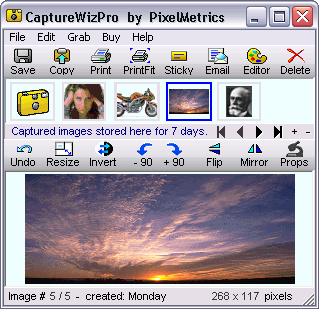
CaptureWiz will capture anything on your screen and print, save, email, or sticky-note it quickly. Just move this virtual point & shoot camera over the area you want and press a button. See exactly what will be captured in the camera's viewfinder. Press one button to print the capture, save it as a .bmp, .png, or .jpg file, email it to a friend, copy it to a document, post it like a sticky note or open it in your graphic editor. Or, collect images into onboard folders for easy reference. You can capture the whole screen or entire windows with a few clicks too. It's for anyone who wants to remember, use or mail information on the screen. Capture pieces of web pages, portions of pdf files, error messages, instructional examples and even video clips. It's so quick and easy, you'll use it all the time.
Latest Reviews

nukefixer reviewed v3.B2 (4.0 Beta) on Jan 26, 2009
Appears to be a great program, I purchased a license after using it for a few minutes!

Carlospr reviewed v3.52 Beta on Jan 30, 2006
VictorAnderson is in fact fanny. He probably think why purchase Word if we have Notepad. :)
I'm just kidding.
CaptureWizPro has lots of nice features, including video capturing (though you have to disable hardware acceleration).

KenH reviewed v3.5 on Aug 30, 2005
VictorAnderson doesn't get it. This program does much more than simply capturing your screen! Don't take my word (or his)try it yourself and decide. It's a fantastic program.

zhatka reviewed v3.23 Beta on Jun 3, 2005
This is a pretty good program, but as far as screen cap utilties go, SnagIt by TechSmith is still at the top of my list.

Robert Seynaeve reviewed v3.2 on Jan 21, 2005
Amazingly usefull! Must be tried. I quickly got another license for my wife's PC. And, not only is the product excellent, the support is very good too. I recommend the Pro version which includes a unique scrolling capture feature, very convenient to capture long web pages.

CapZap reviewed v3.15 Beta on Dec 15, 2004
I've used CaptureWiz for a couple of years now and have been very satisfied. If you want to use your print key and MS Paint, be my guest. If you want to have some real, useable screen capture options, try this program. Captures video quite nicely too.
Highly recommended.

VictorAnderson reviewed v3.0 Release Candidate on Apr 1, 2004
What's this? $29.95 to do WHAT? Hellooo anyone here ever use the "Print Screen" button on your keyboard? Copies your screen to the clipboard, then goto like MS Paint and click Edit/Paste (or CTRL+V). geeeeze! I find it quite astonishing that not only would someone waste the time to write something like this but that there actually people stupid enough to buy it!

omegadraconis reviewed v3.0 Beta on Jul 10, 2003
Great prog, very easy to use. Forget the old print screen button, just so you can paste and crop. This thing make it easy to snap only part of the screen or the whole screen. Overall great.

valerc reviewed v2.0 on Jun 13, 2002
This program has yet to disappoint me, and has proven to
be extremely user friendly. An excellent program!!

nukefixer reviewed v3.B2 (4.0 Beta) on Jan 26, 2009
Appears to be a great program, I purchased a license after using it for a few minutes!
Carlospr reviewed v3.52 Beta on Jan 30, 2006
VictorAnderson is in fact fanny. He probably think why purchase Word if we have Notepad. :)
I'm just kidding.
CaptureWizPro has lots of nice features, including video capturing (though you have to disable hardware acceleration).
KenH reviewed v3.5 on Aug 30, 2005
VictorAnderson doesn't get it. This program does much more than simply capturing your screen! Don't take my word (or his)try it yourself and decide. It's a fantastic program.
zhatka reviewed v3.23 Beta on Jun 3, 2005
This is a pretty good program, but as far as screen cap utilties go, SnagIt by TechSmith is still at the top of my list.
Robert Seynaeve reviewed v3.2 on Jan 21, 2005
Amazingly usefull! Must be tried. I quickly got another license for my wife's PC. And, not only is the product excellent, the support is very good too. I recommend the Pro version which includes a unique scrolling capture feature, very convenient to capture long web pages.
CapZap reviewed v3.15 Beta on Dec 15, 2004
I've used CaptureWiz for a couple of years now and have been very satisfied. If you want to use your print key and MS Paint, be my guest. If you want to have some real, useable screen capture options, try this program. Captures video quite nicely too.
Highly recommended.
VictorAnderson reviewed v3.0 Release Candidate on Apr 1, 2004
What's this? $29.95 to do WHAT? Hellooo anyone here ever use the "Print Screen" button on your keyboard? Copies your screen to the clipboard, then goto like MS Paint and click Edit/Paste (or CTRL+V). geeeeze! I find it quite astonishing that not only would someone waste the time to write something like this but that there actually people stupid enough to buy it!
omegadraconis reviewed v3.0 Beta on Jul 10, 2003
Great prog, very easy to use. Forget the old print screen button, just so you can paste and crop. This thing make it easy to snap only part of the screen or the whole screen. Overall great.
valerc reviewed v2.0 on Jun 13, 2002
This program has yet to disappoint me, and has proven to
be extremely user friendly. An excellent program!!