File Details |
|
| File Size | 1.3 MB |
|---|---|
| License | Shareware, $69.99 |
| Operating System | Windows 7/2000/Vista/XP |
| Date Added | August 20, 2009 |
| Total Downloads | 1,269 |
| Publisher | Stormdance |
| Homepage | CatsCradle |
Publisher's Description
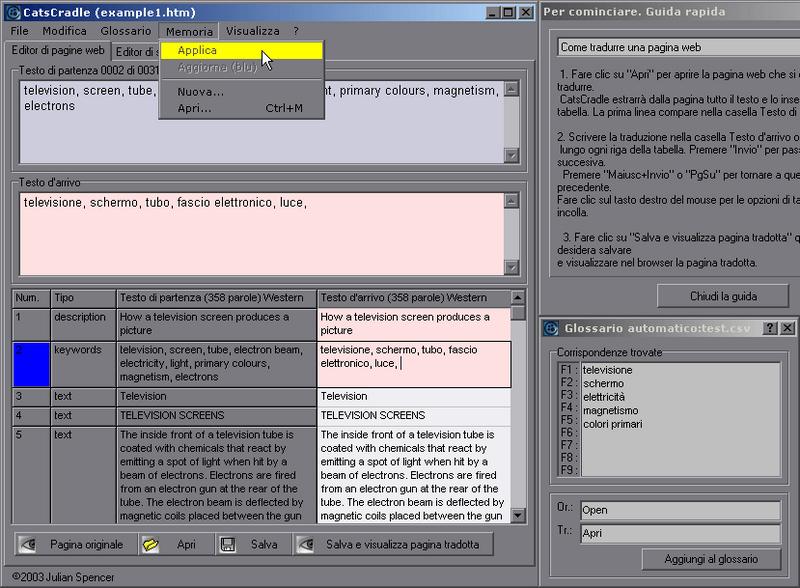
CatsCradle is a fast and easy to use web page editor for professional language translators. Translate whole web-sites without having to worry about page layouts and HTML code - a safe, all-in-one web site localization solution. It grabs all the text that requires translating from a web page, puts it into a built in editor for you to translate alongside, then automatically integrates your translated text back into the web page - leaving all the sensitive HTML code untouched. To check all's going smoothly you can instantly preview your work in progress in a web browser at the click of a button. It features a built in glossary, and a translation memory system. There's also a real-time view where you can see the web page evolving as you translate.
Latest Reviews

Arnvid reviewed v3.6 Beta on Apr 10, 2008
First of all, it's a great program - no question about that. Some time since I used it, but for the purpose of translating (or changing text content) in a page without touching any coding - it's the best tool I know.
I don't see it as a real tool for those who master basic coding, but for all who got a website and need to do adjustment in the text themselves - it's a small gem.
Still, BetaNews should update the information as the small gem has in this version transformed itself from being a freeware tool to a 40 USD shareware tool ...

Arnvid reviewed v3.6 Beta on Apr 10, 2008
First of all, it's a great program - no question about that. Some time since I used it, but for the purpose of translating (or changing text content) in a page without touching any coding - it's the best tool I know.
I don't see it as a real tool for those who master basic coding, but for all who got a website and need to do adjustment in the text themselves - it's a small gem.
Still, BetaNews should update the information as the small gem has in this version transformed itself from being a freeware tool to a 40 USD shareware tool ...