
File Details |
|
| File Size | 1.2 MB |
|---|---|
| License | Freeware |
| Operating System | Windows (All) |
| Date Added | December 4, 2022 |
| Total Downloads | 39,273 |
| Publisher | Arthur Liberman |
| Homepage | Core Temp |
Publisher's Description
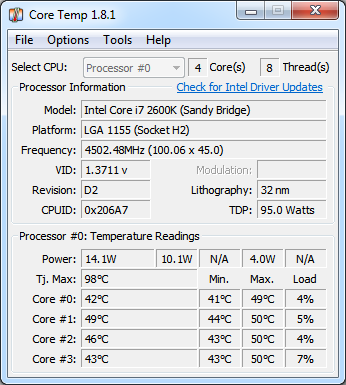
Core Temp is a compact, no fuss, small footprint program to monitor CPU temperature. The uniqueness of it is that it shows the temperature of each individual core in a each processor in your system. You can see in real time how the CPU temperature varies when you load your CPU.
Latest Reviews

minklein reviewed v1.1 on Jul 4, 2016
Well done, ver 1.1 works great, all info for my setup is correct and settings are saved. 5930@4114 Great little utility.

chrispaul reviewed v1.0 RC6 on Feb 17, 2014
5 stars

FatBastard reviewed v1.0 RC5 on Mar 4, 2013
Nice program...

JeremyP reviewed v1.0 RC4 on Oct 17, 2012
minklein
Yeah. It's really really hard clicking on the button that says
"Skip all free offers"
isn't it?
minklein reviewed v1.0 RC2 on Sep 9, 2011
I give it a 2 for effort, 99.5 works better.
The installer wants to put a bunch of bloatware garbage on your system, for that it gets a 1. It recognizes a 990x as a 930, but then 99.5 comes up as an Intel Atom cpu. Everything else works great on 99.5, 1.0 will not save settings. Check the box that says "start with windows" and it comes up with an error message and crashes.
I am using a Asus Rampage x58 and Win64.

djb247365 reviewed v1.0 RC1 on Aug 19, 2011
I've been using this without an issue. Works good, and it's pretty accurate. I don't use the installer, but instead, just use the portable version and run the app from it's own folder. Works well for me.

Nighted reviewed v1.0 RC1 on Aug 19, 2011
Wow this new "InstallIQ" installer is a major buzzkill. Nice work guys, here's 1 star until you drop this garbage. >:(

mamisano reviewed v1.0 RC1 on Aug 19, 2011
I love the application and have been using it for years.
Unfortunately the download link here and the main one on the Core Temp website use "InstallIQ" to install the program. InstallIQ requires you change your start page and default search engine to Yahoo, installs cookies and adds registry keys.
If you want to bypass what I would consider adware / spyware, visit the Core Temp site, and click on Extras below the main download link. This will allow you do download the standalone installation packages.

jetz reviewed v0.99.7.7 on Aug 2, 2010
Turns out it does read my thuban. Had to change a bios setting in ch4.
jetz reviewed v0.99.6.1 on May 10, 2010
Still does not show my AMD 1090T temps :(

minklein reviewed v1.1 on Jul 4, 2016
Well done, ver 1.1 works great, all info for my setup is correct and settings are saved. 5930@4114 Great little utility.
chrispaul reviewed v1.0 RC6 on Feb 17, 2014
5 stars
FatBastard reviewed v1.0 RC5 on Mar 4, 2013
Nice program...
JeremyP reviewed v1.0 RC4 on Oct 17, 2012
minklein
Yeah. It's really really hard clicking on the button that says
"Skip all free offers"
isn't it?
minklein reviewed v1.0 RC2 on Sep 9, 2011
I give it a 2 for effort, 99.5 works better.
The installer wants to put a bunch of bloatware garbage on your system, for that it gets a 1. It recognizes a 990x as a 930, but then 99.5 comes up as an Intel Atom cpu. Everything else works great on 99.5, 1.0 will not save settings. Check the box that says "start with windows" and it comes up with an error message and crashes.
I am using a Asus Rampage x58 and Win64.
djb247365 reviewed v1.0 RC1 on Aug 19, 2011
I've been using this without an issue. Works good, and it's pretty accurate. I don't use the installer, but instead, just use the portable version and run the app from it's own folder. Works well for me.
Nighted reviewed v1.0 RC1 on Aug 19, 2011
Wow this new "InstallIQ" installer is a major buzzkill. Nice work guys, here's 1 star until you drop this garbage. >:(
mamisano reviewed v1.0 RC1 on Aug 19, 2011
I love the application and have been using it for years.
Unfortunately the download link here and the main one on the Core Temp website use "InstallIQ" to install the program. InstallIQ requires you change your start page and default search engine to Yahoo, installs cookies and adds registry keys.
If you want to bypass what I would consider adware / spyware, visit the Core Temp site, and click on Extras below the main download link. This will allow you do download the standalone installation packages.
jetz reviewed v0.99.7.7 on Aug 2, 2010
Turns out it does read my thuban. Had to change a bios setting in ch4.
jetz reviewed v0.99.6.1 on May 10, 2010
Still does not show my AMD 1090T temps :(

us3r reviewed v0.99.6.0 on Apr 27, 2010
This version has few bugs.

Artem S. Tashkinov reviewed v0.99.6.0 on Apr 27, 2010
@maxxowar
Athlon XP M doesn't have an embedded temperature sensor, you are obviously ranting without a reason.

maxxowar reviewed v0.99.5.26 on Aug 4, 2009
It doesn't see my AMD Athlon XP-M Barton 2500+ overclocked to 3200+ (200 * 11 = 2200Mhz).