
File Details |
|
| File Size | 29.3 MB |
|---|---|
| License | Freeware |
| Operating System | Windows (All) |
| Date Added | April 14, 2023 |
| Total Downloads | 14,518 |
| Publisher | Binary Fortress Software |
| Homepage | DisplayFusion |
Publisher's Description
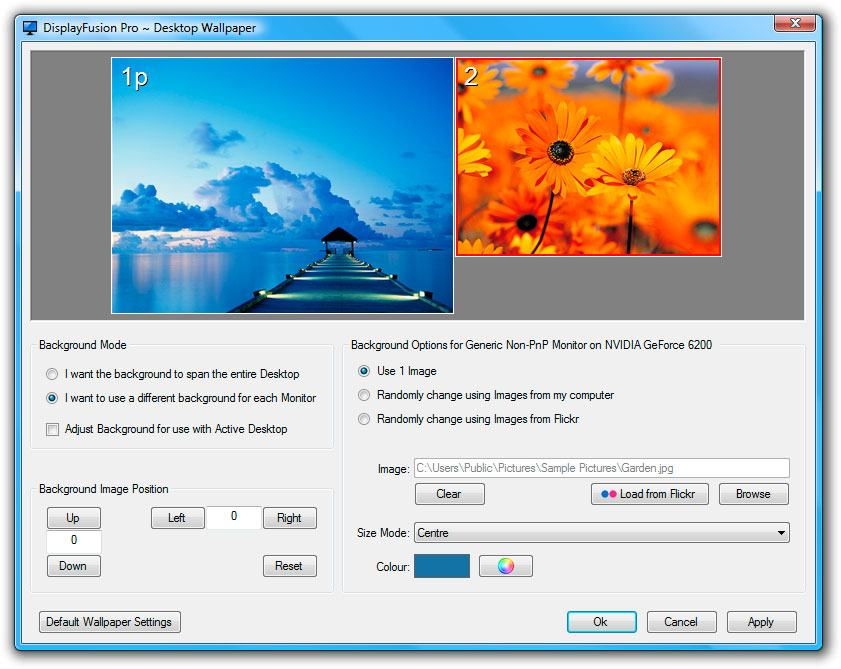
DisplayFusion will make your dual monitor (or triple monitor or more) experience smooth and painless. Advanced multi-monitor wallpaper support, Flickr integration for image searching and fully customizable window management hotkeys are just a sample of the many things DisplayFusion can do. DisplayFusion is also available in many different languages.
Latest Reviews

Hammerhead145 reviewed v9.7 on Jun 28, 2020
Version 9.7 More than worth the price. Very reliable, stable, on Win 7 & 10 great for managing wallpapers and many many of other multi-monitor things.

hero167 reviewed v7.0 on Dec 18, 2014
It is a great programe and i want to download it but i also want to tell my friends about the visitor badge http://www.name-badges.com/visitor-badges.php

TwinsDad reviewed v7.0.0 Beta 7 on Nov 17, 2014
I used this shareware limited for about a year. Then decided to buy full lisence. More than worth the price. Very reliable, stable, great for managing wallpapers and lot sof other multi-monitor things.

DKDude reviewed v6.0 on Jun 27, 2014
Great tool, if you need all the features, buy the full version, nothing in life comes for free, stop being a cheap-ass.

VelvetElvis reviewed v3.5.0 Beta 4 on Feb 12, 2012
No taskbar on 2nd monitor for the free version? Fail.

NunjaBusiness reviewed v3.1.9.104 Beta 4 on Jul 8, 2010
Meh, most of the "must have" features are disabled in the free version. There are many wallpaper switchers around. Pass.

Raton reviewed v3.1.8.111 Beta on Jun 8, 2010
I liked DisplayFusion enough to purchase the pay-version. Switched to Actual Multiple Monitors, however, because it has better support for the system tray on the secondary monitor.
http://www.actualtools.com/multiplemonitors/
The Computer Rodent

Nighted reviewed v3.1.7.105 Beta on Feb 23, 2010
Pure awesome-ness. :)
I prefer this to UltraMon.
Basically, siliconman01's review below says everything that I would.

siliconman01 reviewed v3.1.6 on Dec 8, 2009
Excellent customer support with a user forum at http://www.binaryfortres...um/index.php?board=20.0
Runs very well on Windows 7 (32/64-bit). Developer is responsive to suggested enhancements. License price for PRO version is reasonable for this product and has volume license discounts.
Have not experienced any conflicts with security programs such as Avira Premium Security Suite, Norton Internet Security 2010, TrojanHunter, SuperAntiSpyware, Malwarebytes, HostsMan, and SpywareBlaster. No conflicts observed with MS Office 2007, MS Money, Casper 5.0 Backup, Sticky Password 4.0

anomoly reviewed v3.1.6 on Dec 7, 2009
Free version will not change your wallpaper randomly which is the one thing a wallpaper mgr should do. There is a similar mgr from sourceforge, Wally (http://www.becrux.com/in...projects&name=wally), though it does not have dual monitor support. It does however, support: files, folders, FTP remote folders, Flickr, Yahoo!, Panoramio, Pikeo, Ipernity, Photobucket, Buzznet, Picasa, Smugmug, Bing images, & works with mac and linux (whew). I tried it myself but I have a junk non sse2 card with even junkier drivers so can't really blame the soft.

Hammerhead145 reviewed v9.7 on Jun 28, 2020
Pros: Personal license for every pc you own
Cons: none
Bottom Line: Version 9.7 More than worth the price. Very reliable, stable, on Win 7 & 10 great for managing wallpapers and many many of other multi-monitor things.
hero167 reviewed v7.0 on Dec 18, 2014
It is a great programe and i want to download it but i also want to tell my friends about the visitor badge http://www.name-badges.com/visitor-badges.php
TwinsDad reviewed v7.0.0 Beta 7 on Nov 17, 2014
I used this shareware limited for about a year. Then decided to buy full lisence. More than worth the price. Very reliable, stable, great for managing wallpapers and lot sof other multi-monitor things.
DKDude reviewed v6.0 on Jun 27, 2014
Great tool, if you need all the features, buy the full version, nothing in life comes for free, stop being a cheap-ass.
VelvetElvis reviewed v3.5.0 Beta 4 on Feb 12, 2012
No taskbar on 2nd monitor for the free version? Fail.
NunjaBusiness reviewed v3.1.9.104 Beta 4 on Jul 8, 2010
Meh, most of the "must have" features are disabled in the free version. There are many wallpaper switchers around. Pass.
Raton reviewed v3.1.8.111 Beta on Jun 8, 2010
I liked DisplayFusion enough to purchase the pay-version. Switched to Actual Multiple Monitors, however, because it has better support for the system tray on the secondary monitor.
http://www.actualtools.com/multiplemonitors/
The Computer Rodent
Nighted reviewed v3.1.7.105 Beta on Feb 23, 2010
Pure awesome-ness. :)
I prefer this to UltraMon.
Basically, siliconman01's review below says everything that I would.
siliconman01 reviewed v3.1.6 on Dec 8, 2009
Excellent customer support with a user forum at http://www.binaryfortres...um/index.php?board=20.0
Runs very well on Windows 7 (32/64-bit). Developer is responsive to suggested enhancements. License price for PRO version is reasonable for this product and has volume license discounts.
Have not experienced any conflicts with security programs such as Avira Premium Security Suite, Norton Internet Security 2010, TrojanHunter, SuperAntiSpyware, Malwarebytes, HostsMan, and SpywareBlaster. No conflicts observed with MS Office 2007, MS Money, Casper 5.0 Backup, Sticky Password 4.0
anomoly reviewed v3.1.6 on Dec 7, 2009
Free version will not change your wallpaper randomly which is the one thing a wallpaper mgr should do. There is a similar mgr from sourceforge, Wally (http://www.becrux.com/in...projects&name=wally), though it does not have dual monitor support. It does however, support: files, folders, FTP remote folders, Flickr, Yahoo!, Panoramio, Pikeo, Ipernity, Photobucket, Buzznet, Picasa, Smugmug, Bing images, & works with mac and linux (whew). I tried it myself but I have a junk non sse2 card with even junkier drivers so can't really blame the soft.

Somnambulator reviewed v3.1.5.10 on Dec 4, 2009
great app. latest listed version is a beta, though, not a full release and the download link links to the last full release (3.1.5). this version is 3.1.5.10.exe