
File Details |
|
| File Size | 1.3 MB |
|---|---|
| License | Shareware, $14.80 |
| Operating System | Windows (All) |
| Date Added | March 11, 2024 |
| Total Downloads | 2,911 |
| Publisher | EFSoftware |
| Homepage | EF StartUp Manager |
Publisher's Description
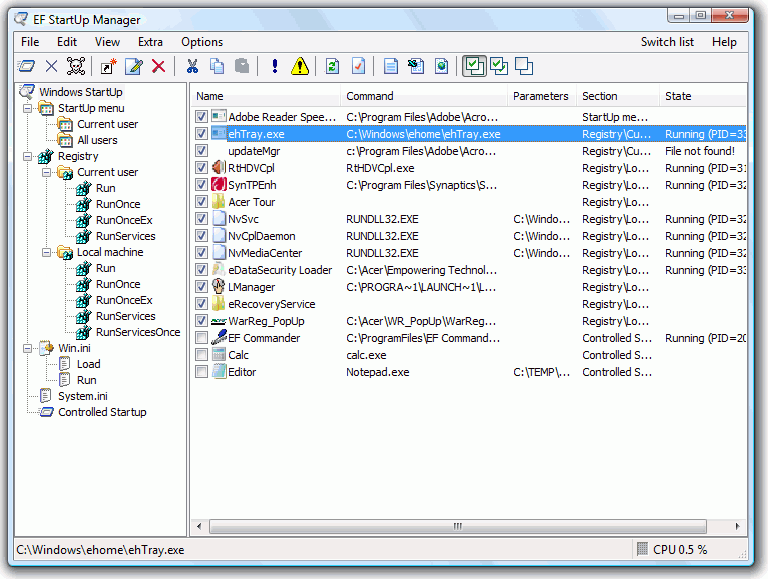
EF StartUp Manager allows you a simple handling and complete control of applications which starts with Windows. They can insert, temporarly disable or delete with ease new programs. More, the controlled starting mode makes it possible to start the programs in a defined order and optionaly specify a delay between them. The Windows Explorer like interface offers an optimal overview on the entries.
Latest Reviews

Reverb reviewed v4.30 on Aug 5, 2009
I had to do a double-take. The screenshot looks too much like an existing freeware startup manager called Starter which I currently use and recommend. Has same features plus process/service manager in one util. Starter has been around since 2005 but I can't find a revision history for EF Startup Manager anywhere. Both GUI's are practically identical. Any it's pretty good, especially the delayed start option and the ability to change the order of startup programs.

SuzzyWoozy reviewed v2.10 on Oct 24, 2005
Well... one must write some utily flawless if he want to charge money for it AND there are (better) freeware concurents around.
I'm using Mike Lin's (simple and effectie) Startup Control Panel for daily basis issues and SysInternals Autoruns if I really want to get deeper:
- Autoruns is the best on the market.
- both above are free so... why paing for this one?
4 out of 5 (if the price is ignored)

httpd.confused reviewed v1.25 on Nov 18, 2004
What a joke. The installer has been configured to install to directory names that represent a different bit of software this author sells. (Oops, can you say "Careless"?) And when run, you'll find that for some bizarre, inexplicable reason, this stupid utility displays all paths in 8.3 format (i.e. "C:\progra~1\thisis~1\program.exe" instead of ""C:\program files\this is the path\program.exe").

fightback reviewed v1.21 on Sep 14, 2004
Like msconfig does except they charge $15 for it? Ehh, I'll pass.

Reverb reviewed v4.30 on Aug 5, 2009
I had to do a double-take. The screenshot looks too much like an existing freeware startup manager called Starter which I currently use and recommend. Has same features plus process/service manager in one util. Starter has been around since 2005 but I can't find a revision history for EF Startup Manager anywhere. Both GUI's are practically identical. Any it's pretty good, especially the delayed start option and the ability to change the order of startup programs.
SuzzyWoozy reviewed v2.10 on Oct 24, 2005
Well... one must write some utily flawless if he want to charge money for it AND there are (better) freeware concurents around.
I'm using Mike Lin's (simple and effectie) Startup Control Panel for daily basis issues and SysInternals Autoruns if I really want to get deeper:
- Autoruns is the best on the market.
- both above are free so... why paing for this one?
4 out of 5 (if the price is ignored)
httpd.confused reviewed v1.25 on Nov 18, 2004
What a joke. The installer has been configured to install to directory names that represent a different bit of software this author sells. (Oops, can you say "Careless"?) And when run, you'll find that for some bizarre, inexplicable reason, this stupid utility displays all paths in 8.3 format (i.e. "C:\progra~1\thisis~1\program.exe" instead of ""C:\program files\this is the path\program.exe").
fightback reviewed v1.21 on Sep 14, 2004
Like msconfig does except they charge $15 for it? Ehh, I'll pass.