File Details |
|
| File Size | 2.0 MB |
|---|---|
| License | Freeware |
| Operating System | Windows (All) |
| Date Added | April 23, 2017 |
| Total Downloads | 42,999 |
| Publisher | Nathan Moinvaziri |
| Homepage | ExtractNow |
Publisher's Description
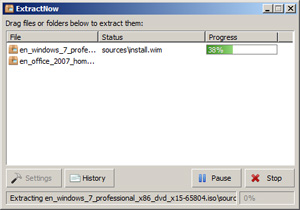
ExtractNow lets you extract multiple files with ease. Extract more than one archived file at a time, with a click of a button. To extract files, simply drag and drop them into the main program window, or right-click the files while in Windows Explorer. Makes extracting files easier and quicker. Supports ZIP, RAR, ISO, BIN, IMG, IMA, IMZ, 7Z, ACE, JAR, GZ, LZH, LHA and SIT archive formats.
Latest Reviews

uberfly reviewed v4.8.0.0 on Aug 7, 2013
This is an awesome app if you need to extract a bunch of archives. Highly configurable. Glad to see the author continues to tinker with it. Use it often.

nvic reviewed v4.8.0.0 on Aug 5, 2013
Works alright, but I prefer Universal Extractor (more formats supported).
The installer showed a blank "special offer" page, and left a process called bi_installer.exe running and using the network. That process later installed a "Fast Free Converter" and a "Bundled Software uninstaller" that I never approved of, and set itself to run at every startup.

Diam0nd reviewed v4.7.7.0 on Jan 16, 2013
One of those "I wish I could code something like this myself" applications. Small, simple, solves ONE need perfectly. Simply genius. A must-have.

Lsavagejt reviewed v4.64 on Jan 9, 2012
Yup. I have yet to need a file this won't extract. It's lightweight and it's granular!

plasticpig72 reviewed v4.64 on Jan 9, 2012
I find this program to be extremely useful and easy to use - no open candy here either.

anomoly reviewed v4.62 on May 4, 2011
No open candy here.

Ozzy1 reviewed v4.62 on May 3, 2011
The spyware that the author has desided to company the new releases destroys this aplication. Look for other applications...

kbsoftware reviewed v4.6.1.1 on Apr 5, 2011
Decided to look at it once more see if the author got a clue and removed OpenCandy and at first it looked like he/she did but when I went to install it (I love virtualmachines) ESet NOD found OpenCandy again. So I deleted that virtual machine.
I don't have any problems with anyone wanting to make some money with their hard work and creations but this is the wrong way to go.
So as a result I have to recommend that everyone stay away from ExtractNow and look at other alternatives, 7-zip is a good place to start looking.

DonGato reviewed v4.59 on Mar 5, 2011
Can confirm it now has OpenCandy that uses data from your computer and location for selecting what additional software to offer you to install with ExtractNow. Most virus software regards this as Spyware/Malware.
kbsoftware reviewed v4.59 on Mar 3, 2011
I love ESet Smart Security, one of those investments in software that pays off here and there.
After finishing downloading ExtractNow ESet caught and stopped the download. Seems this ExtractNow comes bundled with OpenCandy.
And to me OpenCandy is not just advertising, it's malware, my personal opinion.

uberfly reviewed v4.8.0.0 on Aug 7, 2013
This is an awesome app if you need to extract a bunch of archives. Highly configurable. Glad to see the author continues to tinker with it. Use it often.
nvic reviewed v4.8.0.0 on Aug 5, 2013
Works alright, but I prefer Universal Extractor (more formats supported).
The installer showed a blank "special offer" page, and left a process called bi_installer.exe running and using the network. That process later installed a "Fast Free Converter" and a "Bundled Software uninstaller" that I never approved of, and set itself to run at every startup.
Diam0nd reviewed v4.7.7.0 on Jan 16, 2013
One of those "I wish I could code something like this myself" applications. Small, simple, solves ONE need perfectly. Simply genius. A must-have.
Lsavagejt reviewed v4.64 on Jan 9, 2012
Yup. I have yet to need a file this won't extract. It's lightweight and it's granular!
plasticpig72 reviewed v4.64 on Jan 9, 2012
I find this program to be extremely useful and easy to use - no open candy here either.
anomoly reviewed v4.62 on May 4, 2011
No open candy here.
Ozzy1 reviewed v4.62 on May 3, 2011
The spyware that the author has desided to company the new releases destroys this aplication. Look for other applications...
kbsoftware reviewed v4.6.1.1 on Apr 5, 2011
Decided to look at it once more see if the author got a clue and removed OpenCandy and at first it looked like he/she did but when I went to install it (I love virtualmachines) ESet NOD found OpenCandy again. So I deleted that virtual machine.
I don't have any problems with anyone wanting to make some money with their hard work and creations but this is the wrong way to go.
So as a result I have to recommend that everyone stay away from ExtractNow and look at other alternatives, 7-zip is a good place to start looking.
DonGato reviewed v4.59 on Mar 5, 2011
Can confirm it now has OpenCandy that uses data from your computer and location for selecting what additional software to offer you to install with ExtractNow. Most virus software regards this as Spyware/Malware.
kbsoftware reviewed v4.59 on Mar 3, 2011
I love ESet Smart Security, one of those investments in software that pays off here and there.
After finishing downloading ExtractNow ESet caught and stopped the download. Seems this ExtractNow comes bundled with OpenCandy.
And to me OpenCandy is not just advertising, it's malware, my personal opinion.
uberfly reviewed v4.52 on Oct 19, 2010
Not meant to be a replacement for apps like Winrar or 7Zip. Where it excels is opening a large number of archives in specific situations. Occasionally in my job I need to open a large number of uploaded files in many sub folders. ExtractNow does this with complete ease, being both simple and customizable enough to make it an indispensable tool for me.

qpou reviewed v4.52 on Oct 19, 2010
Type your review and select an appropriate rating
* You cannot post that review.
anomoly reviewed v4.48 on Sep 1, 2010
I must change my opinion. I used it on a gzipped file that I needed to peek into that freearc did not work with. Still extracts fine with uni extractor.

CyberDoc999 reviewed v4.48 on Aug 31, 2010
best extract program ever made !!!!!
anomoly reviewed v4.46 on Jul 21, 2010
Yeah it IS. Funny thing just use uni extractor on it. That way you can delete the open candy crap it tries to install which btw is why it wants internet access if you stupidly install it.
Who needs it anyways. Peazip, 7zip, winrar, and FreeArc, my favorite, are ALL portable and do way more.
On the other hand, it says it can monitor a folder for automatic extraction although I could not get it to work in portable mode
Kinda ridiculous that a small archive extractor that's portable needs installation just for open candy crap. Spare us ALL

ilev reviewed v4.45 on Jul 2, 2010
Not portable. It's time to banish all non portable applications.
Diam0nd reviewed v4.45 on Jul 1, 2010
Kicks-ass! :D
dhry:
Read what this program does, genious. This is not a simple archiving app.

dhry reviewed v4.44 on Jun 6, 2010
Okay program, but pointless for anyone who already has an archiver installed. I have 7-Zip installed. It already gives me a context menu to extract pretty much all the archive formats that this program supports. Batched extraction is a good idea, but it's not often that I want to extract more than a single archive at a time. I'd suggest simply getting an archiver and not an extract-only program like this, otherwise you'll simply blow out your context menu size needlessly.
plasticpig72 reviewed v4.44 on Jun 5, 2010
OMG this is brilliant, fantastic options including the ability to put in a list of know passwords to be automatically applied. Absolutely excellent.
uberfly reviewed v4.42 on May 12, 2010
Fits the bill nicely for some specific unzipping tasks. Well written options and gui too.

coover reviewed v4.42 on May 11, 2010
An excellent tool if you only need to extract files.
Need to make them? Take a look at Peazip!
Lsavagejt reviewed v4.4.026 Beta on Sep 15, 2009
A long time ago I went looking for a tool to extract the only .RAR file I would ever need. Windows XP doesn't do .RARs. I found this. I'm glad I did. It's fast and functional- a snap to use- A very snappy tool. Snappy. Happy snappy, pappy.

darthbeads reviewed v4.4.026 Beta on Sep 15, 2009
One man's simple and perfectly functional tool that does exactly what it says on the box is another crying little boy's "abysmal feature set". I get the feeling emanresU deriseD (whose previous moniker Undesired Username was clearly banned for obvious reasons) is the kind of silly internet troll-baby who complains that a sport car can't handle off-road.

KayNine reviewed v4.40.025 Beta on Sep 13, 2009
"Why rate it high?" It supports a whole bunch of compression formats, it supports batch/queue decompression. It's small and handy. So nothing to complain about.
BTW:
New beta version, the (current) download link is
http://www.extractnow.com/beta/extractnow44026.exe

emanresU deriseD reviewed v4.40.025 Beta on Sep 11, 2009
I knew this was freeware before even checking--simply by noting the abysmal feature set and the rating. If it sucks but is rated highly nonetheless, it must be free!

some guy reviewed v4.40.025 Beta on Sep 11, 2009
stylemessiah how is it different? it's F#$%^ free
Lsavagejt reviewed v4.40.020 Beta on Sep 4, 2009
I like it too.

stylemessiah reviewed v4.40.019 Beta on Aug 29, 2009
How is this different from using WinRAR, selecting a whole heap of .rar files and extracting them?
Oh it can automatically delete them afterwards?
What you cant hit the delete key on the files that are already highlighted from the extracting step? Society getting that lazy is it?
Chances are youre a person who also compresses files, so youre likely going to have WinRAR/Winzip on your PC, why then download a separate app that only extracts files?
Please explain...what is the point

Nighted reviewed v4.39 on Jan 7, 2009
Fairly handy and great features but doesn't extract 7zip archives as it claims.

yokozuna reviewed v4.38 on Mar 17, 2007
Nice app, but I've found Universal Extractor which is IMO more intuitive. I do not say that ExtractNow is bad. In fact it is a very good program. Put simply some people prefer red cars, some other prefer blue.

Herb.alone reviewed v4.38 on Mar 15, 2007
PERFECT
Great tool, No more screwing around with archivers.
This one works and works very well.
Just what i've been looking for to extract RAR files.
GREAT !!!

niknet reviewed v4.35 on Dec 2, 2006
Excellent Replace Major Software Like WinZip And WinAce! Is Working Great!

horsecharles reviewed v4.35 on Nov 29, 2006
Download error-- workaround: any download manager(with a function such as download all .exe's-- there's only one such version btw)...

zridling reviewed v4.35 on Nov 28, 2006
"...it can't create archives."
What darthbeads said.
darthbeads reviewed v4.35 on Nov 28, 2006
Does exactly what it says -- and very well -- and nothing more. People like stopbuggingme need to think before they post. It's not called 'Archive Now.' It's called ExtractNow. Frankly, this simple functionaility should be implemented into Windows by default, rather than the very clunky extraxt option we've had since Windows ME.

agildehaus reviewed v4.35 on Nov 28, 2006
Excellent piece of software. Minus one star for not supporting BZIP.

stone80a reviewed v4.34 on Nov 27, 2006
Excellent software. It is perfect for handling and extracting many series of rar packs ;-)

stopbuggingme reviewed v4.33 on Nov 11, 2006
You don't need it, if you have WinRAR and it can't create archives.
coover reviewed v4.33 on Nov 8, 2006
I'm not sure what the complaints below are about. Evidently the software author continues to try to improve this fine software, and some folks don't like that. Do they, perhaps, have there own software for the same purpose and they don't want to fix their own?
By the way, there was a bad bug in 4.31, but the author had the problem fixed the next day. Congratulations on your efforts, and, as far as I am concerned, you can update this every hour if you find something that makes it better.

Jose reviewed v4.33 on Nov 8, 2006
stopbuggingme is right, it's not necessary to post every update of this useless program. the only change seems to be the version number. i think, their intention is to be on top of the list at betanews every day.
zridling reviewed v4.32 on Nov 6, 2006
Wow, and yet you continue to visit BetaNews. Maybe there's something in the name you don't get? Maybe you should stick to OldVersion.com.
stopbuggingme reviewed v4.32 on Nov 6, 2006
How can I block this piece of s*** in Betanews. They are updating this crap three times a day.
KayNine reviewed v4.31 on Nov 6, 2006
@seier: "Wow so you can't even create archives, LOL!" ... Guess why it's called "EXTRACTNow" and not "COMPRESSNow"?!? It works just great, and is especially of great use when you need to extract Mac StuffIt archives. Heck, there's no need to have multiple extractors to be installed anymore! And for compressing... 7-zip and you're done. 5 stars! Defininately!!

ballyhairs reviewed v4.31 on Nov 4, 2006
how many times aday?

Danzig reviewed v4.31 on Nov 4, 2006
anomoly, it does queue files, and while you may see no use of this program, i do use it every day.

seier reviewed v4.31 on Nov 4, 2006
Wow so you can't even create archives, LOL! Does it actually decompress both files at once or does it do one and then the other in a queing fashion? Extracting two files simultaneously is extremely foolish as it will take longer than doing one and then the other. I don't often need to decompress two files at once, so I really don't see the point of this program, therefore I won't even bother installing it.

Nikkie reviewed v4.30 on Nov 2, 2006
READ!!! or sell your computer,please.
"ExtractNow lets you extract multiple files with ease. Extract more than one archived file at a time, with a click of a button."
Some people should just sell their computers..
This program works and it is free.I don't have any problems with it at all.Why use winzip,winrar anyway...theres a ton of FREE programs that work better..
I shall say it again..
"ExtractNow lets you extract MULTIPLE files with ease."
''drag and drop'' (hence easy)...It is for those who want something quick and easy.
"959 KB"
small filesize and for those who dont want a full zip program..just something small and straight to the point.
It does what it says.If you want something like winzip/winrar than go for one of these programs TUGZip, Filzip, ZipGenius, EnZip,7-Zip or IZArc...

zik reviewed v4.30 on Sep 29, 2006
perhaps the point is being able to extract a zillion types of archives without having to install a zillion programs
good for people that just want to extract a file sent from someone or downloaded from internet

Alex Stevens reviewed v4.30 on Sep 29, 2006
It can't create archives, and since any utility that can create them can also extract them I don't see the point of this.
horsecharles reviewed v4.29 on Sep 29, 2006
Need to edit the update info to: version 4.30
Now THAT version is actually on Beta server-- just nobody knows about it.
Latest Version 4.30
Added column sorting functionality to select columns
Fixed bugs in column reordering
Added archive extension extra column
Added Search Ignore Mask registry setting
Changed some user interface text in settings dialog

Floske Tuf reviewed v4.29 on Aug 28, 2006
I prefer Alpha ZIP because it integrates not only with the Windows-Shell, but also with Windows-Explorer which is genious (archive folders of all kinds just open in Explorer and let you play with them as if it were just ordinary folders).
Alpha ZIP is the only program so far (to my humble knowledge that can do this).

bufftbone reviewed v4.28 on Aug 21, 2006
Before my review a question for davewalden. Why post a review for a program you didn't install? If it doesn't extract the files you need then fine, so be it, but don't write a review for it w/o trying it first. go on and write a review for a program you've actually installed and TRIED!!! With that being said....
GREAT little program. It does what it says and it's actually convienant then running winrar (or winzip, etc) 4,5 or even 6 times to extract multiple files.
A+++++++++++++++++++++++
zridling reviewed v4.26 on Aug 1, 2006
Dave, you're tough man! Get WinRAR if you need TAR and Z compatibility. Otherwise, ExtractNow isn't perfect, but it continues to expand and improve its feature set all the time.

davewalden reviewed v4.26 on Aug 1, 2006
I have not installed this software for review. I read the description and noticed it was capable of extracting a many formats. I was surprized to see that it could not extract tar and tar.gz formats.
Since I can not leave a post here without numerical rating, I am assigning a 3. Not high and not low.
Too bad this forum has this limitation.

zeeZee reviewed v4.25 on Jul 27, 2006
people compress files? who cares with broadband. this tool decompresses any stuff that is compressed. works great. updated alot recently.
zridling reviewed v4.25 on Jul 26, 2006
Thanks for the correction, horsecharles. My apologies.
horsecharles reviewed v4.24 on Jul 13, 2006
Just warning folks, zridling. There are other people out there you know.
Software claims to work on a particular OS, but it causes system errors.
I can use DOS if i want-- if it supports DOS...in fact: i challenge you to a DOS shootout!

ModderXManiac reviewed v4.23 on Jul 10, 2006
For the Win9x haters, the addition of unicode is very small. It's a very capable o.s., open-source has proven such, the only limits are bound by drivers, even then it's a plenty Robust Platform for the average user:internet and media, it handles both well.
As for this, all it does it extract, and it doesn't even do it that productively.
7-zip is compatible with all extracting formats this has, with alot more features, a full-fledged archiver in fact, while smaller than this! C'mon, guys! If you develop more in api and use stuff like upx compressor, you could make this 25% it's current size. IF you don't wanna do it, make this open-source then, I'll do it myself.
For size larger than 7zip with less productivity, 3/5.
zridling reviewed v4.23 on Jul 10, 2006
Criticism of any software by someone using an ancient OS is automatically ignored. No one is developing software for 20th century OS's dude.
horsecharles reviewed v4.23 on Jul 10, 2006
Be careful on win9x...recent versions have been causing problems.

Zygi reviewed v4.22 on Jun 27, 2006
Sorry to say but iso and bin aren't archives, they're cd/dvd images. Normally you don't need to unpack them, as you can mount them with daemon tools or alcohol. It even confuse sometimes, as my friend not very good with computers, first unpacked rars, and then he though he should unpack iso too, because it got icon of winrar....
He didn't know how to record with alcohol what he just exctracted. So i think they should leave iso and bin, and focus on more important things. As for SIT extension its very good this program can unpack these files.
CyberDoc999 reviewed v4.22 on Jun 27, 2006
very good to have!
saves me time!

spiked reviewed v4.18 on May 15, 2006
7-Zip gained the ability to extract ISO within days after coover's review below, so ISO was a bad example to choose, but SIT has been unique to ExtractNow for a long time. I would not use ExtractNow as my primary archiver, but I keep it around for SIT (StuffIt, commonly used on Mac). There is only one other free extractor for SIT on Win32, but you can't get it until after you download a bloated trial for a commercial product, install it, then tolerate its nagging until the end of the trial!
coover reviewed v4.16 on May 1, 2006
The previous reviews calling Extract Now "useless" are absolutely rubbish. Yes, WinRAR and 7-Zip are great software and, in some ways, easier to work with than Extract Now, though a small child could properly and easily use Extract Now with virtually no instruction. Just how easy do you need an application to be? But beyond the ease issue, it really isn't fair to compair a shareware application like WinRAR with a freeware application like Extract Now. And 7-Zip, while also freeware, cannot extract some of the file extensions that Extract Now can. Try, for example, to extract an .iso or a .bin file with 7-zip. It can't be done.
That is why I have both Extract Now AND 7-Zip in my toolbox. Extract Now is sometimes better, and 7-Zip is sometimes better. And for what Extract Now does better than 7-Zip, it gets a 5.
By the way, I also could use WinRAR, but feel that with great applications like Extract Now and 7-Zip, I don't need to buy WinRAR. "Oh", you say, you didn't buy WinRAR either, but you use it because the software doesn't stop you from using it, even after the 30 day trial period? You are a thief!
ModderXManiac reviewed v4.16 on May 1, 2006
I agree with the last user, on all the other apps I've used, they have a simple right-click extract; 7-zip, winrar, powerarchiver, while in this; you're required to OPEN it and drag the archive file into the window. It's slow and less productive than the simple right-click approach.
However, it's small, and it does what it does well, extracting on ExtractNow is quite fast. It's a very new program, but I find it very useless with 7-zip and/or winrar doing the same # of functions and lots more.

Banquo reviewed v4.15 on Apr 22, 2006
You can extract multiple archives with WinRAR, Winzip, Powerarchiver, any of those programs. Just highlight the files, right click and extract. Much simpler than opening this program, dragging files to it and clicking extract. That's just ridiculous. It does what it says so I can't give it a low rating for being useless, but it really is.
coover reviewed v4.15 on Apr 21, 2006
Does what it says it does ... easily.

Tokar reviewed v4.13 on Apr 5, 2006
Obviously it lacks archive creation, but as purely an archive extractor its very nice and keeps things organized. The only major difference between this extraction process and say WinRAR's is this: If you have an archive in one folder and another in another folder and wish to extract them in queue, you can do it with ExtractNow but not with WinRAR. You can only do them one at a time, or simultaneously with more than one WinRAR.exe process. ExtractNow can do it all in one process, with a queue. So nice...
But on the other hand, if all you do is extract archives that are in ONE folder, then you really don't need ExtractNow as WinRAR and ZipGenius and all those programs can extract archives in the same folder using one process and a queue (highlight all archives, right click and tell it to extract to separate folders).

benZin reviewed v4.13 on Apr 4, 2006
I use WinRAR but I have to say it's a great software.

Wes reviewed v4.13 on Apr 3, 2006
Fail for MC Hammer.
Program is okay; I prefer WinRAR.
zridling reviewed v4.12 on Mar 17, 2006
ExtractNow doesn't pretend to be what it's not: everything to everyone. Instead it is easy to use and fast. I love it.

Techguy22 reviewed v4.12 on Mar 17, 2006
Great utility for extracting files that explorer cannot extract.
ExtractNow has simple easy to use gui, and I have not had any problems with it
Nice utility, glad it is freeware.
spiked reviewed v4.12 on Mar 17, 2006
Supports more formats than the description here says: ZIP, RAR, ISO, BIN, IMG, IMA, IMZ, 7Z, ACE, JAR, GZ, LZH, LHA, SIT.
Most notable is SIT (Stuffit, popular on Mac). Aladdin also offers a "free" version of Stuffit but you have to endure a "trial" with lots of in-your-face pressure to pay.

englishmen reviewed v4.11 on Mar 17, 2006
As a extractor its great, its got a simple gui tho its a shame there is no right click context menu's.

KAK reviewed v4.10 on Mar 9, 2006
Is not HARD to develope a GUi that can Extract
lots of Archives by using 3rd. Party Active-X.
This Proram use WIMADDLL.DLL Ripped out from WinImage :-)
i never use a "Drag & Drop ONLY Tool" to
Unpack Archives like RAR - ZIP - ???
Skyfrog reviewed v4.10 on Mar 9, 2006
It does what it says, so I can't really fault it. However ALL archive programs can extract multiple files so this is nothing new really, and unlike this one most others can also compress files. So really I don't see the point of this. It is free however and if all you need to do is extract files it works fine.

bobad reviewed v4.10 on Mar 9, 2006
Nice little archive program. I wish it would zip up files, and I wish it had better shell extension options.
ModderXManiac reviewed v4.10 on Mar 9, 2006
The betanews authors should update the features for this app.
It supports ZIP, RAR, ISO, BIN, IMG, IMA, IMZ, 7Z, ACE, JAR, GZ, LZH, LHA, SIT, waaay more than they show here.
Gr8 app tho, small, fast.
yokozuna reviewed v4.07 on Feb 22, 2006
Finally, the new version does what it says AND supports almost all formats which are used in the different parts of the world. Some can neglect the popularity of WinAce files. Well, they are REALLY popular in German speaking countries as well as in Central Europe. LZH is popular in Japan and SE Asia.
Moreover, ExtractNow is free (however, donations are always welcome) - one more reason to rate it 5/5.
zridling reviewed v4.06 on Feb 8, 2006
More 7z support on the way in future releases — woohoo!
zridling reviewed v4.05 on Jan 30, 2006
Ace is virtually a dead format and should be dropped, but don't be critical for that reason, for who uses ace? (I haven't seen an ace file in 20 years.)
yokozuna reviewed v4.05 on Jan 30, 2006
Honestly speaking the new version makes no sense. This kind of tool should support as many formats as possible.
What the author says about it?
"Why does version 3.60 support more archive types then 4.0?
When I developed ExtractNow 3.60, I would include into it almost every feature request that users would email me, not thinking about how complex the project would get in the process. With version 4.0 I decided to trim down ExtractNow and remove the more complex and cumbersome code required to maintain specific archive types."
Well, I prefer XAce for extracting ACE files (ExtractNow does not support them anymore) and 7-Zip for the rest (extracting and archiving).
zridling reviewed v4.02 on Jan 10, 2006
One of the better, more elegant archive tools available. For a complete archiving solution, nothing touches WinRAR.

fruityjunkie reviewed v3.56 on Dec 7, 2003
Try not to think of this as a replacement for WinZip. Think of it as something that can work with WinZip. Sure WinZip is great and I love it to death, even if Nico is to lazy to add support for other popular formats such as RAR. But this is where ExtractNow can come in.

Bachalor reviewed v3.30 on Oct 2, 2003
Yes, very nice tool. But it was fine, if one at least create .ZIP files with this tool; then it would be a WINZIP replacement :-)

Dirk van Hoofen reviewed v3.0 on Jun 6, 2003
For EXTRACT files fast and easy. Pitty, that I can only extract files - but therfore it is free for me (Im a student and so I happy to see freeware).

n3wh4r7 reviewed v3.0 on Jun 6, 2003
Downloaded, installed, and ran it...no problems so far. Used the Auto Update...no problems. The UI is a bit odd...will definitely take some time to get used to. It doesn't start automatically when you boot up and there isn't an option within the program to set it to do so...lame. Realtime Protection is *disabled* until you make a donation...UBER-lame. Definitely, would have rated it higher if not for the donation thing.

xzqz reviewed v2.83 on Feb 15, 2002
all ive got to say is this is the best.. im runing WinXP and dont want to install alot of programs that mess with things.. and i dont want to mess up my Zip Folders.. so i use this for those that RAR files.. and its great.

wolfkhan reviewed v1.06 on Feb 1, 2000
ExtractNow is an excellent unarchiving program. A definate 5 star winner!!!!!!!!1

ali reviewed v1.06 on Dec 9, 1999
I tried to extract a multi-archive ACE set. It didn't get past the first file.