File Details |
|
| File Size | 1.0 MB |
|---|---|
| License | Freeware |
| Operating System | Windows 2000/Server 2003/Vista/XP |
| Date Added | September 9, 2009 |
| Total Downloads | 1,422 |
| Publisher | Softvoile |
| Homepage | Flashnote |
Publisher's Description
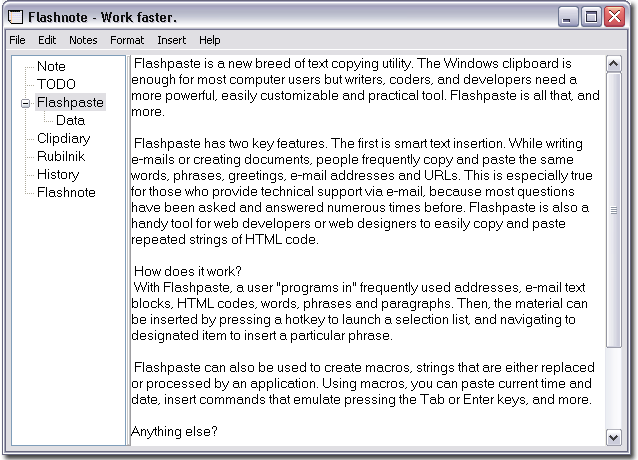
When you need a rough copy to save or to process some pieces of a text, Flashnote is small, quick and convenient. Press the shortcut-key combination and a rough copy is on screen in a flash of a second. Press ESC and the program hides. It's that simple. You don't need to find a place for text, to run Notepad or your PIM. Everything gets done quickly, simply and in a more convenient way.
Latest Reviews

Bonekhan reviewed v3.0 Beta on Apr 19, 2008
Flashnote has been all I ever needed for notes. I started using the 2.0 version shortly after ShirusPad gave me numerous startup problems, and liked the simple tree interface and drag and drop abilities.
The 3.0 version really doesn't change much, but adds for better control over note management--commands that were previous hotkeys or menu items are now also buttons. The database importation works fine.
I use this as my text editor and always have it running, and I highly recommend it to anyone in need of a simple note taker.

scious reviewed v3.0 Beta on Apr 9, 2008
used it for a while, looks good.
Nighted are you leaving a rating for something you didnt try this time?

Nighted reviewed v3.0 Beta on Apr 9, 2008
I tried it once before but found it inconvenient. Since, I've found others that I preferred: MiniPad2, MemPad, and ShirusuPad...all free, all portable. :) Google 'em, try 'em. :)

Stingray57 reviewed v2.2 on Mar 27, 2007
Does what it says, but I require more power. So I have to use MyNotesKeeper. I am a former Keynote user - so I see this as a low end Keynote app.

Bonekhan reviewed v3.0 Beta on Apr 19, 2008
Flashnote has been all I ever needed for notes. I started using the 2.0 version shortly after ShirusPad gave me numerous startup problems, and liked the simple tree interface and drag and drop abilities.
The 3.0 version really doesn't change much, but adds for better control over note management--commands that were previous hotkeys or menu items are now also buttons. The database importation works fine.
I use this as my text editor and always have it running, and I highly recommend it to anyone in need of a simple note taker.
scious reviewed v3.0 Beta on Apr 9, 2008
used it for a while, looks good.
Nighted are you leaving a rating for something you didnt try this time?
Nighted reviewed v3.0 Beta on Apr 9, 2008
I tried it once before but found it inconvenient. Since, I've found others that I preferred: MiniPad2, MemPad, and ShirusuPad...all free, all portable. :) Google 'em, try 'em. :)
Stingray57 reviewed v2.2 on Mar 27, 2007
Does what it says, but I require more power. So I have to use MyNotesKeeper. I am a former Keynote user - so I see this as a low end Keynote app.