File Details |
|
| File Size | 0.1 MB |
|---|---|
| License | Freeware |
| Operating System | Windows 7/8/Server 2003/Server 2008/Vista/XP |
| Date Added | October 18, 2012 |
| Total Downloads | 2,061 |
| Publisher | My Portable Software |
| Homepage | Free Clipboard Manager |
Publisher's Description
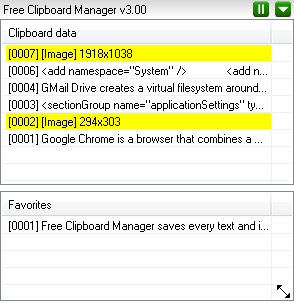
Free Clipboard Manager saves every text and image that is copied in the clipboard. This is useful if you have to take a lot of screenshots or if you need to access to multiple notes of part of code without the need to paste them in a text editor. Simply hit CTRL-C or PRINT SCREEN to save automatically the clipboard content to hdd! To copy them back to clipboard, select the item, right click with the mouse and select "copy item to clipboard".
Latest Reviews

TROLL reviewed v3.10 on May 6, 2012
screenshot utility da best since 2001 working forever

asaenz reviewed v1.17 on Nov 6, 2011
Has potential and being updated frequently. @vsam - try 1.20 or later when available regarding explorer problem.

vsam reviewed v1.12 on Oct 28, 2011
Does what it's supposed to do, but a nasty popup upon rebot asking for donation. Then it messes with explorer.exe, causing the process to restart.

TROLL reviewed v3.10 on May 6, 2012
screenshot utility da best since 2001 working forever
asaenz reviewed v1.17 on Nov 6, 2011
Has potential and being updated frequently. @vsam - try 1.20 or later when available regarding explorer problem.
vsam reviewed v1.12 on Oct 28, 2011
Does what it's supposed to do, but a nasty popup upon rebot asking for donation. Then it messes with explorer.exe, causing the process to restart.