File Details |
|
| File Size | 1.1 MB |
|---|---|
| License | Freeware |
| Operating System | Windows 7/8/10/Vista/XP |
| Date Added | July 18, 2018 |
| Total Downloads | 180,176 |
| Publisher | |
| Homepage | Google Toolbar |
Publisher's Description
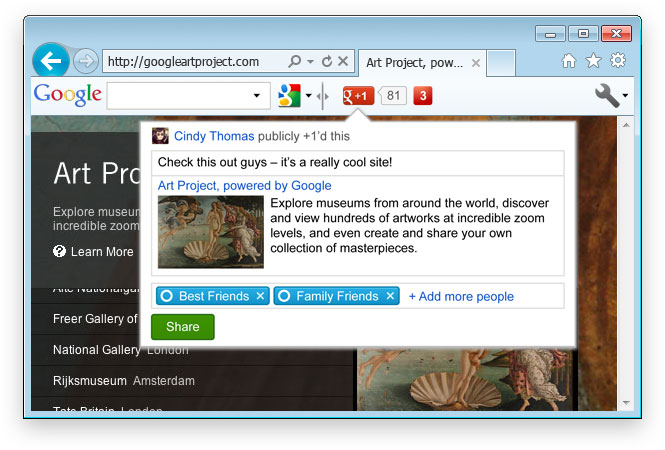
Google Toolbar increases your ability to find information from anywhere on the web. The toolbar appears along with the Internet Explorer toolbar. This means you can quickly and easily use Google to search from any website location, without returning to the Google home page to begin another search.
Latest Reviews

FatBastard reviewed v7.5.5111.1712 on Jun 10, 2014
I hate toolbars in any shape or form!

Uriel reviewed v7.1.2011.0512b on May 30, 2011
I input a search query, and was overloaded with spyware.
Uriel reviewed v7.0.1614.2212 on Apr 21, 2011
Who is stupid enough to use Google anything? It's spyware folks. Wake up!
Go to:
https://duckduckgo.com/
or
https://s2-us2.startingpage.com/
instead!

CyberDoc999 reviewed v7.0.1614.2212 on Apr 21, 2011
who still uses Internet Explorer ????

war593122 reviewed v7.0.1614.2212 on Apr 21, 2011
I don't have a problem with toolbars themselves. Most of them anyways. Yes some of them are just adware/spyware junk.
My problem with them is that companies, like Google, install them automatically or if not automatically set to install by default.
They slow down the browser and I am sick of removing them all the time. Thankfully it has gotten a lot easier these days to remove them.
Thank God they are banned in Chrome. Now if only IE and FF would ban them too.

roj reviewed v7.0.1614.2212 on Apr 20, 2011
So let me get this straight:
I should install and run a toolbar that phones home continuously, allows tracking of my whereabouts and search criteria for ad purposes to be sold to the highest bidder, is a SERIOUS privacy violation from a company with the worst privacy record imaginable and in general is just a candy-coated piece of malware?
Right.
And the worst part is that so many users are running (not walking) down the "Too Stupid To Live" road to install and run it.
It's a pity there is no negative rating.
Avoid anything and everything form this company. As a security analyst, I can only way that their practices are despicable.

SineWave reviewed v6.6.1409.1944 on Feb 23, 2011
I really, REALLY don't know who and why invented adding toolbars to the browsers. It's totally useless! USELESS. It doesn't even diserve a one star in my book. ANY browser toolbar.

Input Overload reviewed v6.6.1409.1944 on Feb 23, 2011
I hate toolbars with a vengeance!
Google put this program where the sun don't shine.

uberfly reviewed v6.6.1124.846 on Nov 30, 2010
It's a 24/7 proctology exam.
Uriel reviewed v6.6.916.106 on Sep 21, 2010
SPYWARE! Type the phrase, "Is Google Spyware?" in your favorite search engine and see for yourselves.

FatBastard reviewed v7.5.5111.1712 on Jun 10, 2014
I hate toolbars in any shape or form!
Uriel reviewed v7.1.2011.0512b on May 30, 2011
I input a search query, and was overloaded with spyware.
Uriel reviewed v7.0.1614.2212 on Apr 21, 2011
Who is stupid enough to use Google anything? It's spyware folks. Wake up!
Go to:
https://duckduckgo.com/
or
https://s2-us2.startingpage.com/
instead!
CyberDoc999 reviewed v7.0.1614.2212 on Apr 21, 2011
who still uses Internet Explorer ????
war593122 reviewed v7.0.1614.2212 on Apr 21, 2011
I don't have a problem with toolbars themselves. Most of them anyways. Yes some of them are just adware/spyware junk.
My problem with them is that companies, like Google, install them automatically or if not automatically set to install by default.
They slow down the browser and I am sick of removing them all the time. Thankfully it has gotten a lot easier these days to remove them.
Thank God they are banned in Chrome. Now if only IE and FF would ban them too.
roj reviewed v7.0.1614.2212 on Apr 20, 2011
So let me get this straight:
I should install and run a toolbar that phones home continuously, allows tracking of my whereabouts and search criteria for ad purposes to be sold to the highest bidder, is a SERIOUS privacy violation from a company with the worst privacy record imaginable and in general is just a candy-coated piece of malware?
Right.
And the worst part is that so many users are running (not walking) down the "Too Stupid To Live" road to install and run it.
It's a pity there is no negative rating.
Avoid anything and everything form this company. As a security analyst, I can only way that their practices are despicable.
SineWave reviewed v6.6.1409.1944 on Feb 23, 2011
I really, REALLY don't know who and why invented adding toolbars to the browsers. It's totally useless! USELESS. It doesn't even diserve a one star in my book. ANY browser toolbar.
Input Overload reviewed v6.6.1409.1944 on Feb 23, 2011
I hate toolbars with a vengeance!
Google put this program where the sun don't shine.
uberfly reviewed v6.6.1124.846 on Nov 30, 2010
It's a 24/7 proctology exam.
Uriel reviewed v6.6.916.106 on Sep 21, 2010
SPYWARE! Type the phrase, "Is Google Spyware?" in your favorite search engine and see for yourselves.
Uriel reviewed v6.4.1321.1732 on Feb 1, 2010

ZenoLabs reviewed v6.4.1321.1732 on Feb 1, 2010
Useless.

Cage22 reviewed v6.3.1001.1015 on Oct 27, 2009
UPDATE Browse by name/Provide suggestion on navigation errors now works
Version: 6.3.1014.1517/en (GGLL)
Notifier Version: 5.4.4525.1752
http://dl.google.com/too...staller_en32_signed.exe
Provide suggestions on navigaton errors still does not work on IE8 w/Version 6.3.1001.1015