File Details |
|
| File Size | 8.3 MB |
|---|---|
| License | Shareware, $25.00 |
| Operating System | Windows 7/8/2000/Server 2003/Vista/XP |
| Date Added | September 17, 2014 |
| Total Downloads | 25,863 |
| Publisher | BinarySense, Inc. |
| Homepage | HDDlife |
Publisher's Description
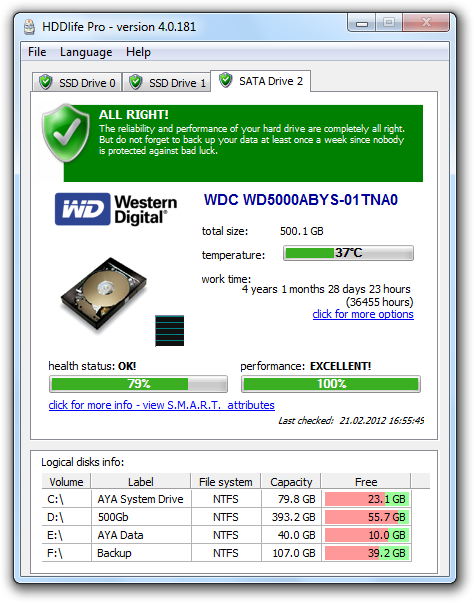
HDDlife is a real-time hard drive monitoring utility with alerts, malfunction protection and data loss prevention functions. This hard drive inspector is an advanced proactive hard drive failure detection system which controls all of your hard drive risks. It uses S.M.A.R.T. technology and works both for single PCs and large computer networks.
Latest Reviews

BANDIT- reviewed v4.0.194 on Oct 8, 2013
This is Absolutely AMAZING ...........
... ly crap. -20*

dankarlan reviewed v3.0.139 on Jun 18, 2007
Avoid this product and the people who produce it (BinarySense). I've been trying now for more than 2 months to get them to refund the ppurchase price for HDDLife, and they will not do it. They even asked me to sign a statement declaring that I have completely removed all trace of HDDLife from my system before they would refund my money. I printed, filled out, and mailed the form (to Russia!), but 10 weeks later, they still haven't refunded my money. Why did I want a refund? Because I could not get the product to start up after installing, and they repeatedly suggested workarounds that didn't work, until I finally gave up.

ravemanson reviewed v3.0.129 Beta on Apr 16, 2007
- LOWER YOUR VOLUME ! - The extremely, unnecessarily loud warning-sound, even worse than when Kaspersky AV founds a virus, almost made me give it a 3 instead of a 4. (YES, i KNOW You can turn those sounds off, if they wouldn't it would definitely recieve a 3. Tinnitus is a quite high price to pay to try a software that might save Your HD...)
Found problems as soon as i installed it, something like this is recommended if You don't want to use a a diagnostics suite to manually check the SMART status.
It's quite the resource-chunk, starting up slowly and sometimes freezing when changing options.
I wonder if anyone actually buy software like this; You typically just install it to check the status for a week or so and then You won't need it to check the status again for many months to come anyway.
UPDATE - The uninstallation fails due to "another installation currently active", which doesn't work until You manually kill one of the program's processes, even after a restart of the computer. It sometimes also freezes for no reason after a few minutes after booting.
Did they intentionally put "BETA" in the topic because they are too lazy to actually fix the bugs instead? This is too much to be recommended, changing to a 2, since it actually does "work" sometimes.

bello reviewed v2.9.102 RC1 on Sep 25, 2006
Watch out guys! Don't ever try this kind horrorware ! Half year ago after using it within 3 days ate my HDD after . There are many free softs that do the same job but very safe at the same time...

photonboy reviewed v2.8.100 Beta on Jul 28, 2006
WARNING:
I believe all such programs prevent hard drives from spinning down.
Ironically, the software that is meant to look for premature wearing actually helps to cause it!

esnyder reviewed v2.8.91 RC1 on Mar 17, 2006
This product ONLY WORKS WITH INTERNAL S.M.A.R.T. technology hard drives. No external drives. I thought this was going to be a good product, but as Zygi says, there are free products that work just as well. I downloaded the demo and only saw my internal 40 GB drive. I have an external USB and FireWire and I assumed I was only seeing C: as a demo/shareware limitation. I purchased it, still nothing. Uninstall and reinstall, still, nothing. If you check the bottom of the FAQ page however, you will find they cannot "control" USB drives. No mention of FireWire. I was not looking to “control” but to monitor. It turns out that even if an external enclosure has a S.M.A.R.T. drive in it, the information is not passed. I guess this is a case of buyer beware.

Zygi reviewed v2.8.89 Beta on Mar 1, 2006
Its not bad after all, but i know program that do at least the same and cost nothing its HD Tune, http://www.hdtune.com/
http://fileforum.betanew...il/HD_Tune/1141220325/1
I highly recommend it as its show info about hdd, smart and temperature (where avaiable).
PS. HD Tune even have hard to find in newer windows xp and 2k, ability to scan surface, i think HDDlife don't have this useful feature, now you can be sure your drive is realy healthy.

azimov reviewed v2.5.74 RC1 on Aug 24, 2005
Not a bad product ... only that it can't read my SATA drives, both are Hitachis bought less than a year ago. HDDlife id's them as SCSI drives and advises that it cannot get any SMART info from them!
Not good enough! sorry ... All SATA drives will be ID'ed as SCSI drives on Windows.

deadmonkey reviewed v2.5.74 Beta on Aug 19, 2005
Banquo: It is possible your drive is faulty. I have had several brand new drives at work and they have died within a few weeks/months.
I suggest you try a few other tools just to make sure everything is ok with your driver. If not send it back.
Btw it gets the information from the hard drive SMART information. Do a search for hard drives and SMART and you will see how all the information is collected and read. It is very interesting :)
As for the program I have found it to be fine. It does what it says and it looks nice. It is a little expensive considering there are a lot of free alternatives. Would be five stars if it was priced around $15

Banquo reviewed v2.5.74 Beta on Aug 19, 2005
This program is full of it. I tried it out on my brand new Seagate hard drive which I know for a fact has absolutely no problems at all. It should have been 100% healthy should it not? Seagate's diagnostic utility gave it a perfect bill of health, but not this program. If you ask me those numbers are meaningless; where do they come from? In my opinion, this program is really nothing more than modern day snake oil. There are plenty of respected diagnostics programs out there, many of which are FREE. Hard drive manufacturers have their own utilities you can download for example. I really see no point in paying for something like this.

BANDIT- reviewed v4.0.194 on Oct 8, 2013
This is Absolutely AMAZING ...........
... ly crap. -20*
dankarlan reviewed v3.0.139 on Jun 18, 2007
Avoid this product and the people who produce it (BinarySense). I've been trying now for more than 2 months to get them to refund the ppurchase price for HDDLife, and they will not do it. They even asked me to sign a statement declaring that I have completely removed all trace of HDDLife from my system before they would refund my money. I printed, filled out, and mailed the form (to Russia!), but 10 weeks later, they still haven't refunded my money. Why did I want a refund? Because I could not get the product to start up after installing, and they repeatedly suggested workarounds that didn't work, until I finally gave up.
ravemanson reviewed v3.0.129 Beta on Apr 16, 2007
- LOWER YOUR VOLUME ! - The extremely, unnecessarily loud warning-sound, even worse than when Kaspersky AV founds a virus, almost made me give it a 3 instead of a 4. (YES, i KNOW You can turn those sounds off, if they wouldn't it would definitely recieve a 3. Tinnitus is a quite high price to pay to try a software that might save Your HD...)
Found problems as soon as i installed it, something like this is recommended if You don't want to use a a diagnostics suite to manually check the SMART status.
It's quite the resource-chunk, starting up slowly and sometimes freezing when changing options.
I wonder if anyone actually buy software like this; You typically just install it to check the status for a week or so and then You won't need it to check the status again for many months to come anyway.
UPDATE - The uninstallation fails due to "another installation currently active", which doesn't work until You manually kill one of the program's processes, even after a restart of the computer. It sometimes also freezes for no reason after a few minutes after booting.
Did they intentionally put "BETA" in the topic because they are too lazy to actually fix the bugs instead? This is too much to be recommended, changing to a 2, since it actually does "work" sometimes.
bello reviewed v2.9.102 RC1 on Sep 25, 2006
Watch out guys! Don't ever try this kind horrorware ! Half year ago after using it within 3 days ate my HDD after . There are many free softs that do the same job but very safe at the same time...
photonboy reviewed v2.8.100 Beta on Jul 28, 2006
WARNING:
I believe all such programs prevent hard drives from spinning down.
Ironically, the software that is meant to look for premature wearing actually helps to cause it!
esnyder reviewed v2.8.91 RC1 on Mar 17, 2006
This product ONLY WORKS WITH INTERNAL S.M.A.R.T. technology hard drives. No external drives. I thought this was going to be a good product, but as Zygi says, there are free products that work just as well. I downloaded the demo and only saw my internal 40 GB drive. I have an external USB and FireWire and I assumed I was only seeing C: as a demo/shareware limitation. I purchased it, still nothing. Uninstall and reinstall, still, nothing. If you check the bottom of the FAQ page however, you will find they cannot "control" USB drives. No mention of FireWire. I was not looking to “control” but to monitor. It turns out that even if an external enclosure has a S.M.A.R.T. drive in it, the information is not passed. I guess this is a case of buyer beware.
Zygi reviewed v2.8.89 Beta on Mar 1, 2006
Its not bad after all, but i know program that do at least the same and cost nothing its HD Tune, http://www.hdtune.com/
http://fileforum.betanew...il/HD_Tune/1141220325/1
I highly recommend it as its show info about hdd, smart and temperature (where avaiable).
PS. HD Tune even have hard to find in newer windows xp and 2k, ability to scan surface, i think HDDlife don't have this useful feature, now you can be sure your drive is realy healthy.
azimov reviewed v2.5.74 RC1 on Aug 24, 2005
Not a bad product ... only that it can't read my SATA drives, both are Hitachis bought less than a year ago. HDDlife id's them as SCSI drives and advises that it cannot get any SMART info from them!
Not good enough! sorry ... All SATA drives will be ID'ed as SCSI drives on Windows.
deadmonkey reviewed v2.5.74 Beta on Aug 19, 2005
Banquo: It is possible your drive is faulty. I have had several brand new drives at work and they have died within a few weeks/months.
I suggest you try a few other tools just to make sure everything is ok with your driver. If not send it back.
Btw it gets the information from the hard drive SMART information. Do a search for hard drives and SMART and you will see how all the information is collected and read. It is very interesting :)
As for the program I have found it to be fine. It does what it says and it looks nice. It is a little expensive considering there are a lot of free alternatives. Would be five stars if it was priced around $15
Banquo reviewed v2.5.74 Beta on Aug 19, 2005
This program is full of it. I tried it out on my brand new Seagate hard drive which I know for a fact has absolutely no problems at all. It should have been 100% healthy should it not? Seagate's diagnostic utility gave it a perfect bill of health, but not this program. If you ask me those numbers are meaningless; where do they come from? In my opinion, this program is really nothing more than modern day snake oil. There are plenty of respected diagnostics programs out there, many of which are FREE. Hard drive manufacturers have their own utilities you can download for example. I really see no point in paying for something like this.

Tokar reviewed v2.5.69 on Jul 6, 2005
At least fileforum lists this as shareware.
SoftPedia is still listing it as Freeware.
I have uninstalled this software. Dont feel like paying $30 for something that is done by a multitude of other freeware apps.
Those HEALTH numbers see rather bogus to me as well.
My 2 year old 120GB HD shows up at 44% health.
My 8+ year old 6GB, 5.25" HD shows up at 100% health.

SinbadKRT reviewed v2.5 RC2 on Jul 4, 2005
Granted while Adenix Smart Explorer does do the job it appears there is a large differential in reliability and performance between the 2 programs. Makes me wonder which is more accurate in that sense. I like HDDLife as it shows your current temp of the hard drive and also free space/capacity. It would be nice to see the serial number of your drives also though. I agree that one can look at the bios but how many do on a regular basis? For the not so novice this may be the way to go.

pyridox reviewed v2.5 Beta 2 on Jun 27, 2005
Most PC's made today, support S.M.A.R.T technology in the BIOS. The machine will alert you on boot up, if a drive is in danger of failing. While this program is nice, it's not nessesary. I think I could spend my $30, towards something more useful.