
File Details |
|
| File Size | 8.3 MB |
|---|---|
| License | Freeware |
| Operating System | Windows (All) |
| Date Added | September 2, 2021 |
| Total Downloads | 139,363 |
| Publisher | Martin Malik |
| Homepage | HWiNFO |
Publisher's Description
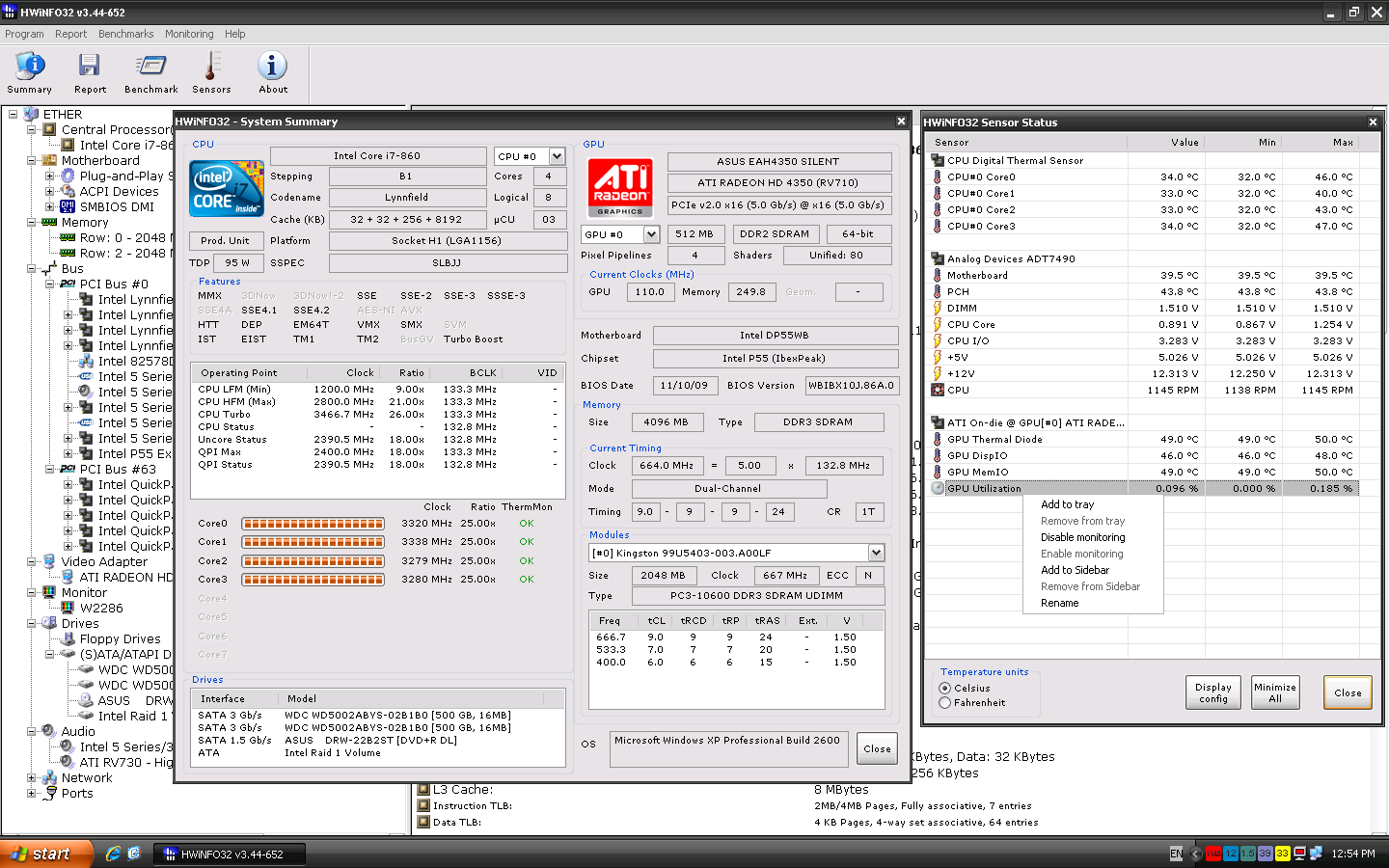
HWiNFO (Hardware Information) is a professional hardware information and diagnostic tool supporting latest components, industry technologies and standards. It's targeted to recognize and extract the most possible amount of information about computer's hardware which makes it suitable for users searching for driver updates, computer manufactures, system integrators and technical exteperts too. Retrieved information is presented in a logical and easily understandable form and can be exported into various types of reports. System health monitoring and basic benchmarking available too.
Latest Reviews

Pkshadow reviewed v6.42 on Mar 2, 2021
This link goes to a MALICIOUS auto download, caught by Malwarebytes Browser Guard for website redirect to sac.sk, Norton360 stopped file download and quarantined it. Norton 360 also brought up page review, nothing for it.

Rizwan Saqib reviewed v6.32 on Jan 15, 2021
Good to see you here, good information for us, are you interested in a affordable web developer

ashleye23 reviewed v6.12 on Nov 13, 2019
Good plus bad but above mediocre.

aszure reviewed v6.00 on Dec 23, 2018
Excellent program

mikebratley reviewed v4.34 on Mar 11, 2014
4 stars good stuff

kerimachin reviewed v4.20-1960 on Jul 22, 2013
awesome for any overclockers out there!!

beatmakershq reviewed v4.12-1850 on Feb 11, 2013
bobad is right, this is PRICELESS for overclockers.

SineWave reviewed v4.04-1730 on Sep 5, 2012
This program was not so good a few years back, but now I find it simply brilliant for discovering what's in ones PC. I also really appreciate the portability and not having to install it every time on the client's PC. 6 stars! :)

bobad reviewed v3.92-1500 on Jan 19, 2012
This is my fovorite installation (actually, a non-installation) of my favorite hardware info program. Does everything you need, priceless for overclockers as well as general troubleshooting. The Dev. keeps it up to date to include the latest CPU's and other hardware.
bobad reviewed v3.62 on Nov 22, 2010
This is a great program. I really like the variety of hardware monitors, and the portability. I wish the benchmark had a graphics benchmark, nothing elaborate, just something to give a complete system score. Seems to work great on Win 7 X64 despite the name.

Pkshadow reviewed v6.42 on Mar 2, 2021
Pros: This link goes to a MALICIOUS auto download, caught by Malwarebytes Browser Guard for website redirect to sac.sk, Norton360 stopped file download and quarantined it. Norton 360 also brought up page review, nothing for it.
Cons: This link goes to a MALICIOUS auto download, caught by Malwarebytes Browser Guard for website redirect to sac.sk, Norton360 stopped file download and quarantined it. Norton 360 also brought up page review, nothing for it.
Bottom Line: This link goes to a MALICIOUS auto download, caught by Malwarebytes Browser Guard for website redirect to sac.sk, Norton360 stopped file download and quarantined it. Norton 360 also brought up page review, nothing for it.
Rizwan Saqib reviewed v6.32 on Jan 15, 2021
Pros: Good to see you here, good information for us, are you interested in a affordable web developer
Cons: Good to see you here, good information for us, are you interested in a affordable web developer
Bottom Line: Good to see you here, good information for us, are you interested in a affordable web developer
ashleye23 reviewed v6.12 on Nov 13, 2019
Pros: This is an excellent resource indeed.
https://www.layoutindex.com
https://www.layoutindex....se-software-development
https://www.layoutindex..../mobile-app-development
https://solis-newlanka.com/
Cons: Some improvement required
Bottom Line: Good plus bad but above mediocre.
aszure reviewed v6.00 on Dec 23, 2018
Pros: Very comprehensive info. Works quickly and well.
Cons: Maybe a bit too much info for the newbie. Maybe have a few views (novice, advanced, genius)
Bottom Line: Excellent program
mikebratley reviewed v4.34 on Mar 11, 2014
4 stars good stuff
kerimachin reviewed v4.20-1960 on Jul 22, 2013
awesome for any overclockers out there!!
beatmakershq reviewed v4.12-1850 on Feb 11, 2013
bobad is right, this is PRICELESS for overclockers.
SineWave reviewed v4.04-1730 on Sep 5, 2012
This program was not so good a few years back, but now I find it simply brilliant for discovering what's in ones PC. I also really appreciate the portability and not having to install it every time on the client's PC. 6 stars! :)
bobad reviewed v3.92-1500 on Jan 19, 2012
This is my fovorite installation (actually, a non-installation) of my favorite hardware info program. Does everything you need, priceless for overclockers as well as general troubleshooting. The Dev. keeps it up to date to include the latest CPU's and other hardware.
bobad reviewed v3.62 on Nov 22, 2010
This is a great program. I really like the variety of hardware monitors, and the portability. I wish the benchmark had a graphics benchmark, nothing elaborate, just something to give a complete system score. Seems to work great on Win 7 X64 despite the name.

GadgetPig reviewed v3.35 on Jan 17, 2010
Works fine on Windows 7. Program comes in a portable version for flash drives. Device viewer could use more "top level" tree categories like siw.exe does.
To find cardbus/multicard reader for example, it's nested deep under HWinfo32 device manager BUS>PCI BUS
Cool software (along with SIW.exe) to have in your toolbox.

datvup reviewed v3.32 on Jan 9, 2010
Works exactly as described on an hp dv9000 running Vista. Program displays more than one can learn by taking the computer apart, including CPU core temps and frequencies, battery wear data and drive SMART information. Program runs without errors or crashes. Only area for improvement in my opinion is the 'Config' screen could use tooltip descriptions for the settings.

carlrjr reviewed v2.36 on Jan 18, 2009
Works exactly as described on an hp dv9000 running Vista. Program displays more than one can learn by taking the computer apart, including CPU core temps and frequencies, battery wear data and drive SMART information. Program runs without errors or crashes. Only area for improvement in my opinion is the 'Config' screen could use tooltip descriptions for the settings.