
File Details |
|
| File Size | 8.8 MB |
|---|---|
| License | Open Source |
| Operating System | Windows (All) |
| Date Added | October 24, 2023 |
| Total Downloads | 13,374 |
| Publisher | André Simon |
| Homepage | Highlight |
Publisher's Description
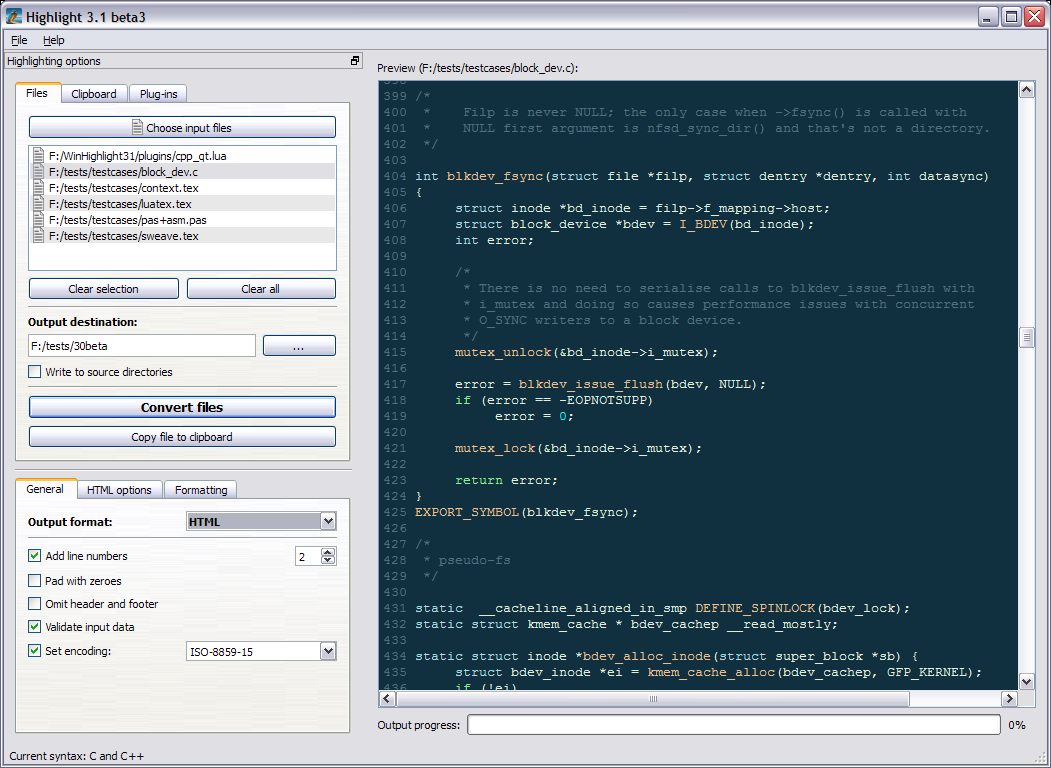
Highlight is a universal source code converter which transforms code to HTML, XHTML, RTF, LaTeX, TEX, SVG and BBCode files with syntax highlighting. (X)HTML and SVG output is formatted by CSS. It supports customizable color theme and language descriptions with regular expressions. The configuration files are Lua scripts with plug-in support. The tool contains several options to provide a consistent formatting of the output code.
Latest Reviews

westor reviewed v3.27 on Jan 25, 2016
Missing the mIRC (mSL) scripting language support!!!

johnrc2 reviewed v3.26 on Jan 16, 2016
I haven't needed a program like this in years, but just on the day when I had to document the logic of a couple of Java programs using pseudo-code, I find out about this program. I'm sure I'll find even more uses for Highlight, but this one use saved me a ton of time

chrispaul reviewed v3.17 on Feb 17, 2014
great

olivergiving reviewed v3.15 on Sep 25, 2013
very useful!

paulperry reviewed v3.15 on Aug 24, 2013
great!

spiked reviewed v2.6.10 on May 12, 2008
Not just Freeware but Open Source (and the source is even included in the regular Win32 setup). Supports lots of non-Win platforms including Mac OS X, and plug-ins are available to integrate with Total Commander and Notepad++.

Nighted reviewed v2.6.10 on May 9, 2008
Very simple, easy to use, and tons of templates.
I tried INI files and had to convert from unicode to ansi to get it to work properly. I shouldn't have to do this manually! ;)
I'll stick with Kudaz which is a bit complicated at first but is far more powerful.

AceroSBU reviewed v2.3-4 Beta on Jun 22, 2005
Would you care to share what modification you made to output code trees? I would love to know and I'm sure many other people would.

hhravn reviewed v2.3-4 Beta on Jun 22, 2005
This does exactly what it says, and its exactly what i was looking for (last week sadly). I use it for C++ code and the formatting looks good. Perhaps a few less styles to choose from :o) It's a keeper!

PKKid reviewed v2.2-9 on Feb 28, 2005
I tried this on a bunch of different languages and it worked great. Creating a Style Sheet looks like a pain in the butt, and the GUI is not quite that intuitive. The program does what it says. I see alot of potential to what this program can do... possibly auto create API Modules? ;)

westor reviewed v3.27 on Jan 25, 2016
Missing the mIRC (mSL) scripting language support!!!
johnrc2 reviewed v3.26 on Jan 16, 2016
I haven't needed a program like this in years, but just on the day when I had to document the logic of a couple of Java programs using pseudo-code, I find out about this program. I'm sure I'll find even more uses for Highlight, but this one use saved me a ton of time
chrispaul reviewed v3.17 on Feb 17, 2014
great
olivergiving reviewed v3.15 on Sep 25, 2013
very useful!
paulperry reviewed v3.15 on Aug 24, 2013
great!
spiked reviewed v2.6.10 on May 12, 2008
Not just Freeware but Open Source (and the source is even included in the regular Win32 setup). Supports lots of non-Win platforms including Mac OS X, and plug-ins are available to integrate with Total Commander and Notepad++.
Nighted reviewed v2.6.10 on May 9, 2008
Very simple, easy to use, and tons of templates.
I tried INI files and had to convert from unicode to ansi to get it to work properly. I shouldn't have to do this manually! ;)
I'll stick with Kudaz which is a bit complicated at first but is far more powerful.
AceroSBU reviewed v2.3-4 Beta on Jun 22, 2005
Would you care to share what modification you made to output code trees? I would love to know and I'm sure many other people would.
hhravn reviewed v2.3-4 Beta on Jun 22, 2005
This does exactly what it says, and its exactly what i was looking for (last week sadly). I use it for C++ code and the formatting looks good. Perhaps a few less styles to choose from :o) It's a keeper!
PKKid reviewed v2.2-9 on Feb 28, 2005
I tried this on a bunch of different languages and it worked great. Creating a Style Sheet looks like a pain in the butt, and the GUI is not quite that intuitive. The program does what it says. I see alot of potential to what this program can do... possibly auto create API Modules? ;)

horst reviewed v2.0-22 on May 2, 2004
Quite fast, good interface. Sufficient support for plenty of markp languages, easily extended.
It was nice to discover I actually have a use for this program: it will come in handy next time I want to include code snippets in my documentation. With a small modification it's output can be made in to a navigatable code tree or groove.