File Details |
|
| File Size | 6.4 MB |
|---|---|
| License | Freeware |
| Operating System | Windows 7/8/10 |
| Date Added | May 17, 2017 |
| Total Downloads | 8,396 |
| Publisher | Hornil Co. |
| Homepage | Hornil StylePix |
Publisher's Description
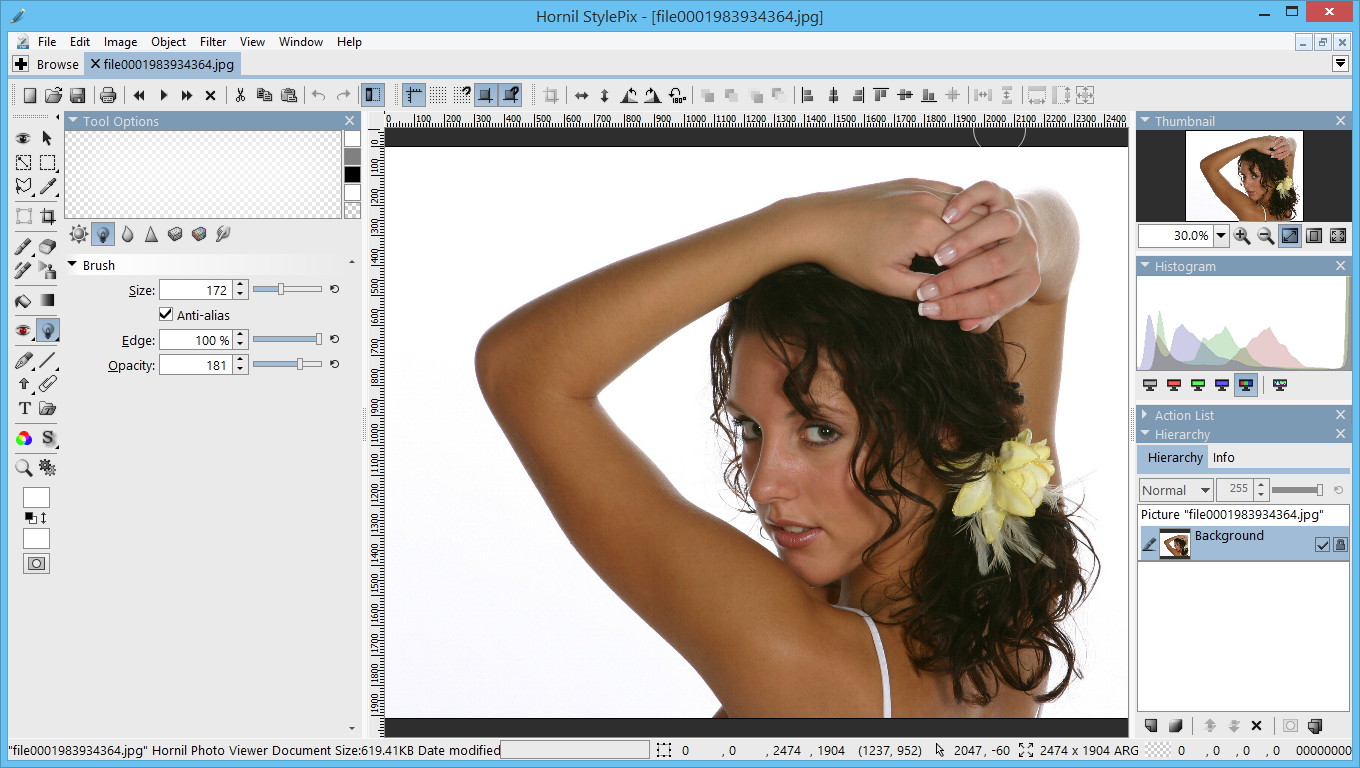
Hornil StylePix is a graphics editing program with a number of advanced features. Stylepix is an acronym for "Style Pictures". This means your pictures with nice style. It has intuitive user interface. It is designed to control the selected functions easy and conveniently. Even if you have no experience, you can easily learn how to edit image and retouching your photos. As a result, Hornil StylePix's intuitive UI reduces your time to work. To better speed editing, it is designed to focus on light and powerful. We are always striving to improve the performance of Hornil StylePix. It runs on fewer resources environment such as Net-books and laptop computer or virtual machines (vmware, virtual box, virtual pc, etc.) with full image handling features.
Latest Reviews

darkNiGHTS reviewed v1.14.5.0 on Jan 14, 2015
Great product! Entitled people rating this product 1-star because the free version isn't the same as the paid version - go away.

garretthylltun reviewed v1.14.3.0 on Mar 13, 2014
Crippled Shareware version.

mikebratley reviewed v1.14.3.0 on Mar 11, 2014
nice

kstev99 reviewed v1.14.2 on Feb 7, 2014
Sounds wonderful, but MalwareBytes detects the home page of this app as malicious. I trust MBAM and am not going to try this app although it is more than likely a False Positive

BANDIT- reviewed v1.14.0 on Oct 10, 2013
I do a lot of Logos, Images, Skins, Ani-Gif, Buttons, blah blah, for
vBulletin Forums. I use various Apps which suit my needs.
-
I reviewed Hornil StylePix a year ago, and am Astonished to see only One
other review since..?? When I first spotted this App I gave it the "Once over", And was taken Aback at the number of features Included in the free App. Take a look at the HomePage & see for yourself. & while you're there (at least) grab a portable copy. You might be suprised..!!
It has a painful Splash screen on Launch, but just add a switch to the End of the "Shortcut" Target string.
"C:\ ~ \HornilStylePix1.14.0\StylePix.exe" /nosplash
Multiply the Stars I give this App by 10. Superb..!!

uberfly reviewed v1.12.3.3 on May 24, 2013
Wow. Very nice full set of features. Very nice even if it wasn't free.
BANDIT- reviewed v1.11.3 on Oct 5, 2012
FreeWare & Superb.
Saves to lots of Formats incl .ICO
No troubles with Editing pixels via Z+ key
Hats off to this S/w & Developers.

Karol Mily reviewed v1.8.3 on Feb 28, 2012
Looks very good. Needs rename to shorter NEW name. Two words are optimal. Still needs a lot of work to be serious alternative to similar existing graphics software.
Stars: 3+

bobad reviewed v1.6.5 on Oct 26, 2010
This is a first class graphics editor. It has plenty of features and tools, and may be the only graphics editor you ever need. Being no-install and portable is great too, being free is priceless! There is a learning curve to the unusual GUI, and that's a shame, 1 point off for that. There's nothing to lose, try it!

kansapa reviewed v1.0.1.1121 on Nov 11, 2009
You can chage the size or width rate of the text on tool options panel. If you can't see the tool options, press F3 or select View > Window > Tool Options in menu.

darkNiGHTS reviewed v1.14.5.0 on Jan 14, 2015
Great product! Entitled people rating this product 1-star because the free version isn't the same as the paid version - go away.
garretthylltun reviewed v1.14.3.0 on Mar 13, 2014
Crippled Shareware version.
mikebratley reviewed v1.14.3.0 on Mar 11, 2014
nice
kstev99 reviewed v1.14.2 on Feb 7, 2014
Sounds wonderful, but MalwareBytes detects the home page of this app as malicious. I trust MBAM and am not going to try this app although it is more than likely a False Positive
BANDIT- reviewed v1.14.0 on Oct 10, 2013
I do a lot of Logos, Images, Skins, Ani-Gif, Buttons, blah blah, for
vBulletin Forums. I use various Apps which suit my needs.
-
I reviewed Hornil StylePix a year ago, and am Astonished to see only One
other review since..?? When I first spotted this App I gave it the "Once over", And was taken Aback at the number of features Included in the free App. Take a look at the HomePage & see for yourself. & while you're there (at least) grab a portable copy. You might be suprised..!!
It has a painful Splash screen on Launch, but just add a switch to the End of the "Shortcut" Target string.
"C:\ ~ \HornilStylePix1.14.0\StylePix.exe" /nosplash
Multiply the Stars I give this App by 10. Superb..!!
uberfly reviewed v1.12.3.3 on May 24, 2013
Wow. Very nice full set of features. Very nice even if it wasn't free.
BANDIT- reviewed v1.11.3 on Oct 5, 2012
FreeWare & Superb.
Saves to lots of Formats incl .ICO
No troubles with Editing pixels via Z+ key
Hats off to this S/w & Developers.
Karol Mily reviewed v1.8.3 on Feb 28, 2012
Looks very good. Needs rename to shorter NEW name. Two words are optimal. Still needs a lot of work to be serious alternative to similar existing graphics software.
Stars: 3+
bobad reviewed v1.6.5 on Oct 26, 2010
This is a first class graphics editor. It has plenty of features and tools, and may be the only graphics editor you ever need. Being no-install and portable is great too, being free is priceless! There is a learning curve to the unusual GUI, and that's a shame, 1 point off for that. There's nothing to lose, try it!
kansapa reviewed v1.0.1.1121 on Nov 11, 2009
You can chage the size or width rate of the text on tool options panel. If you can't see the tool options, press F3 or select View > Window > Tool Options in menu.

jogygeorge reviewed v1.0.1.1121 on Nov 11, 2009
This is turning out to be great! Updates almost every other day.
Just can't find a way to change the font and its size when typing text

Ulmo reviewed v1.0.1.1118 on Nov 9, 2009
Wouahh !
A Paint.NET but :
- Lighter !
- Without .NET
- Portable
- With an UI that can be improved

steve364 reviewed v1.0.0.1028 RC on Nov 3, 2009
I like the small size of the program in relation of what it can do. It is continually improving & can only get better.