
File Details |
|
| File Size | 2.8 MB |
|---|---|
| License | Shareware, $29.95 |
| Operating System | Windows (All) |
| Date Added | January 19, 2021 |
| Total Downloads | 6,385 |
| Publisher | Imposant |
| Homepage | Hot Keyboard |
Publisher's Description
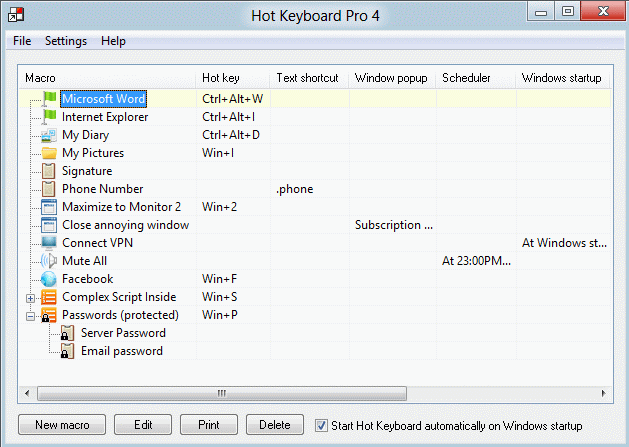
Hot Keyboard assigns to hot keys such repetitive tasks as: frequently used text phrases or names, date/time stamps and email addressing, as well as application launches, etc. It can quickly change sound volumes, and can open dial-up connections. User defined functions can be recorded and played back by Hot Keyboard. Network support: create macros once, share and synchronize them over LAN or WAN.
Latest Reviews

nikus1975 reviewed v3.1.597 on May 31, 2011
veri good program +++5

covakid reviewed v3.1.597 on Mar 16, 2008
Hot-Keyboard is my favorite program
I work in a very high pace call center – taking customer calls when their business internet is down.
I use hot-keyboard macros in the trouble ticket process, for there is repetitive Pull-Down menus and this where I have recorded the “mouse” to perform these repetitive operations. This is so much more efficient and error free and Decreases Repetitive Strain Injury.
I have also made “canned phrases” that are also repetitive and I do not have to worry about spelling errors either. I just have to hit 3 to 4 keys for a whole paragraph to appear.
I have made Hot-Keyboard Macros, for quicker entry of router commands for Cisco, Junipers, Nortel. I created Hot-Keyboard macros which are “troubleshooting scripts” for various UNIX systems and network devices.
I also have to monitor for proactive notifications trouble tickets – which is very repetitive process and I rely on hot-keyboard macros for a majority of the work now and it’s much faster and professional with “prepared canned phrases” which get emailed to customers.
I have “booked marked” websites within Hot-keyboard menus system, it so much faster than using “favorites” and better organized under a specific job functions. I just hit a few keys and I am able to launch a Dispatch page to a tech, or get status on a problem as well.
I am always adding more and more macros and also I’m able to export my macros daily to a network drive so incase my computer crashes, I will have my “toolbox” of commands safely stored.
In a daily bases, I would say that I used Hot-Keyboard every 5 minutes. It has automated my Office Space, you could say, and I am lost without it. It’s an easy to use program and I have been using it since 2001 its just saves me a great deal of time by with the ability to automate repetitive tasks in a Call Center environment. Do not hesitate to make a purchase if you have a need for repeating the same PC tasks over and over for it’s worth it in so many ways.

zridling reviewed v3.0.584 on Nov 22, 2006
Pretty cool program, and far more comprehensive than I expected. But maybe giving it a rating it deserves (5) is suspicious? Nope, just honest.

dgg reviewed v3.0.584 on Nov 22, 2006
These "reviews" all read suspiciously alike.

BamseTuz reviewed v2.7 on Jan 10, 2005
I was try many hotkey managers. But This is really BEST.

Sapov reviewed v2.3 on Nov 13, 2004
Great and very usefull soft.
Highly recommend! Sapov

androgen reviewed v2.3 on Oct 17, 2004
This program has made happy me. It is very convenient.
Work on a computer became much easier.

Magnum-M reviewed v2.3 on Oct 7, 2004
I tried many Hotkey Managers and understood, that Hot Keyboard is most right choice.
I have been using it for 1 year. It's has so many functions. Mmm...
Thanks to Developers.

Ravager2000 reviewed v2.3 on Sep 27, 2004
Basically the program has liked. Convenient navigation and installation of macroowls. I and could not force to press the cursor of a mousy in the places necessary to me on the screen. But what smart system of start of macroowls on time.

-MoLE- reviewed v2.1 on Sep 14, 2004
IMHO this i the BEST program of such kind !!! I tried several similar progs but noone was so simple, convenient and functional, thats for sure! Thx to developers. Advise to all.

nikus1975 reviewed v3.1.597 on May 31, 2011
veri good program +++5
covakid reviewed v3.1.597 on Mar 16, 2008
Hot-Keyboard is my favorite program
I work in a very high pace call center – taking customer calls when their business internet is down.
I use hot-keyboard macros in the trouble ticket process, for there is repetitive Pull-Down menus and this where I have recorded the “mouse” to perform these repetitive operations. This is so much more efficient and error free and Decreases Repetitive Strain Injury.
I have also made “canned phrases” that are also repetitive and I do not have to worry about spelling errors either. I just have to hit 3 to 4 keys for a whole paragraph to appear.
I have made Hot-Keyboard Macros, for quicker entry of router commands for Cisco, Junipers, Nortel. I created Hot-Keyboard macros which are “troubleshooting scripts” for various UNIX systems and network devices.
I also have to monitor for proactive notifications trouble tickets – which is very repetitive process and I rely on hot-keyboard macros for a majority of the work now and it’s much faster and professional with “prepared canned phrases” which get emailed to customers.
I have “booked marked” websites within Hot-keyboard menus system, it so much faster than using “favorites” and better organized under a specific job functions. I just hit a few keys and I am able to launch a Dispatch page to a tech, or get status on a problem as well.
I am always adding more and more macros and also I’m able to export my macros daily to a network drive so incase my computer crashes, I will have my “toolbox” of commands safely stored.
In a daily bases, I would say that I used Hot-Keyboard every 5 minutes. It has automated my Office Space, you could say, and I am lost without it. It’s an easy to use program and I have been using it since 2001 its just saves me a great deal of time by with the ability to automate repetitive tasks in a Call Center environment. Do not hesitate to make a purchase if you have a need for repeating the same PC tasks over and over for it’s worth it in so many ways.
zridling reviewed v3.0.584 on Nov 22, 2006
Pretty cool program, and far more comprehensive than I expected. But maybe giving it a rating it deserves (5) is suspicious? Nope, just honest.
dgg reviewed v3.0.584 on Nov 22, 2006
These "reviews" all read suspiciously alike.
BamseTuz reviewed v2.7 on Jan 10, 2005
I was try many hotkey managers. But This is really BEST.
Sapov reviewed v2.3 on Nov 13, 2004
Great and very usefull soft.
Highly recommend! Sapov
androgen reviewed v2.3 on Oct 17, 2004
This program has made happy me. It is very convenient.
Work on a computer became much easier.
Magnum-M reviewed v2.3 on Oct 7, 2004
I tried many Hotkey Managers and understood, that Hot Keyboard is most right choice.
I have been using it for 1 year. It's has so many functions. Mmm...
Thanks to Developers.
Ravager2000 reviewed v2.3 on Sep 27, 2004
Basically the program has liked. Convenient navigation and installation of macroowls. I and could not force to press the cursor of a mousy in the places necessary to me on the screen. But what smart system of start of macroowls on time.
-MoLE- reviewed v2.1 on Sep 14, 2004
IMHO this i the BEST program of such kind !!! I tried several similar progs but noone was so simple, convenient and functional, thats for sure! Thx to developers. Advise to all.

Nurik reviewed v2.3 on Aug 20, 2004
Best program