
File Details |
|
| File Size | 11.5 MB |
|---|---|
| License | Shareware, $39.95 |
| Operating System | Windows 7/8/10/Vista |
| Date Added | October 28, 2019 |
| Total Downloads | 39,122 |
| Publisher | Hyperionics |
| Homepage | HyperSnap |
Publisher's Description
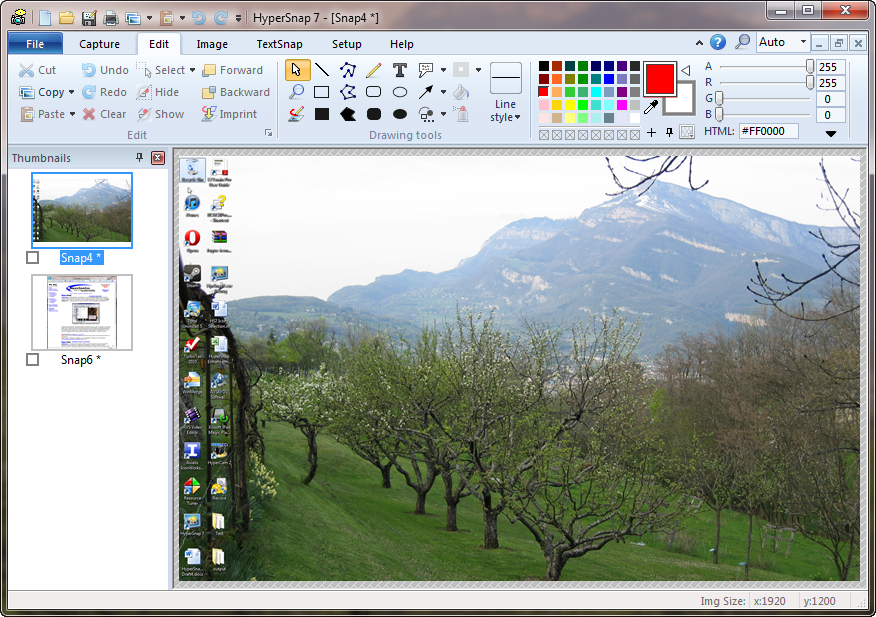
HyperSnap is a screen capture and image editing tool for Windows. It captures screens from standard desktop programs and even those hard-to-grab DirectX, Direct3D, 3Dfx Voodoo, and Glide mode games. It can capture frames from many software DVD players and other video playing software.
Latest Reviews

Karol Mily reviewed v8.00.00 Beta 1 on Sep 4, 2014
Does not run on XP anymore?
Yes. Only Windows 7+
More, here - http://hyperionics.com/forum2/tm.aspx?m=10933

mikebray reviewed v7.28.01 on Mar 12, 2014
awesome!
Karol Mily reviewed v7.23.01 on Jan 29, 2013
Author is working... but very slooowly.
Please DO NOT every day release new version.
* I am leaving it. Go to Ashampoo Snap 6.

Uriel reviewed v7.14.01 on Apr 19, 2012
Gotta give this great app another five stars. I found a new use for this software while customizing my shopping cart. The price for this software is really a steal.
Uriel reviewed v7.12.01 on Feb 2, 2012
I am assuming that this update makes it compatible with Firefox's version 10 that came out yesterday. Firefox warned me that the Hypersnap plugin was not compatible with the upgrade. Hypersnap was quick to update their product. Good stuff.
Karol Mily reviewed v7.11.01 on Dec 15, 2011
To be clear - HperSnap 7 does not support OCR when text is part of image. It does only OCR from web browsers, dialogs and so on.
Nice software.
For OCR only few langs try - Boxoft Screen OCR 1.5 (http://www.boxoft.com/screen-ocr/)

cricri_pingouin reviewed v7.07.04 on Oct 3, 2011
Uriel:
"this software can capture text. I can then use Nuance Omni Page Pro's OCR to translate it"
I don't get it:why do you need to use OCR? HyperSnap-DX already captures text in usable form. This feature alone makes me rate it a 5, and it remain in my toolbox.
Uriel reviewed v7.07.00 on Sep 8, 2011
This is a nice feature packed application. I like the fact that this software can capture text. I can then use Nuance Omni Page Pro's OCR to translate it into a Word Document and such if I desire. I purchased this software while in version six and updated it as soon as they came out with version seven because of it's power.

QQFarmer reviewed v7 Beta 8 on May 21, 2011
Used to be my favorite screen capture application. Not any more. I'm now using Snagit 10

uberfly reviewed v7 Beta 8 on May 21, 2011
Full-featured and mature without being a bulky mess. Can do everything I need it to do and surprises me when I discover a new ability after using it for many years. Glad it's still being developed.

Karol Mily reviewed v8.00.00 Beta 1 on Sep 4, 2014
Does not run on XP anymore?
Yes. Only Windows 7+
More, here - http://hyperionics.com/forum2/tm.aspx?m=10933
mikebray reviewed v7.28.01 on Mar 12, 2014
awesome!
Karol Mily reviewed v7.23.01 on Jan 29, 2013
Author is working... but very slooowly.
Please DO NOT every day release new version.
* I am leaving it. Go to Ashampoo Snap 6.
Uriel reviewed v7.14.01 on Apr 19, 2012
Gotta give this great app another five stars. I found a new use for this software while customizing my shopping cart. The price for this software is really a steal.
Uriel reviewed v7.12.01 on Feb 2, 2012
I am assuming that this update makes it compatible with Firefox's version 10 that came out yesterday. Firefox warned me that the Hypersnap plugin was not compatible with the upgrade. Hypersnap was quick to update their product. Good stuff.
Karol Mily reviewed v7.11.01 on Dec 15, 2011
To be clear - HperSnap 7 does not support OCR when text is part of image. It does only OCR from web browsers, dialogs and so on.
Nice software.
For OCR only few langs try - Boxoft Screen OCR 1.5 (http://www.boxoft.com/screen-ocr/)
cricri_pingouin reviewed v7.07.04 on Oct 3, 2011
Uriel:
"this software can capture text. I can then use Nuance Omni Page Pro's OCR to translate it"
I don't get it:why do you need to use OCR? HyperSnap-DX already captures text in usable form. This feature alone makes me rate it a 5, and it remain in my toolbox.
Uriel reviewed v7.07.00 on Sep 8, 2011
This is a nice feature packed application. I like the fact that this software can capture text. I can then use Nuance Omni Page Pro's OCR to translate it into a Word Document and such if I desire. I purchased this software while in version six and updated it as soon as they came out with version seven because of it's power.
QQFarmer reviewed v7 Beta 8 on May 21, 2011
Used to be my favorite screen capture application. Not any more. I'm now using Snagit 10
uberfly reviewed v7 Beta 8 on May 21, 2011
Full-featured and mature without being a bulky mess. Can do everything I need it to do and surprises me when I discover a new ability after using it for many years. Glad it's still being developed.

some guy reviewed v7 Beta 1 on Feb 8, 2011
to out dated and to many freewares that do a better job

roymccoy reviewed v6.70.02 on Mar 5, 2010
This program is a now a well trusted senior member of my software basics staff lineup.
Always worked perfectly in all sorts of screen capture -related tasks.
- Great...

Elanessé reviewed v6.50.03 on May 15, 2009
I've been using this software for years and it's definitely worth it's money.