File Details |
|
| File Size | 5.8 MB |
|---|---|
| License | Shareware, $96.00 |
| Operating System | Windows (All) |
| Date Added | August 17, 2020 |
| Total Downloads | 6,120 |
| Publisher | ICE Graphics |
| Homepage | ICE Book Reader Professional |
Publisher's Description
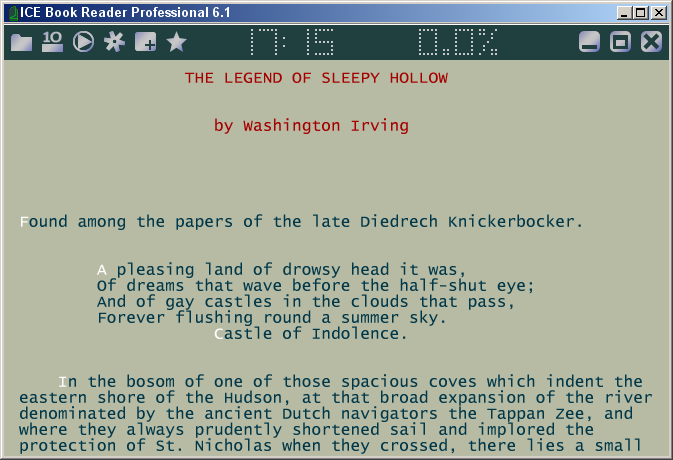
ICE Book Reader Professional is an ultimate e-book reader. It is possible to use it as a teleprompter. It is a first alternative e-book reader with native support .LIT files, which do not use any Microsoft Reader components. It is made to make reading electronic books convenient. It can can read TXT, RTF, HTML, MS Word documents, PALM books (.PDB and .PRC) and Microsoft Reader Books (.LIT). Ultra smooth scrolling with the exact control of scroll speed, automatically adjusted scroll speed, full text antialising, super scrolling with subpixel precision, wave scrolling, complete support Unicode and all known codepages, automatic text reformating, automatic text coloring, the system of an artificial intellect recognizing a format of the text, the programs built - in a code archivers ZIP, RAR, ARJ, LZH, HA is only small list of opportunities.
Latest Reviews

MaxBrowns reviewed v9.6.5 on Apr 15, 2022
really like this app!

smaragdus reviewed v9.2.0 on Nov 21, 2013
The program is not bad but the price is atrocious.

CyberDoc999 reviewed v9.0.8 on Jan 28, 2012
I would pay $5
96 $$$$$ really

anomoly reviewed v8.5 on Jul 4, 2006
I like it bcause it will run from a flash & can import lit files

photonboy reviewed v8.3.1 on May 11, 2006
Interface not completely intuitive. I don't like the text going directly to the edge of the screen (can't seem to change this). Text-to-speech?
In Microsoft's Reader all I have to do is double-click the LIT file and the ebook opens up. With this I have to open the file, then make sure to change the "codepage" if it's not on the right one, then I have to IMPORT the file, then I have to go to the list of imported files and open the file. Come on, I should just have to open a LIT file in one step. I don't want to convert the file and have another copy. Also, it doesn't display any cover page jpg's. It's not that complicated, especially for a program that costs this much.
I like the text interface but I can't justify the cost of this program when I can find free programs that are even better in many respects.

slegg reviewed v7.5b on Mar 23, 2005
Program crashes a way too often. Can't read the ebooks whitch I converted on the same computer with an earlier version of the ICE Book Reader... says: buy a full version. Takes too many computer resources.
And... last but not least - quite similar program - Rudenko Book Reader is freeware.

zulugrid reviewed v5.0 Beta 1 on May 27, 2003
Despite reasonable efforts, I was unable to get a .lit book to open with a white background. I don't understand why this program doesn't have a white background anyway.. I mean, books are white, paper is white, why shouldn't an ebook be white? Support for ebooks is extremely crude. Interface is crude and non-intutive. This program has a LONG way to go before I'd consider using it on a regular basis.

kmansuri reviewed v1.0 Beta 4 on Apr 6, 2002
This program does do what it says, but I have found it quite useless. The scrolling feature is not as smooth as I'd like it to be, and it also does not handle spacing in many documents well at all. Often documents will come out displayed without carridge returns, perhaps there is an option to fix this, but I could not find it. Personally, I feel that with the invention of the mouse scroll wheel, we don't need smooth scrolling book readers. But of course, until they actually fix this program's problems, the ratings will unfortunately stay in the 1-2 star range

smaragdus reviewed v9.2.0 on Nov 21, 2013
The program is not bad but the price is atrocious.
CyberDoc999 reviewed v9.0.8 on Jan 28, 2012
I would pay $5
96 $$$$$ really
anomoly reviewed v8.5 on Jul 4, 2006
I like it bcause it will run from a flash & can import lit files
photonboy reviewed v8.3.1 on May 11, 2006
Interface not completely intuitive. I don't like the text going directly to the edge of the screen (can't seem to change this). Text-to-speech?
In Microsoft's Reader all I have to do is double-click the LIT file and the ebook opens up. With this I have to open the file, then make sure to change the "codepage" if it's not on the right one, then I have to IMPORT the file, then I have to go to the list of imported files and open the file. Come on, I should just have to open a LIT file in one step. I don't want to convert the file and have another copy. Also, it doesn't display any cover page jpg's. It's not that complicated, especially for a program that costs this much.
I like the text interface but I can't justify the cost of this program when I can find free programs that are even better in many respects.
slegg reviewed v7.5b on Mar 23, 2005
Program crashes a way too often. Can't read the ebooks whitch I converted on the same computer with an earlier version of the ICE Book Reader... says: buy a full version. Takes too many computer resources.
And... last but not least - quite similar program - Rudenko Book Reader is freeware.
zulugrid reviewed v5.0 Beta 1 on May 27, 2003
Despite reasonable efforts, I was unable to get a .lit book to open with a white background. I don't understand why this program doesn't have a white background anyway.. I mean, books are white, paper is white, why shouldn't an ebook be white? Support for ebooks is extremely crude. Interface is crude and non-intutive. This program has a LONG way to go before I'd consider using it on a regular basis.
kmansuri reviewed v1.0 Beta 4 on Apr 6, 2002
This program does do what it says, but I have found it quite useless. The scrolling feature is not as smooth as I'd like it to be, and it also does not handle spacing in many documents well at all. Often documents will come out displayed without carridge returns, perhaps there is an option to fix this, but I could not find it. Personally, I feel that with the invention of the mouse scroll wheel, we don't need smooth scrolling book readers. But of course, until they actually fix this program's problems, the ratings will unfortunately stay in the 1-2 star range