
File Details |
|
| File Size | 2.9 MB |
|---|---|
| License | Freeware |
| Operating System | Windows (All) |
| Date Added | March 9, 2023 |
| Total Downloads | 25,637 |
| Publisher | KC Softwares |
| Homepage | IDPhotoStudio |
Publisher's Description
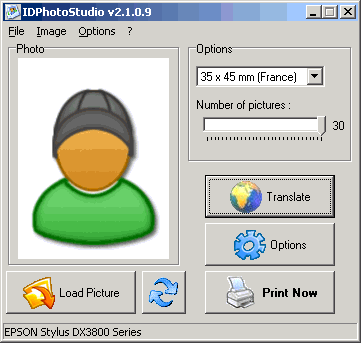
IDPhotoStudio is a user-friendly ID Photo duplicator and printer.
This download is for the Lite installer. It does not contain any sponsor.
Latest Reviews

agenslot reviewed v2.16.3.73 on Dec 27, 2021
That's enough for all this information. It has been very helpful in helping me in solving problems.

nvic reviewed v2.13.4.40 on Apr 11, 2015
For those looking for a clean version of this program, the developer does offer the program without adware here: http://www.kcsoftwares.com/files/sumo_lite.exe
Very simple, does what's advertised. the -1 is because of the adware.

Music4Ever reviewed v2.8.0.28 on Jun 20, 2012
'ReleventKnowledge is anything but benign & classified as Spy-ware by some company's.
Judge for yourself:
http://www.spywareremove...erelevantknowledge.html
http://www.ghacks.net/20...bout-relevant-knowledge/
http://gsa.ca.com/pest/pest.aspx?ID=453097949
I wouldn't have 'RelevantKnowledge' on any PC I use.

zeeshan1153 reviewed v2.8.0.28 on Jun 1, 2012
RelevantKnowledge is a research software installed with the user's permission. RelevantKnowledge is part of an online market research community with over 2 million members worldwide. By participating in periodic surveys, users can receive free select software sponsored by RelevantKnowledge. If a user decides to uninstall the program for any reason, they can do so through control panel. We provide instruction for uninstalling RelevantKnoweldge in the FAQ section of our website: http://www.relevantknowledge.com/faq.aspx. If you have any questions, feel free to contact us at https://www.relevantknowledge.com/supportform.aspx Thank you, Relevant Knowledge Support Team

Jtaylor83 reviewed v2.7.2 on Dec 22, 2009
Even if it has the option to opt out Relevant Knowledge, this product is adware, not freeware.
This software can also be used to counterfeit photo IDs.
As the Judge from the Zelda CD-I games would say
"This is illegal you know."

anomoly reviewed v2.7.1.21 on May 29, 2009
Installer has option to add a "relevant knowledge" sponsor-default at no.
After installing it, 2 'rfkverify,exe' files were running from temp location and this is b4 I ever ran it. They belong to TMRG, Inc, a marketing research corp. I killed them & the ap never asked for internet access & niether does it have an update option. no big deal

betasun reviewed v2.7.0.20 on May 11, 2009
NOD 32 alerts of adware in exe. file .probably false ?
betasun reviewed v2.0.0.8 Beta on Jun 28, 2006
this is a program for printing ID size personal photos(3*4) up to 30 or less in a page .it does it as supposed .

spiked reviewed v1.4.0.4 on Dec 20, 2005
If you're thinking that this program is for copying or creating fake ID cards, think again. It's really just a tool for printing a graphic image multiple times on a sheet of paper. What you might call "wallet sized" is being called "ID" photos here. I suppose you could use this progam as a tool in the process of making ID cards but the same could be said of ACDSee or Microsoft Word.
This little program does what it's designed to do, but the name will probably mislead some people. Also, most people already have something which can perform this function. Even if you don't have an actual app which does, most photo printers have print drivers which include "N-up" options in Print Setup or Printing Preferences.

agenslot reviewed v2.16.3.73 on Dec 27, 2021
Pros: Very helpful for me who is looking for this information.
Cons: It may be incomplete in some information.
Bottom Line: That's enough for all this information. It has been very helpful in helping me in solving problems.
nvic reviewed v2.13.4.40 on Apr 11, 2015
For those looking for a clean version of this program, the developer does offer the program without adware here: http://www.kcsoftwares.com/files/sumo_lite.exe
Very simple, does what's advertised. the -1 is because of the adware.
Music4Ever reviewed v2.8.0.28 on Jun 20, 2012
'ReleventKnowledge is anything but benign & classified as Spy-ware by some company's.
Judge for yourself:
http://www.spywareremove...erelevantknowledge.html
http://www.ghacks.net/20...bout-relevant-knowledge/
http://gsa.ca.com/pest/pest.aspx?ID=453097949
I wouldn't have 'RelevantKnowledge' on any PC I use.
zeeshan1153 reviewed v2.8.0.28 on Jun 1, 2012
RelevantKnowledge is a research software installed with the user's permission. RelevantKnowledge is part of an online market research community with over 2 million members worldwide. By participating in periodic surveys, users can receive free select software sponsored by RelevantKnowledge. If a user decides to uninstall the program for any reason, they can do so through control panel. We provide instruction for uninstalling RelevantKnoweldge in the FAQ section of our website: http://www.relevantknowledge.com/faq.aspx. If you have any questions, feel free to contact us at https://www.relevantknowledge.com/supportform.aspx Thank you, Relevant Knowledge Support Team
Jtaylor83 reviewed v2.7.2 on Dec 22, 2009
Even if it has the option to opt out Relevant Knowledge, this product is adware, not freeware.
This software can also be used to counterfeit photo IDs.
As the Judge from the Zelda CD-I games would say
"This is illegal you know."
anomoly reviewed v2.7.1.21 on May 29, 2009
Installer has option to add a "relevant knowledge" sponsor-default at no.
After installing it, 2 'rfkverify,exe' files were running from temp location and this is b4 I ever ran it. They belong to TMRG, Inc, a marketing research corp. I killed them & the ap never asked for internet access & niether does it have an update option. no big deal
betasun reviewed v2.7.0.20 on May 11, 2009
NOD 32 alerts of adware in exe. file .probably false ?
betasun reviewed v2.0.0.8 Beta on Jun 28, 2006
this is a program for printing ID size personal photos(3*4) up to 30 or less in a page .it does it as supposed .
spiked reviewed v1.4.0.4 on Dec 20, 2005
If you're thinking that this program is for copying or creating fake ID cards, think again. It's really just a tool for printing a graphic image multiple times on a sheet of paper. What you might call "wallet sized" is being called "ID" photos here. I suppose you could use this progam as a tool in the process of making ID cards but the same could be said of ACDSee or Microsoft Word.
This little program does what it's designed to do, but the name will probably mislead some people. Also, most people already have something which can perform this function. Even if you don't have an actual app which does, most photo printers have print drivers which include "N-up" options in Print Setup or Printing Preferences.