File Details |
|
| File Size | 20.7 MB |
|---|---|
| License | Freeware |
| Operating System | Windows 7/8/10/2000/Vista/XP |
| Date Added | December 16, 2020 |
| Total Downloads | 3,092 |
| Publisher | CSoftLab |
| Homepage | Interactive Calendar |
Publisher's Description
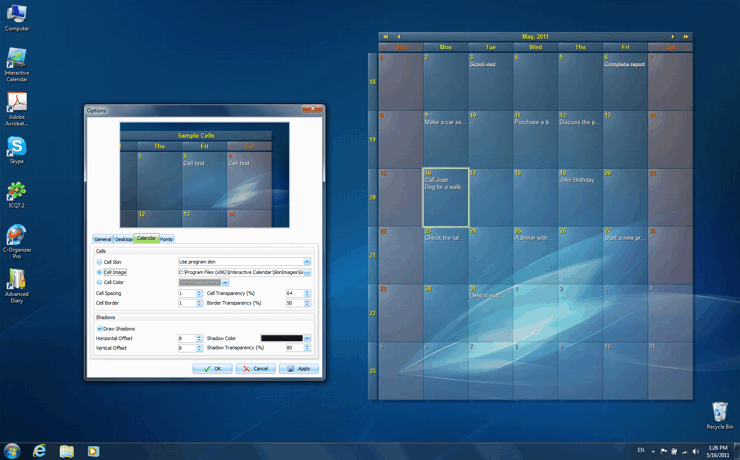
Interactive Calendar is a completely free, feature-packed and extremely customizable desktop calendar that is a pleasure to use and look at. Unlike the majority of its direct competitors, this calendar software renders the calendar grid right on the wallpaper, considerably increasing the speed of refreshes/updates and seamlessly integrating with your Windows theme. Another advantage of Interactive Calendar is the degree of visual customization it supports. You can control nearly every aspect of the calendar's appearance: cell spacing, font size, position on the screen, color, opacity and so on. Which is more, you can use a dozen skins that come with the program or load your own images to serve as background for the calendar. The program also supports three interface variations, which allows it to blend perfectly with any Windows theme.
The calendar has several views and allows you easily create and manage tasks, specifying their duration, order, start and end days, description and other parameters. Task descriptions support RTF formatting, allowing you to create properly formatted and well-structured Word-like documents, if need be. Interactive Calendar supports task import (from CSV and the program's own format) and export(to CSV, XML and the program's own DB format).
Latest Reviews

anomoly reviewed v1.1 Beta on Jan 30, 2012
Toss it on to a digital picture display, ts no doubt, and maybe, but for a calendar it already seems a bit bloated. There's no way I want a calendar overlayed on my screen. Currently I use Borg, but rainlendar would be my second choice bar none.

AllanS reviewed v1.0 on May 25, 2011
Tried this program and like it very much. Nice addition to my desktop.

kbsoftware reviewed v1.0 on May 24, 2011
I get over a dozen access violation errors, all different address' to InteravtiveCalender.exe.
So I uninstalled it and took it out the back and put it out of it's misery :)
Even so I did get to play with it and it does look very promising so will be looking to future releases when this problem has been fixed.

Aegis69 reviewed v1.0 on May 24, 2011
No Ical support?

casp reviewed v1.0 Beta on May 18, 2011
Great program! I think it is the best freeware desktop calendar out there.

DudeBoyz reviewed v1.0 Beta on May 17, 2011
Cool concept - liking a lot of if early on. Configurable, useful, seems low on resources. I'll keep messing with it and see if any bugs show up. Until then, good effort so far folks!

anomoly reviewed v1.1 Beta on Jan 30, 2012
Toss it on to a digital picture display, ts no doubt, and maybe, but for a calendar it already seems a bit bloated. There's no way I want a calendar overlayed on my screen. Currently I use Borg, but rainlendar would be my second choice bar none.
AllanS reviewed v1.0 on May 25, 2011
Tried this program and like it very much. Nice addition to my desktop.
kbsoftware reviewed v1.0 on May 24, 2011
I get over a dozen access violation errors, all different address' to InteravtiveCalender.exe.
So I uninstalled it and took it out the back and put it out of it's misery :)
Even so I did get to play with it and it does look very promising so will be looking to future releases when this problem has been fixed.
Aegis69 reviewed v1.0 on May 24, 2011
No Ical support?
casp reviewed v1.0 Beta on May 18, 2011
Great program! I think it is the best freeware desktop calendar out there.
DudeBoyz reviewed v1.0 Beta on May 17, 2011
Cool concept - liking a lot of if early on. Configurable, useful, seems low on resources. I'll keep messing with it and see if any bugs show up. Until then, good effort so far folks!