
File Details |
|
| File Size | 40.3 MB |
|---|---|
| License | Shareware, $59.98 |
| Operating System | Windows (All) |
| Date Added | February 14, 2024 |
| Total Downloads | 80,909 |
| Publisher | JRiver, Inc. |
| Homepage | JRiver Media Center |
Publisher's Description
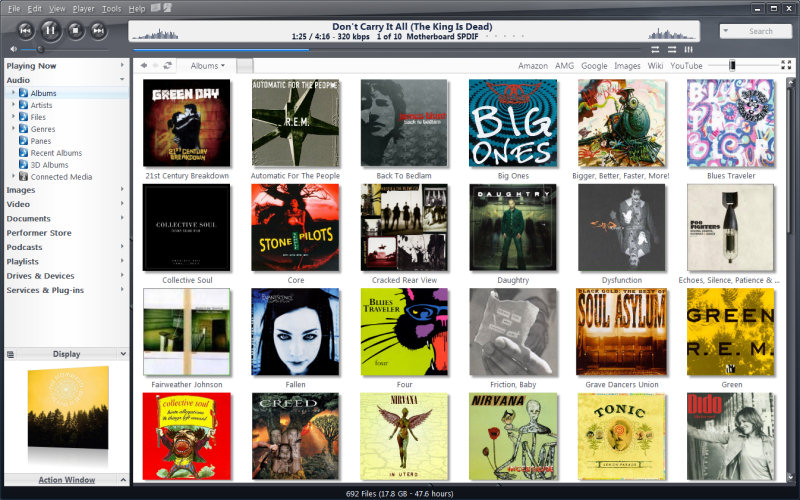
JRiver Media Center is a high quality media solution for large libraries. Organize, play, tag all types of media files. Rip, Burn, serve to Xbox, PS3, UPnP, DLNA, TiVo. Audiophile quality, DSD, madVR, Ten foot mode, remote control, HD TV recording in real time. Customizable media views. 3D views. Supports iPods, cameras, 90+ media file formats. Integration with Facebook, Flickr, Audible, Amazon MP3, Google, Youtube, Wikipedia, Hulu, Last.FM, Twitter. Cover art lookup.
Three skinned interfaces. A Visualization Studio feature lets you create your own visualizations, and a DSP Studio allows personalization of the listening environment. Media Scheduler for sleep, alarm and recording functions, Media Editor for editing sound files. Smartlists based on rules. Drag-and-drop for easy Playlist creation. Unique media browsing views for faster, easier and more powerful file search and play. Tagging studio. Integrated CD labeler. Support for CD and DVD database and support for popular handheld players, Sony PSP and PlaysForSure devices.
Latest Reviews

outofspace reviewed v25.0.37 on May 15, 2019

qazimono reviewed v20.0.80 on Mar 5, 2015
Using it for few years.
Never had issues with online support.
Stable versions are just stable.

CyberDoc999 reviewed v20.0.54 on Jan 11, 2015
Music Bee is far better than this

some guy reviewed v20.0.51 on Jan 6, 2015
use to be good

mscottring reviewed v19.0.127 on Apr 12, 2014
Don't buy it, just don't. At the very least read through their forums first, because THAT is their support (yes, you pay for it but they have no support other than the forum). And if you say anything negative about the product on the forum they will threaten to remove even THAT support (the CEO emailed me and threatened to do just that). The product is buggy, and has known issues with regard to compatibility with virus protection (read the forums, they talk about it all over the place).
CyberDoc999 reviewed v19.0.125 on Apr 4, 2014
Buggy quits playing for no reason..... Windows Media Player never does this
some guy reviewed v19.0.050 on Oct 3, 2013
one of the only programs that work with Hauppauge PVR 1600 tv tuner card. The music end really no better then a lot of free ones like Music Bee my choice

Gilmorcg reviewed v19.0.032 on Aug 27, 2013
It is best for use

angrypat reviewed v17.0.68 on Oct 11, 2012
Jriver is not bloated, it opens quickly and is very responsive, and has very few peers in functionality. You would have to be deaf not to immediately hear sound quality improvement over even media monkey and foobar, and especially the slow and clunky itunes. Sound quality should be the main concern, and jriver has no equal in this area. It burns, rips, sync, and plays almost all formats including FLAC, (mp3 is garbage) handles video, photos, even pdf, (for pdf, Nitro is better). And no, you do not need high end audiophile quality equipment to hear the difference, but appreciating the difference is another matter. If you experience lag, it is a hardware or conflict issue, most likely not enough ram. Many people expect every new program should run on 8-10 year old hardware without any lag which is not realistic. Also, although integrated motherboard sound has improved, there is no comparison to a good sound card (ht omega or auzentech or asus).

CyberHobo reviewed v17.0.68 on Jul 29, 2012
Bloated and buggy. Does everything and nothing. Ethics of the company also come into question.

outofspace reviewed v25.0.37 on May 15, 2019
Pros: Universal and working!
Cons: Need to go deeper with settings if you want to explore it.
Bottom Line:
qazimono reviewed v20.0.80 on Mar 5, 2015
Using it for few years.
Never had issues with online support.
Stable versions are just stable.
CyberDoc999 reviewed v20.0.54 on Jan 11, 2015
Music Bee is far better than this
some guy reviewed v20.0.51 on Jan 6, 2015
use to be good
mscottring reviewed v19.0.127 on Apr 12, 2014
Don't buy it, just don't. At the very least read through their forums first, because THAT is their support (yes, you pay for it but they have no support other than the forum). And if you say anything negative about the product on the forum they will threaten to remove even THAT support (the CEO emailed me and threatened to do just that). The product is buggy, and has known issues with regard to compatibility with virus protection (read the forums, they talk about it all over the place).
CyberDoc999 reviewed v19.0.125 on Apr 4, 2014
Buggy quits playing for no reason..... Windows Media Player never does this
some guy reviewed v19.0.050 on Oct 3, 2013
one of the only programs that work with Hauppauge PVR 1600 tv tuner card. The music end really no better then a lot of free ones like Music Bee my choice
Gilmorcg reviewed v19.0.032 on Aug 27, 2013
It is best for use
angrypat reviewed v17.0.68 on Oct 11, 2012
Jriver is not bloated, it opens quickly and is very responsive, and has very few peers in functionality. You would have to be deaf not to immediately hear sound quality improvement over even media monkey and foobar, and especially the slow and clunky itunes. Sound quality should be the main concern, and jriver has no equal in this area. It burns, rips, sync, and plays almost all formats including FLAC, (mp3 is garbage) handles video, photos, even pdf, (for pdf, Nitro is better). And no, you do not need high end audiophile quality equipment to hear the difference, but appreciating the difference is another matter. If you experience lag, it is a hardware or conflict issue, most likely not enough ram. Many people expect every new program should run on 8-10 year old hardware without any lag which is not realistic. Also, although integrated motherboard sound has improved, there is no comparison to a good sound card (ht omega or auzentech or asus).
CyberHobo reviewed v17.0.68 on Jul 29, 2012
Bloated and buggy. Does everything and nothing. Ethics of the company also come into question.

keefrob reviewed v16.0.181 on Jan 19, 2012
Do not buy this software. You will be paying to be a beta-tester. Do not attempt to nick it either -- it phones home. Jim Hillegrass, the CEO of JRiver is one of the heaviest-handed, most insane control freaks I have ever seen in my life and you would do best to never go near him.

intex12345 reviewed v16.0.176 on Sep 27, 2011
Tested so many media players like VLC player, KM Player, Power DVD, GOM Player, Windows Media Player.... but finally I found J.River Media Center to be Best. J River has so many features and customizations that renders best audio and video quality simultaneously.
Good work needs to be acknowledged....!!!

testmenot reviewed v16.0.164 on Sep 18, 2011
I must concur wit the review stating why pay $40 to replace freeware bloated overly complex unituitive Windows Media Player with an even more complex bloated unintuitive lookalike?
But wait! You can also enjoy your posts on the support forum being habitually greeted with snide insults from the official company posters including the CEO, who instantly deletes posts which he deems derogatory or heaven forbid mention a competing product.
The company claims audiophile sound quality beyond the competitors, yet few ppl even have an audiophile digital playback setup to even evaluate let alone validate the claim.