File Details |
|
| File Size | 3.5 MB |
|---|---|
| License | Shareware, $19.95 |
| Operating System | Windows 7/8/10/Vista/XP |
| Date Added | May 31, 2017 |
| Total Downloads | 2,028 |
| Publisher | Carolina Road Software |
| Homepage | Jarte |
Publisher's Description
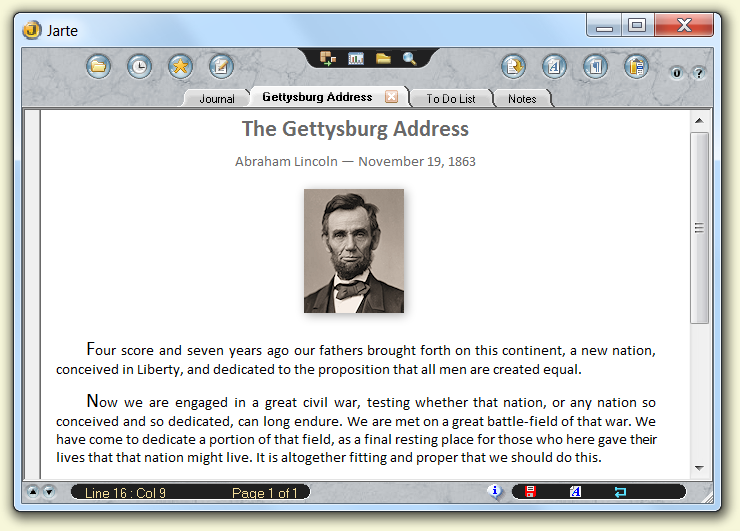
Jarte is a compact word processor and WordPad replacement with a unique, easy-to-use interface. Features include the ability to edit Microsoft Word documents, OLE support (the ability to insert pictures and sounds), tabbed document access, a quality spelling checker, page breaks, print previewing, visual header and footer designer, clip history, a reference bar, multilevel undo and redo functionality, and single-click bookmarking. A detailed help file is included.
Latest Reviews

Morningdove reviewed v3.3 on Jan 15, 2009
One of the really neat things about Jarte is you can make the GUI look anyway you want it. Try "View/Minimal Layout" and "View/Show Tabs". While you're at it, try the other checkboxes in the "View" menu. You might also test the "Options/Use alternate menu" checkbox. The print feature is not disabled, but it is easy to press the "Ok" button instead of the "Print" button.

bellgamin reviewed v3.2 on Mar 24, 2008
This is a free full-fledged WordProcessor in a compact package. It has been around a long time; assiduously maintained; stable as a rock; friendly & efficient to use. It prints just fine, too -- not at all *cripple-ware*.

patmcpgh reviewed v3.1 on Mar 9, 2008
Actually this is perfect for a bunch of needs. Do not confuse this with NotePad replacements. Jarte is a full Word Processor. Having the Find window shown all the time is great.
Yes, the GUI takes a bit of time to get accustomed to, but I was able to do it. So you can. And 'Yes', I would like to see a more conventional menu bar, toolbar, and icons. But all in all, this is a great product!

Jerrymiah reviewed v3.1 on Feb 20, 2008
Why would the 'Print'option be disabled if this is really freeware.

Yours Truly reviewed v3.0 Beta 3 on Sep 26, 2007
The screen shot which BetaNews shows is not of Jarte 3.0. Check this link to see one of the three GUI views available in Jarte 3:
http://www.jarte.com/screen_shot_30_cmpt.html

kindbud1 reviewed v3.0 Beta 3 on Sep 25, 2007
sorry, but that GUI is so ugly.

Dsfargeg reviewed v3.0 Beta 2 on Jul 30, 2007
Nice feature set, but I seriously hope they change the *hideous* Gui and fix the many remaining bugs until final release.
Only then, it would be a good Wordpad replacement.

DaComboMan reviewed v3.0 Beta 2 on Jul 30, 2007
@KingSky - GUI may need a bit of work but as freebie this is just perfect for basic needs.

Giacomo® reviewed v3.0 Beta 1 on Jan 18, 2007
This 3.0 beta 1 is, apparently, much superior than 2.6, but, at least on my system, is totally unusable: every button or menu item I touch a series of error messages come up and I can't use the application. I am trying to see with the author if these big bugs can be fixed, but for now no success...

jerry4dos reviewed v2.6 on Jun 1, 2006
Hear Hear! It IS my word processor.

Morningdove reviewed v3.3 on Jan 15, 2009
One of the really neat things about Jarte is you can make the GUI look anyway you want it. Try "View/Minimal Layout" and "View/Show Tabs". While you're at it, try the other checkboxes in the "View" menu. You might also test the "Options/Use alternate menu" checkbox. The print feature is not disabled, but it is easy to press the "Ok" button instead of the "Print" button.
bellgamin reviewed v3.2 on Mar 24, 2008
This is a free full-fledged WordProcessor in a compact package. It has been around a long time; assiduously maintained; stable as a rock; friendly & efficient to use. It prints just fine, too -- not at all *cripple-ware*.
patmcpgh reviewed v3.1 on Mar 9, 2008
Actually this is perfect for a bunch of needs. Do not confuse this with NotePad replacements. Jarte is a full Word Processor. Having the Find window shown all the time is great.
Yes, the GUI takes a bit of time to get accustomed to, but I was able to do it. So you can. And 'Yes', I would like to see a more conventional menu bar, toolbar, and icons. But all in all, this is a great product!
Jerrymiah reviewed v3.1 on Feb 20, 2008
Why would the 'Print'option be disabled if this is really freeware.
Yours Truly reviewed v3.0 Beta 3 on Sep 26, 2007
The screen shot which BetaNews shows is not of Jarte 3.0. Check this link to see one of the three GUI views available in Jarte 3:
http://www.jarte.com/screen_shot_30_cmpt.html
kindbud1 reviewed v3.0 Beta 3 on Sep 25, 2007
sorry, but that GUI is so ugly.
Dsfargeg reviewed v3.0 Beta 2 on Jul 30, 2007
Nice feature set, but I seriously hope they change the *hideous* Gui and fix the many remaining bugs until final release.
Only then, it would be a good Wordpad replacement.
DaComboMan reviewed v3.0 Beta 2 on Jul 30, 2007
@KingSky - GUI may need a bit of work but as freebie this is just perfect for basic needs.
Giacomo® reviewed v3.0 Beta 1 on Jan 18, 2007
This 3.0 beta 1 is, apparently, much superior than 2.6, but, at least on my system, is totally unusable: every button or menu item I touch a series of error messages come up and I can't use the application. I am trying to see with the author if these big bugs can be fixed, but for now no success...
jerry4dos reviewed v2.6 on Jun 1, 2006
Hear Hear! It IS my word processor.

fair_is_fair reviewed v2.6 on May 31, 2006
I've used Jarte for years. Excellent wordpad replacement.