
File Details |
|
| File Size | 2.9 MB |
|---|---|
| License | Open Source |
| Operating System | Windows (All) |
| Date Added | February 1, 2024 |
| Total Downloads | 34,428 |
| Publisher | Dominik Reichl |
| Homepage | KeePass Password Safe |
Publisher's Description
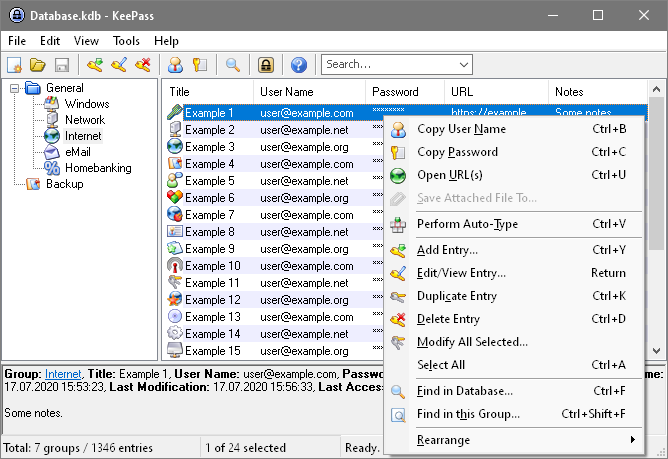
KeePass Password Safe is a free/open-source password safe or manager which helps you to manage your passwords in a secure way. You can put all your passwords in one database, which is locked with one master key or a key-disk. So you only have to remember one single master password or insert the key-disk to unlock the whole database. The databases are encrypted using the best and most secure encryption algorithms currently known (AES and Twofish).
Latest Reviews

smaragdus reviewed v1.27 on Apr 7, 2014
@asaenz
Any database can get corrupted, so make back-up copies of the KDB file regularly and you are safe. KeePass is perfect for me since I don't trust the cloud services.

mikebray reviewed v1.26 on Mar 12, 2014
pretty good

asaenz reviewed v1.26 on Sep 20, 2013
Had to stop using it although I liked it ... database sometimes gets corrupted and then I can't access it with password ... suppose that's a problem with these types of applications. Guess I'll have to depend on the cloud i.e. LastPass
edit: I might make a copy in case it gets corrupted again. I found a copy and was able to get into an older database but, of course, lost quite a few entries.

egg83 reviewed v1.24 on Sep 4, 2012
Very good software for passwords! Can generate complex passwords for you, and it has great security features built within! A must have, period!

Floodland reviewed v1.19 on Apr 5, 2011
Best of its class.
Avoid the version 2 like the plague. Slower and without extra functionality.
In fact, .NET should be forbidden. Some exceptions (paint.net one of them), products compiled in .NET are pathetic.
This version is the one to choose.

Plumber reviewed v1.18 on Sep 2, 2010
Great. I despise version 2 for its .NET slowness and general crapitude, but this version is brilliance.

Nicholos87 reviewed v1.17 on Apr 9, 2010
What about password i use LoginTrap.It’s prog can capture every login events by using iSight.It really good prog.

anonymouscowturd reviewed v1.17 on Dec 7, 2009
Still brilliant. Better than version 2 as this one is portable whereas version 2 requires the .NET framework. This together with Trucrypt and Antivir is all that's really required for most of my security needs.

Earwicker reviewed v1.16 on Jul 16, 2009
A top piece of software, deeply impressive. Easy to use, very secure, a comprehensive range of security features, portable too...
So yep, a real winner. Means you can use very strong passwords (which the app can generate for you ) without having to remember them all.

Skyfrog reviewed v1.15 on Mar 9, 2009
Works ok, though I prefer fsekrit. Mostly I'm just surprised that the author didn't realize that "Keep Ass" might not be the best name to use.

smaragdus reviewed v1.27 on Apr 7, 2014
@asaenz
Any database can get corrupted, so make back-up copies of the KDB file regularly and you are safe. KeePass is perfect for me since I don't trust the cloud services.
mikebray reviewed v1.26 on Mar 12, 2014
pretty good
asaenz reviewed v1.26 on Sep 20, 2013
Had to stop using it although I liked it ... database sometimes gets corrupted and then I can't access it with password ... suppose that's a problem with these types of applications. Guess I'll have to depend on the cloud i.e. LastPass
edit: I might make a copy in case it gets corrupted again. I found a copy and was able to get into an older database but, of course, lost quite a few entries.
egg83 reviewed v1.24 on Sep 4, 2012
Very good software for passwords! Can generate complex passwords for you, and it has great security features built within! A must have, period!
Floodland reviewed v1.19 on Apr 5, 2011
Best of its class.
Avoid the version 2 like the plague. Slower and without extra functionality.
In fact, .NET should be forbidden. Some exceptions (paint.net one of them), products compiled in .NET are pathetic.
This version is the one to choose.
Plumber reviewed v1.18 on Sep 2, 2010
Great. I despise version 2 for its .NET slowness and general crapitude, but this version is brilliance.
Nicholos87 reviewed v1.17 on Apr 9, 2010
What about password i use LoginTrap.It’s prog can capture every login events by using iSight.It really good prog.
anonymouscowturd reviewed v1.17 on Dec 7, 2009
Still brilliant. Better than version 2 as this one is portable whereas version 2 requires the .NET framework. This together with Trucrypt and Antivir is all that's really required for most of my security needs.
Earwicker reviewed v1.16 on Jul 16, 2009
A top piece of software, deeply impressive. Easy to use, very secure, a comprehensive range of security features, portable too...
So yep, a real winner. Means you can use very strong passwords (which the app can generate for you ) without having to remember them all.
Skyfrog reviewed v1.15 on Mar 9, 2009
Works ok, though I prefer fsekrit. Mostly I'm just surprised that the author didn't realize that "Keep Ass" might not be the best name to use.

Paul Skinner reviewed v1.15 on Feb 13, 2009
Superb software. Really very, very good.

belthurgp reviewed v1.15 on Feb 13, 2009
@nika27
Couple of reasons why the db size grows.
1. You store attachments with entries.
2. You must not have cleared the backup folder.
1. Please buy a USB drive to store your backups. Storing on GOOGLE is not a safe place. Your privacy is not guaranteed.
2. Empty the backup category in Keepass.
egg83 reviewed v1.15 on Feb 13, 2009
Fantastic program! Very useful for storing of passwords and other important info. A must have software!