File Details |
|
| File Size | 4.0 MB |
|---|---|
| License | Shareware, $19.00 |
| Operating System | Windows 2000/9x/Server 2003/XP |
| Date Added | July 4, 2012 |
| Total Downloads | 3,163 |
| Publisher | Martin Aignesberger |
| Homepage | Local Website Archive |
Publisher's Description
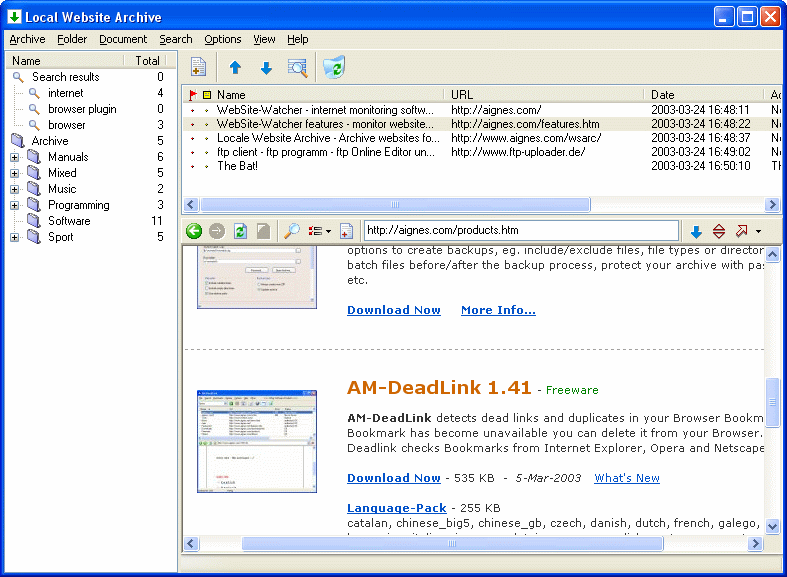
Local Website Archive offers a fast and easy way to store websites from your browser permanently for future reference. Information on the web often vanishes quickly, sometimes before you even have a chance to make use of it.
Latest Reviews

iphigenie reviewed v2.0.1 Beta 1 on Mar 23, 2007
This is one of my "staple" software.
It could be improved by making notes and updates a little easier, but it is wonderful at taking copies of pages and emails and storing them in a program independent way.
Works with pretty much all browsers i have thrown at it, including kmeleon and opera

Zoroaster reviewed v1.23 Beta 2 on Jun 8, 2005
Excellent. But for those using Avant Browser in Unicode, you will have to proceed to this modification in the AvantBrowser.ini file :
In \Local Website Archive\app\AvantBrowser.ini :
[General] / AppWindowClass =
Replace TfrmAvantBrowser by TfrmAvantBrowser.UnicodeClass
Otherwise, it is practically perfect. The export function is great. Save pages, export them as a .exe file, email it as an attachment, and voila!

jaybergen reviewed v1.23 Beta 1 on Apr 21, 2005
This is an excellent program for anyone who does a lot of web research and/or offline reading of web pages. Higher-priced programs like Net Snippets and Onfolio get the press coverage, but Local Website Archive is less expensive, saves pages faster, and is surprisingly powerful. Works with Firefox (and just about any other program), too; read the documentation.

iphigenie reviewed v2.0.1 Beta 1 on Mar 23, 2007
This is one of my "staple" software.
It could be improved by making notes and updates a little easier, but it is wonderful at taking copies of pages and emails and storing them in a program independent way.
Works with pretty much all browsers i have thrown at it, including kmeleon and opera
Zoroaster reviewed v1.23 Beta 2 on Jun 8, 2005
Excellent. But for those using Avant Browser in Unicode, you will have to proceed to this modification in the AvantBrowser.ini file :
In \Local Website Archive\app\AvantBrowser.ini :
[General] / AppWindowClass =
Replace TfrmAvantBrowser by TfrmAvantBrowser.UnicodeClass
Otherwise, it is practically perfect. The export function is great. Save pages, export them as a .exe file, email it as an attachment, and voila!
jaybergen reviewed v1.23 Beta 1 on Apr 21, 2005
This is an excellent program for anyone who does a lot of web research and/or offline reading of web pages. Higher-priced programs like Net Snippets and Onfolio get the press coverage, but Local Website Archive is less expensive, saves pages faster, and is surprisingly powerful. Works with Firefox (and just about any other program), too; read the documentation.