
File Details |
|
| File Size | 6.2 MB |
|---|---|
| License | Freeware |
| Operating System | Windows (All) |
| Date Added | November 27, 2019 |
| Total Downloads | 109,896 |
| Publisher | Ventis Media, Inc. |
| Homepage | MediaMonkey |
Publisher's Description
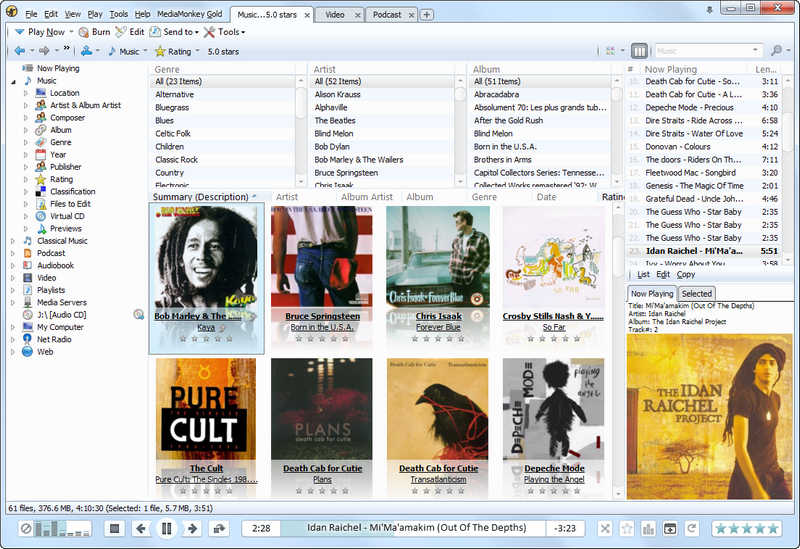
MediaMonkey is an easy-to-use music manager and media jukebox for serious music collectors and iPod users. It catalogs your CDs, OGG, WMA, MPC, FLAC, APE, WAV and MP3 audio files. It looks up missing Album Art and track information via Freedb and the web, and includes an intelligent tag editor and an automated file and directory renamer to organize your music library. It includes a CD ripper, CD Burner, and audio converter for saving music, and manual or automated playlist editors for creating music mixes. Its player automatically adjusts volume levels so that you don't have continually fiddle with the volume control and supports hundreds of Winamp plug-ins and visualizations; or if you prefer, it can use Winamp as the default player. It also includes portable audio device synchronization that allows you to quickly synch tracks and playlists with iPods and other portable audio devices.
Latest Reviews

MikeTechno reviewed v5.0.0.2215 Beta on Nov 29, 2019
Just tried out the new v5.0 Beta today and it is VERY impressive! SO much better and farther ahead than where they were on the v4 software. Really a big step forward here. Well done! Well worth looking into.

Evalu8 reviewed v4.1.8.1751 on Jul 17, 2015
I've used this program for sometime now and it has never been a smooth ride. Pretty well every time there's an update, something somewhere breaks. I've had enough of the bugs now and I'm moving on. The developers are non-responsive and the moderators on their forum have got a bad attitude as well, which doesn't help when so much is constantly in need of fixing. It gets 2 stars for what it does do, but that has barely changed in years. Keep your money in your pocket.

andi gjata reviewed v4.1.0.1690 RC on Jan 29, 2014
My favorite jukebox and song managing application,supports loads of different formats,doesnt bother you with ads even when you have the free edition.Straight forward and a classic UI.Definetly try it out.

aszure reviewed v4.0.7.1507 RC on Nov 6, 2012
I don't actually pay for much software. But this I have. My music collection is rather large, and MM really takes care of it all. Plays, tags, renames, streams, etc...Everything. As far as performance goes, I find that it runs well on my setup. quad core intel 8gb ram, even with many other applications running. It reads UPNP servers easily. Just a great program. A few quirks on the interface I would rather not have, but meh, no biggie.

Doubledoom reviewed v4.0.0.1415 Beta on Aug 13, 2011
The current build is not a beta as it currently says here. It is a developer build. It has a number of known bugs (15 urgent ones according to their website).
Stick with version 3 if you don't like being a tester or need stability. You can run version 4 alongside version 3 if you like to test but want to keep your stable version clean of problems. Rating is of version 3, the current release build.

sweathog reviewed v3.2.4.1304 on Nov 27, 2010
This app is pretty good as a music organizer. But as a player it's too bloated and ugly. I prefer XMPlay, also skinable, but way lighter on its feet and much prettier skins.

trents reviewed v3.2.4.1304 on Nov 25, 2010
Hi,
That is true and you will see that MediaMonkey is an easy-to-use music manager and media jukebox for serious music collectors and iPod users.It is more convenient to used...

ramblinrick reviewed v3.2.2.1299 Beta on Aug 9, 2010
I have used J River Media Center for many years. I happened to read an article about MM and thought I would try it. I haven't been disappointed. The name is misleading, as it only handles music. But, it's free, so I will certainly not complain. There are plenty of skins to choose from, and able to use the dfx plug-in. J River offers so much more, and I will never can that one. I am tempted to upgrade to the PRO version of MM. No lifetime upgrades for me, I got burned by that scam with MusicMatch. If I was looking for something to just handle music, MM would be the one for me.

Lee Wilkerson reviewed v3.2.2.1298 Beta on Jul 31, 2010
I got lower audio levels on the left channel, so I uninstalled it. Still use VideoLan Player.

byronb3247 reviewed v3.2.1.1297 RC on Jun 25, 2010
Still having problems with 1297 itouch still will not sync. i know you guys will get it right. much luv for MM.

MikeTechno reviewed v5.0.0.2215 Beta on Nov 29, 2019
Pros: Excellent auto-tag feature! Works like a charm.
Cons: With there were more default skin options included with the app.
Bottom Line: Just tried out the new v5.0 Beta today and it is VERY impressive! SO much better and farther ahead than where they were on the v4 software. Really a big step forward here. Well done! Well worth looking into.
Evalu8 reviewed v4.1.8.1751 on Jul 17, 2015
I've used this program for sometime now and it has never been a smooth ride. Pretty well every time there's an update, something somewhere breaks. I've had enough of the bugs now and I'm moving on. The developers are non-responsive and the moderators on their forum have got a bad attitude as well, which doesn't help when so much is constantly in need of fixing. It gets 2 stars for what it does do, but that has barely changed in years. Keep your money in your pocket.
andi gjata reviewed v4.1.0.1690 RC on Jan 29, 2014
My favorite jukebox and song managing application,supports loads of different formats,doesnt bother you with ads even when you have the free edition.Straight forward and a classic UI.Definetly try it out.
aszure reviewed v4.0.7.1507 RC on Nov 6, 2012
I don't actually pay for much software. But this I have. My music collection is rather large, and MM really takes care of it all. Plays, tags, renames, streams, etc...Everything. As far as performance goes, I find that it runs well on my setup. quad core intel 8gb ram, even with many other applications running. It reads UPNP servers easily. Just a great program. A few quirks on the interface I would rather not have, but meh, no biggie.
Doubledoom reviewed v4.0.0.1415 Beta on Aug 13, 2011
The current build is not a beta as it currently says here. It is a developer build. It has a number of known bugs (15 urgent ones according to their website).
Stick with version 3 if you don't like being a tester or need stability. You can run version 4 alongside version 3 if you like to test but want to keep your stable version clean of problems. Rating is of version 3, the current release build.
sweathog reviewed v3.2.4.1304 on Nov 27, 2010
This app is pretty good as a music organizer. But as a player it's too bloated and ugly. I prefer XMPlay, also skinable, but way lighter on its feet and much prettier skins.
trents reviewed v3.2.4.1304 on Nov 25, 2010
Hi,
That is true and you will see that MediaMonkey is an easy-to-use music manager and media jukebox for serious music collectors and iPod users.It is more convenient to used...
ramblinrick reviewed v3.2.2.1299 Beta on Aug 9, 2010
I have used J River Media Center for many years. I happened to read an article about MM and thought I would try it. I haven't been disappointed. The name is misleading, as it only handles music. But, it's free, so I will certainly not complain. There are plenty of skins to choose from, and able to use the dfx plug-in. J River offers so much more, and I will never can that one. I am tempted to upgrade to the PRO version of MM. No lifetime upgrades for me, I got burned by that scam with MusicMatch. If I was looking for something to just handle music, MM would be the one for me.
Lee Wilkerson reviewed v3.2.2.1298 Beta on Jul 31, 2010
I got lower audio levels on the left channel, so I uninstalled it. Still use VideoLan Player.
byronb3247 reviewed v3.2.1.1297 RC on Jun 25, 2010
Still having problems with 1297 itouch still will not sync. i know you guys will get it right. much luv for MM.
byronb3247 reviewed v3.2.0.1294 on Jun 24, 2010
MediaMonkey 3.2.0 is not yet compatible with iTunes 9.2 or iOS 4.0.
We are currently testing MediaMonkey 3.2.1 which resolves this incompatibility.
For a fix, and up to date status information, see:
http://www.mediamonkey.c...cle&kbarticleid=139
i gave it a 3 until they fix this. Wish i new this b4 i updated to OS 4

4122 reviewed v3.2.0.1294 on Nov 19, 2009
This is a fine piece of software for anyone looking to replace iTunes and get away from the grip of Apple.
Just be aware that this version I'm reviewing isn't a beta. This is the final release version according to their forums.
And I didn't experience any sound loss with RC3, but I feel sympathy for those who did.
As good as this version is the devs are saying v4.0 is going to be even better.

krgood reviewed v3.2.0.1294 on Nov 19, 2009
Reinstall of lastest Beta seems to have fixed the sound problem. It is now working fine. I deleted the directory, did a clean of the registry, reinstalled and re-registered the pgm and all seems fine.