File Details |
|
| File Size | 37.2 MB |
|---|---|
| License | Freeware |
| Operating System | Windows 7/8/10/Server 2003/Vista/XP |
| Date Added | May 12, 2022 |
| Total Downloads | 232,408 |
| Publisher | Microsoft Corp. |
| Homepage | Microsoft Malicious Software Removal Tool |
Publisher's Description
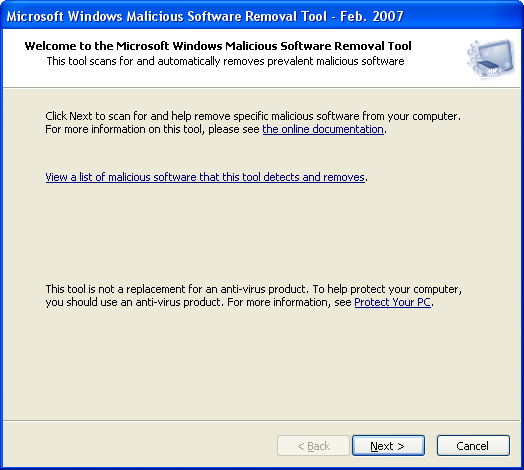
Microsoft Malicious Software Removal Tool checks your computer for infection by specific, prevalent malicious software (including Blaster, Sasser, and Mydoom) and helps to remove the infection if it is found.
This tool will help to remove specific, prevalent malicious software from infected systems. Because computers can appear to function normally when infected, Microsoft advises you to run this tool even if your computer seems to be fine. In addition to using this tool, you should use an up-to-date antivirus product to help protect your computer from other malicious software.
Latest Reviews

some guy reviewed v5.29 on Oct 27, 2015
crapware
some guy reviewed v5.21 on Feb 11, 2015
garbage nagware during Microsoft update ! are you sure ? positive you don't want to install it ? will ask you again and again and again !

nilst2006 reviewed v5.15 on Aug 23, 2014
Nice spyware !
nilst2006 reviewed v5.15 on Aug 23, 2014
Nice spyware !

jamesmeyer reviewed v5.14 on Jul 9, 2014
I don't understand how this tool has 5 stars rating, It isn't posible to rate it with 0 stars? Avoid it
some guy reviewed v5.8 on Jan 14, 2014
avoid this tool it's !@#$% worthless ! google it

BANDIT- reviewed v5.5 on Oct 8, 2013
MRT is a tool which runs "Once a month" During Win Updates. Otherwise, It lays dormant unless it is "called Up". It is a useful tool "ONLY" If your system has ground to a halt. (Do Not) rely on MRT/MSERT alone.
You need
(1) A "good" A/v which is Highly configurable.
(2) A "second opinion" like M/ware-Bytes for Instance.
(3) A Nifty tool to keep at hand, TDSSKiller.
- Launch TDSSK: Allow "updates" & then go into (change parameters). Some Items are ticked by default. Also TICK (Detect TDLFS file system).
You "MAY" get a suprise in some cases..!!
Your A/v should be running at all times. Other tools should be used in conjunction with your A/v, but only on a "call-Up" basis. Too many tools monitoring your system in "Real Time" = False positives, & Crashes.
(BUT THAT IS UP TO THE USER)
Still 3* for being an Alternative (Tool)..... "Keep Safe" .. ^_^
BANDIT- reviewed v5.5 on Oct 8, 2013
MRT is a tool which runs "Once a month" During Win Updates. Otherwise, It lays dormant unless it is "called Up". It is a useful tool "ONLY" If your system has ground to a halt. (Do Not) rely on MRT/MSERT alone.
You need
(1) A "good" A/v which is Highly configurable.
(2) A "second opinion" like M/ware-Bytes for Instance.
(3) A Nifty tool to keep at hand, TDSSKiller.
- Launch TDSSK: Allow "updates" & then go into (change parameters). Some Items are ticked by default. Also TICK (Detect TDLFS file system).
You "MAY" get a suprise in some cases..!!
Your A/v should be running at all times. Other tools should be used in conjunction with your A/v, but only on a "call-Up" basis. Too many tools monitoring your system in "Real Time" = False positives, & Crashes.
(BUT THAT IS UP TO THE USER)
Still 3* for being an Alternative (Tool)..... "Keep Safe" .. ^_^

DKDude reviewed v5.5 on Oct 8, 2013
Simple, free and perfect.
IMO the best.
BTW. I use MSE too, and love it.

Music4Ever reviewed v5.4 on Sep 10, 2013
Probably used to have a good look round your units & report back to HQ in Redmond, if you really need this tool you ought to give your PC(s) away :-)
MS came 17th out of 18 AV's on 'AV Comparative' (March - June 2013) tests.

some guy reviewed v5.29 on Oct 27, 2015
crapware
some guy reviewed v5.21 on Feb 11, 2015
garbage nagware during Microsoft update ! are you sure ? positive you don't want to install it ? will ask you again and again and again !
nilst2006 reviewed v5.15 on Aug 23, 2014
Nice spyware !
nilst2006 reviewed v5.15 on Aug 23, 2014
Nice spyware !
jamesmeyer reviewed v5.14 on Jul 9, 2014
I don't understand how this tool has 5 stars rating, It isn't posible to rate it with 0 stars? Avoid it
some guy reviewed v5.8 on Jan 14, 2014
avoid this tool it's !@#$% worthless ! google it
BANDIT- reviewed v5.5 on Oct 8, 2013
MRT is a tool which runs "Once a month" During Win Updates. Otherwise, It lays dormant unless it is "called Up". It is a useful tool "ONLY" If your system has ground to a halt. (Do Not) rely on MRT/MSERT alone.
You need
(1) A "good" A/v which is Highly configurable.
(2) A "second opinion" like M/ware-Bytes for Instance.
(3) A Nifty tool to keep at hand, TDSSKiller.
- Launch TDSSK: Allow "updates" & then go into (change parameters). Some Items are ticked by default. Also TICK (Detect TDLFS file system).
You "MAY" get a suprise in some cases..!!
Your A/v should be running at all times. Other tools should be used in conjunction with your A/v, but only on a "call-Up" basis. Too many tools monitoring your system in "Real Time" = False positives, & Crashes.
(BUT THAT IS UP TO THE USER)
Still 3* for being an Alternative (Tool)..... "Keep Safe" .. ^_^
BANDIT- reviewed v5.5 on Oct 8, 2013
MRT is a tool which runs "Once a month" During Win Updates. Otherwise, It lays dormant unless it is "called Up". It is a useful tool "ONLY" If your system has ground to a halt. (Do Not) rely on MRT/MSERT alone.
You need
(1) A "good" A/v which is Highly configurable.
(2) A "second opinion" like M/ware-Bytes for Instance.
(3) A Nifty tool to keep at hand, TDSSKiller.
- Launch TDSSK: Allow "updates" & then go into (change parameters). Some Items are ticked by default. Also TICK (Detect TDLFS file system).
You "MAY" get a suprise in some cases..!!
Your A/v should be running at all times. Other tools should be used in conjunction with your A/v, but only on a "call-Up" basis. Too many tools monitoring your system in "Real Time" = False positives, & Crashes.
(BUT THAT IS UP TO THE USER)
Still 3* for being an Alternative (Tool)..... "Keep Safe" .. ^_^
DKDude reviewed v5.5 on Oct 8, 2013
Simple, free and perfect.
IMO the best.
BTW. I use MSE too, and love it.
Music4Ever reviewed v5.4 on Sep 10, 2013
Probably used to have a good look round your units & report back to HQ in Redmond, if you really need this tool you ought to give your PC(s) away :-)
MS came 17th out of 18 AV's on 'AV Comparative' (March - June 2013) tests.
Music4Ever reviewed v5.4 on Sep 10, 2013
@Zootopia3001 - I do know it scans for malware (doh) - My point is if you really need this program to scan for malware you ought not to be able to own PC's ~
MS came 17th out of 18 AV's on 'AV Comparative' (March - June 2013) tests.
BANDIT- reviewed v5.3 on Aug 14, 2013
Download & run MSERT as an alternative to MRT, Or at least give it a try.. lol
Follow this link & Directly below the Big Blue "Download Now" Button.
("Select your Version" link). Click = (32bit - 64bit). Note 10day Expiry.
Usually between 70Mb-90Mb, Portable, Fairly quick scan. Double click & run
from wherever you selected to download. Same UI as if you called up MRT.
Not the best by any imagination, It'll sniff a "Rootkit" among other Bogeys.
h**p://www.microsoft.com/security/scanner/en-gb/default.aspx
The usual 3* for being an Alternative.
BANDIT- reviewed v5.3 on Aug 14, 2013
Download & run MSERT as an alternative to MRT, Or at least give it a try.. lol
Follow this link & Directly below the Big Blue "Download Now" Button.
("Select your Version" link). Click = (32bit - 64bit). Note 10day Expiry.
Usually between 70Mb-90Mb, Portable, Fairly quick scan. Double click & run
from wherever you selected to download. Same UI as if you called up MRT.
Not the best by any imagination, It'll sniff a "Rootkit" among other Bogeys.
h**p://www.microsoft.com/security/scanner/en-gb/default.aspx
The usual 3* for being an Alternative.