File Details |
|
| File Size | 4.0 MB |
|---|---|
| License | Freeware |
| Operating System | Windows (All) |
| Date Added | May 26, 2016 |
| Total Downloads | 11,634 |
| Publisher | FSPro Labs |
| Homepage | My Lockbox |
Publisher's Description
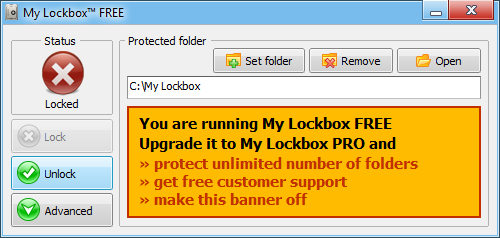
My Lockbox is a security software enabling you to password protect folders on your computer. The protected folder is hidden and locked from any user and application of your system and also from the net. To access the protected folder you have to provide a valid password. The program is extremely easy to use. You can protect the folder and set the password during the setup procedure. After the setup is finished, your folder will be hidden and locked until you enter the valid password. It allows you to easily change software parameters: password, location of the protected folders, hotkeys, trusted processes. In addition, a skinned user interface lets you choose from different skins to select the most comfortable look and feel of the software.
Latest Reviews

Aegis69 reviewed v3.0.3 Beta on Oct 4, 2013
Booted with linux cd, could see right inside the 'locked box'

asaenz reviewed v1.6 on Apr 26, 2010
Would be more useful to me if I could hide more folders. Would be nice if it had the option to encrypt but I guess that would be asking too much. 5 stars for doing what it claims to do which is hide 1 folder.

anomoly reviewed v1.6 on Mar 17, 2010
Comparing this to truecrypt is like comparing a car & a slinky. Stupid.
Encryption software is numerous & free and can easily lock the contents of any folder.
I can't quite figure out why a parent would need to quickly hide a folder from a child on a pc??. porn? If I needed to hide a folder, which I don't, I would use something like freearc or peazip, or 7zip.
And as for truecrypt-NOT, I'd go all the way and use DiskCryptor which encrypts the disks you already have unlike truecrypt which creates new disks within the ones that actually exist-lame

no_one reviewed v1.2 on Jun 11, 2009
If you are a professional sneaky-beaky then go to your department egg-head and get something secure.
If, on the other hand, you are just like the rest of us and want to keep wee little prying eyes away from adult content...then this is for you !
This terrific little tool simply locks and hides the folder, it does not encrypt the internal files...so it is instantaneous.
what is more, you cannot simply show hidden files and folders/protected system files and see the folder.
Seriously, if you are a parent....then you need this !

GreenWhite reviewed v1.2 on Jan 12, 2008
Not good. At first this program will excite you with its ability to hide a folder almost instantly. Yes, the claim is true that you can't access it from Safe Mode and even DOS. The protected folder is indeed protected but herein lies a fatal flaw.
I used a "tool" to scan for the hidden files and true enough the files all appear, worse still they were not encrypted but hidden like a list of "rootkit", and with a few clicks I copied the files to any directory I wanted.
Within the scope of the program ( to hide ), it is good. It will protect and hide your secret folder (sorry, not(s)) and make it difficult for normal users to peep at your little secrets. But my advise is if you really want security, use encryption software like Truecrypt.

rbgolfing reviewed v1.2 on Jan 4, 2008
Trucrypt will also hide files from virus scanner as only it understands what is inside that big file it keeps. As with trucrypt, mount the drive (or in lockbox, unlock the folder) and virus scan will find files.
And to have files locked, drag and drop folders into directory you have designated lockbox to "lock down". leaving them outside that directory defeats the purpose.

dlaws reviewed v1.1 Beta on Nov 6, 2006
Yes! I followed the installation instructions and it works great. The 'locked' folder actually disappears from the Windows Explorer. And locked docs can't be opened from 'Recent Documents' - the file is not found.
Great program...

belthurgp reviewed v1.1 Beta on Nov 6, 2006
All fancy names and so many problems. Use TrueCrypt and be happy.

ballyhairs reviewed v1.0 Beta 3 on Oct 29, 2006
Its working

tp reviewed v1.0 Beta 3 on Oct 13, 2006
does the job.. dlaws you have to reboot first..

Aegis69 reviewed v3.0.3 Beta on Oct 4, 2013
Booted with linux cd, could see right inside the 'locked box'
asaenz reviewed v1.6 on Apr 26, 2010
Would be more useful to me if I could hide more folders. Would be nice if it had the option to encrypt but I guess that would be asking too much. 5 stars for doing what it claims to do which is hide 1 folder.
anomoly reviewed v1.6 on Mar 17, 2010
Comparing this to truecrypt is like comparing a car & a slinky. Stupid.
Encryption software is numerous & free and can easily lock the contents of any folder.
I can't quite figure out why a parent would need to quickly hide a folder from a child on a pc??. porn? If I needed to hide a folder, which I don't, I would use something like freearc or peazip, or 7zip.
And as for truecrypt-NOT, I'd go all the way and use DiskCryptor which encrypts the disks you already have unlike truecrypt which creates new disks within the ones that actually exist-lame
no_one reviewed v1.2 on Jun 11, 2009
If you are a professional sneaky-beaky then go to your department egg-head and get something secure.
If, on the other hand, you are just like the rest of us and want to keep wee little prying eyes away from adult content...then this is for you !
This terrific little tool simply locks and hides the folder, it does not encrypt the internal files...so it is instantaneous.
what is more, you cannot simply show hidden files and folders/protected system files and see the folder.
Seriously, if you are a parent....then you need this !
GreenWhite reviewed v1.2 on Jan 12, 2008
Not good. At first this program will excite you with its ability to hide a folder almost instantly. Yes, the claim is true that you can't access it from Safe Mode and even DOS. The protected folder is indeed protected but herein lies a fatal flaw.
I used a "tool" to scan for the hidden files and true enough the files all appear, worse still they were not encrypted but hidden like a list of "rootkit", and with a few clicks I copied the files to any directory I wanted.
Within the scope of the program ( to hide ), it is good. It will protect and hide your secret folder (sorry, not(s)) and make it difficult for normal users to peep at your little secrets. But my advise is if you really want security, use encryption software like Truecrypt.
rbgolfing reviewed v1.2 on Jan 4, 2008
Trucrypt will also hide files from virus scanner as only it understands what is inside that big file it keeps. As with trucrypt, mount the drive (or in lockbox, unlock the folder) and virus scan will find files.
And to have files locked, drag and drop folders into directory you have designated lockbox to "lock down". leaving them outside that directory defeats the purpose.
dlaws reviewed v1.1 Beta on Nov 6, 2006
Yes! I followed the installation instructions and it works great. The 'locked' folder actually disappears from the Windows Explorer. And locked docs can't be opened from 'Recent Documents' - the file is not found.
Great program...
belthurgp reviewed v1.1 Beta on Nov 6, 2006
All fancy names and so many problems. Use TrueCrypt and be happy.
ballyhairs reviewed v1.0 Beta 3 on Oct 29, 2006
Its working
tp reviewed v1.0 Beta 3 on Oct 13, 2006
does the job.. dlaws you have to reboot first..
Aegis69 reviewed v1.0 Beta 3 on Sep 14, 2006
Does this only work while Wincrap is running? If so its completely useless.
If you want serious security, try this;
http://www.truecrypt.org/
dlaws reviewed v1.0 Beta 3 on Sep 14, 2006
Amazing. After installing it, configuring a folder, and 'locking' it, I just went to the designated folder in 'My Computer' and opened all of the files.

algogo-com reviewed v1.0 Beta 3 on Sep 13, 2006
Thank you for your introduction.
Algogo.com-One-stop Electronics store