
File Details |
|
| File Size | 0.1 MB |
|---|---|
| License | Freeware |
| Operating System | Windows 2000/9x/Server 2003/XP |
| Date Added | February 20, 2017 |
| Total Downloads | 9,382 |
| Publisher | NirSoft |
| Homepage | MyUninstaller |
Publisher's Description
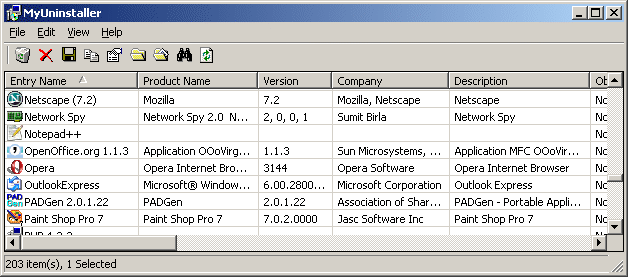
MyUninstaller is an alternative utility to the standard Add/Remove applet of Windows operating system. It displays the list of all installed application, and allows you to uninstall an application, delete an uninstall entry, and save the list of all installed applications into a text file or HTML file. It also provides additional information for most installed applications that the standard Add/Remove applet doesn't display: product name, company, version, uninstall string, installation folder and more.
Latest Reviews

jotte_ct reviewed v1.73 on Apr 19, 2011
some subscribers like xsnred should be required to pass a minimum IQ test before being allowed to write reviews.
Actually they should not be allowed to own a computer!

rip_pit reviewed v1.66 on Jun 23, 2010
no need of uninstaller when there's no install. just unzip and use !
one of my best app, a bit slower thant safarp but have more options so choose between light but fast vs advanced & bit slower

xsnred reviewed v1.56 on Dec 30, 2009
MyUninstaller has no uninstaller, that is so hilarious. I guess you have to use the add/remove program! LMAO!!

Cris3 reviewed v1.50 on Sep 16, 2009
Been using MyUninstaller for years and am happy that it works well in Vista. Great to see Nirsoft still seveloping this app.

Tao2005 reviewed v1.42 on Jul 29, 2008
I have used a previous version of this. Enjoyed it till I got Total Uninstaller. Now I enjoy TU more. Only if this one had an install monitor.
Aside what TU does. This program rates up there with it.

anonymous_user reviewed v1.41 on Jul 7, 2008
This isnt meant to be a complete uninstaller tools. Its just a very fast alternative to Add/Remove Programs.

rdtmk5 reviewed v1.41 on Jul 7, 2008
Needs much work. And, frankly, there is no reason to switch from Revo Uninstaller. Revo has quickly become the gold standard for uninstallers - I haven't found any other freeware or payware that beats it.

Ryusennin reviewed v1.40 on May 22, 2008
Still needs a lot of work.

why hello there reviewed v1.37 on Dec 22, 2007
It's free, it's fast, it's handy, but it's deeply imperfect. For example, in some cases, it incorrectly initiates an application's change or repair function, rather than its uninstall function. Because of this bug--and no, I don't care if you know what I'm talking about or have experienced it yourself--I still need to revert to Add/Remove sometimes.

anomoly reviewed v1.37 on Dec 21, 2007
RevoUninstaller is the best I've seen. It will scan your hd AND registry for leftovers (& then delete them if you tell it to). Revo incl. startup info disabler deleter killer as well a reg cleaner & junk file cleaner, plus some system tool shortcuts & a 'hunter' overlay icon for quick uninstall etc.
For a 'review' try Parmavex WinAudit Freeware-rocks.
Both of the above are portable.

jotte_ct reviewed v1.73 on Apr 19, 2011
some subscribers like xsnred should be required to pass a minimum IQ test before being allowed to write reviews.
Actually they should not be allowed to own a computer!
rip_pit reviewed v1.66 on Jun 23, 2010
no need of uninstaller when there's no install. just unzip and use !
one of my best app, a bit slower thant safarp but have more options so choose between light but fast vs advanced & bit slower
xsnred reviewed v1.56 on Dec 30, 2009
MyUninstaller has no uninstaller, that is so hilarious. I guess you have to use the add/remove program! LMAO!!
Cris3 reviewed v1.50 on Sep 16, 2009
Been using MyUninstaller for years and am happy that it works well in Vista. Great to see Nirsoft still seveloping this app.
Tao2005 reviewed v1.42 on Jul 29, 2008
I have used a previous version of this. Enjoyed it till I got Total Uninstaller. Now I enjoy TU more. Only if this one had an install monitor.
Aside what TU does. This program rates up there with it.
anonymous_user reviewed v1.41 on Jul 7, 2008
This isnt meant to be a complete uninstaller tools. Its just a very fast alternative to Add/Remove Programs.
rdtmk5 reviewed v1.41 on Jul 7, 2008
Needs much work. And, frankly, there is no reason to switch from Revo Uninstaller. Revo has quickly become the gold standard for uninstallers - I haven't found any other freeware or payware that beats it.
Ryusennin reviewed v1.40 on May 22, 2008
Still needs a lot of work.
why hello there reviewed v1.37 on Dec 22, 2007
It's free, it's fast, it's handy, but it's deeply imperfect. For example, in some cases, it incorrectly initiates an application's change or repair function, rather than its uninstall function. Because of this bug--and no, I don't care if you know what I'm talking about or have experienced it yourself--I still need to revert to Add/Remove sometimes.
anomoly reviewed v1.37 on Dec 21, 2007
RevoUninstaller is the best I've seen. It will scan your hd AND registry for leftovers (& then delete them if you tell it to). Revo incl. startup info disabler deleter killer as well a reg cleaner & junk file cleaner, plus some system tool shortcuts & a 'hunter' overlay icon for quick uninstall etc.
For a 'review' try Parmavex WinAudit Freeware-rocks.
Both of the above are portable.

sauzee reviewed v1.35 on May 29, 2007
Super.
Much better than standard windows uninstall feature. Can sort by name or install date, useful when you you want to review what you installed.

bellgamin reviewed v1.35 on May 25, 2007
MyUninstaller is a handy front-end for add/remove, but a full-scope uninstaller must monitor a program at the time when it is installed. MyUninstaller doesn't do that.
I need to update my earlier list of full-scope uninstallers.
AFIK, the only uninstall programs that monitor registry & system changes during install are...
Total Uninstall
Ashampoo Uninstall
Tenebril Uninstall
Zsoft
Trash It
Of those listed, Zsoft is free. In addition to the paid version of Total Uninstall, there is also an older/free version of Total Uninstall.

stisev reviewed v1.34 on Apr 11, 2007
What the hell are you people talking about?
This is the best damn "standard" uninstaller program I've ever seen, and BOY have I tried them all.
Total Uninstall is the best "real" uninstaller program out there.