File Details |
|
| File Size | 3.2 MB |
|---|---|
| License | Shareware, $30.00 |
| Operating System | Windows (All) |
| Date Added | May 25, 2009 |
| Total Downloads | 4,935 |
| Publisher | Gracebyte Software |
| Homepage | Network Assistant |
Publisher's Description
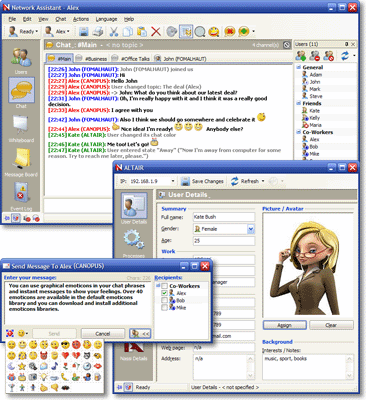
Network Assistant is a multiple-mode user-friendly network communication utility, including real-time chat, shared whiteboard, message board and instant messaging. It is intended to be used in small office or home office (SOHO) local networks. It does not require a dedicated server and may be used instead of old good WinPopup. In addition, it has many features such as user details, remote processes control, remote screenshots taking, usage statistics tracking and remote alerts.
Latest Reviews

utomo reviewed v3.2 Beta 3 on Feb 27, 2004
Good, but need to improve:
- Add option to create our own channel. beside general, announcer, password protected and private (person-to-person), sometimes we need more in big company.
- For white board, we need to be able to use thicker line, color line, color fill, etc.
- Missing undo button.
- Message must be able to use the rich text. Bold, color, italic, underline and smiley.
- It will be more powerful if it can integrate with the ICQ, YM and MSN too, like trillian :)
Other suggestions later

ayudin reviewed v3.0 Beta Build 2053 on Jul 15, 2002
Really powerful and nice!

Akuma2 reviewed v3.0 Beta Build 2053 on Jul 15, 2002
This seems like a pretty good communications solution but I have a few things I'd like to point out with Version 3.0 Beta.
Although the BetaNews page says it's Freeware, it is in fact Shareware with a 30 usage period. The startup message states:
UNREGISTERED EVALUATION VERSION
This is fully functional evaluation version of Network
Assistant. If you want to continue using it after 30-day
evaluation period you will have to purchase it.
[Purchase] [Register] [Ordering Info] [Evaluate]

ajm149 reviewed v2.0 on Aug 2, 2000
If you are on a network and Windows Messaging is getting on your nerves, this is the solution. I think that this is a god send for my business network and I plan to install it as soon as I get in the office. My home network has also found use for it. I can send a message to my nephew who lives across the street because 90% of the time he's online so I can't call.

utomo reviewed v3.2 Beta 3 on Feb 27, 2004
Good, but need to improve:
- Add option to create our own channel. beside general, announcer, password protected and private (person-to-person), sometimes we need more in big company.
- For white board, we need to be able to use thicker line, color line, color fill, etc.
- Missing undo button.
- Message must be able to use the rich text. Bold, color, italic, underline and smiley.
- It will be more powerful if it can integrate with the ICQ, YM and MSN too, like trillian :)
Other suggestions later
ayudin reviewed v3.0 Beta Build 2053 on Jul 15, 2002
Really powerful and nice!
Akuma2 reviewed v3.0 Beta Build 2053 on Jul 15, 2002
This seems like a pretty good communications solution but I have a few things I'd like to point out with Version 3.0 Beta.
Although the BetaNews page says it's Freeware, it is in fact Shareware with a 30 usage period. The startup message states:
UNREGISTERED EVALUATION VERSION
This is fully functional evaluation version of Network
Assistant. If you want to continue using it after 30-day
evaluation period you will have to purchase it.
[Purchase] [Register] [Ordering Info] [Evaluate]
ajm149 reviewed v2.0 on Aug 2, 2000
If you are on a network and Windows Messaging is getting on your nerves, this is the solution. I think that this is a god send for my business network and I plan to install it as soon as I get in the office. My home network has also found use for it. I can send a message to my nephew who lives across the street because 90% of the time he's online so I can't call.