File Details |
|
| File Size | 2.2 MB |
|---|---|
| License | Freeware |
| Operating System | Windows 2000/Vista/XP |
| Date Added | May 4, 2007 |
| Total Downloads | 28,344 |
| Publisher | pBUS-167 |
| Homepage | Notebook Hardware Control |
Publisher's Description
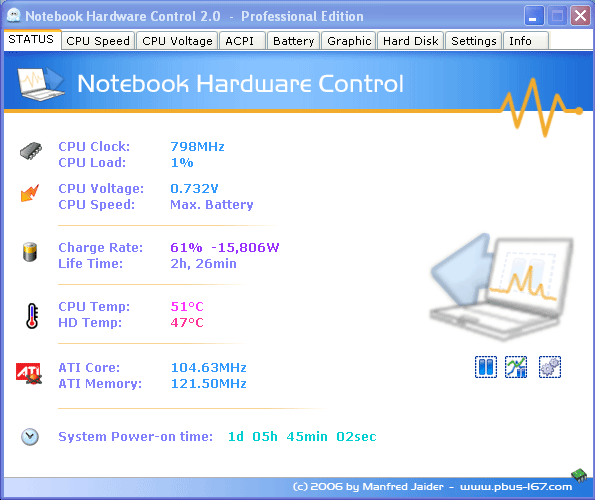
Notebook Hardware Control (formerly Centrino Hardware Control) can easily control the hardware components of your Intel Mobile Notebook. It helps you to prolong the battery lifetime and cool down the system with CPU Voltage Control and ATI Clock Control; full processor speed control with custom dynamic switching and CPU Speed Control (CPU policy); monitor the battery charge level and system temperature; control and monitor the Hard Drive with S.M.A.R.T management, acoustic & advanced power management and Hard Drive temperature monitoring; and reduce noise with Notebook FAN Control.
Latest Reviews

noVuz reviewed v2.0 Pre-Release-06 on Oct 26, 2008
I got a special version for Dell Notebooks on the offical Homepage. Works perfect!

softapo7 reviewed v2.0 Pre-Release-06 on Oct 28, 2007
The best free CPU controller and cooler that I have tested. Stable machine even at CPU 6X 0.9500 volts. Runs cooler, both CPU and hard disk. Works faultlessly on Vista home premium.

kb9mawjh reviewed v2.0 Pre-Release-06 on May 7, 2007
Works fairly well. However you may want to go to the Author's page if you have a Dell system he has a hotfix version there

KayNine reviewed v2.0 Pre-Release-06 on May 7, 2007
applez33: if used correctly, you definately ARE able to configure your notebook to run silent and cool. Or, if performance is an issue (as is for me while programming/compiling), to run as fast as possible without clocking down too often.
5 stars from me, NHC works perfectly.

applez33 reviewed v2.0 Pre-Release-04 on Apr 10, 2007
When I upgraded to Notebook Hardware Control from the original Centrino Hardware Control, it made my laptop overall run about 10 degrees hotter than it used to. When I run apps, my computer would often get burning hot and start the shut down sequence, one of the features of NHC. Never had this happened when I used CHC, and I don't want to keep being interuppted every 10 minutes that my computer is getting too hot and it needs to shut down. The point of using NHC is so that my computer WON'T get too hot. Needless to say, I switched to RightMark, and I am amazed at how cool and quiet my laptop is now.

-Lord- reviewed v2.0 Pre-Release-04 on Sep 10, 2006
Pretty nice for what it delivers, but only use this if you know what you're doing and get into the thick of things when managing things on your laptop.
One word of caution: For Vista beta testers:
DO NOT INSTALL THIS ON WINDOWS VISTA!!!
Your system WILL crash. You can recover, but why go with the hassle. You've been warned

srdowns reviewed v2.0 Pre-Release-04 on Sep 9, 2006
A well done program for my new laptop. I couldn't find any other program that came close.

mjm01010101 reviewed v2.0 Pre-Release-04 on Sep 8, 2006
This is decent and well done.

hunterb reviewed v2.0 Pre-Release-02 on Aug 2, 2006
Very nice program. GUI is excellent - layout, alpha, icons. Loads of information and features - all configurable. Performance is excellent. Everything works perfectly.

Chikushou reviewed v2.0 Pre-Release-02 on Aug 1, 2006
While the concept seems nice, installing this completely destroyed my system performance, particularly in 3D games. Uninstalling it didn't fix anything, nor did a registry back-up.

noVuz reviewed v2.0 Pre-Release-06 on Oct 26, 2008
I got a special version for Dell Notebooks on the offical Homepage. Works perfect!
softapo7 reviewed v2.0 Pre-Release-06 on Oct 28, 2007
The best free CPU controller and cooler that I have tested. Stable machine even at CPU 6X 0.9500 volts. Runs cooler, both CPU and hard disk. Works faultlessly on Vista home premium.
kb9mawjh reviewed v2.0 Pre-Release-06 on May 7, 2007
Works fairly well. However you may want to go to the Author's page if you have a Dell system he has a hotfix version there
KayNine reviewed v2.0 Pre-Release-06 on May 7, 2007
applez33: if used correctly, you definately ARE able to configure your notebook to run silent and cool. Or, if performance is an issue (as is for me while programming/compiling), to run as fast as possible without clocking down too often.
5 stars from me, NHC works perfectly.
applez33 reviewed v2.0 Pre-Release-04 on Apr 10, 2007
When I upgraded to Notebook Hardware Control from the original Centrino Hardware Control, it made my laptop overall run about 10 degrees hotter than it used to. When I run apps, my computer would often get burning hot and start the shut down sequence, one of the features of NHC. Never had this happened when I used CHC, and I don't want to keep being interuppted every 10 minutes that my computer is getting too hot and it needs to shut down. The point of using NHC is so that my computer WON'T get too hot. Needless to say, I switched to RightMark, and I am amazed at how cool and quiet my laptop is now.
-Lord- reviewed v2.0 Pre-Release-04 on Sep 10, 2006
Pretty nice for what it delivers, but only use this if you know what you're doing and get into the thick of things when managing things on your laptop.
One word of caution: For Vista beta testers:
DO NOT INSTALL THIS ON WINDOWS VISTA!!!
Your system WILL crash. You can recover, but why go with the hassle. You've been warned
srdowns reviewed v2.0 Pre-Release-04 on Sep 9, 2006
A well done program for my new laptop. I couldn't find any other program that came close.
mjm01010101 reviewed v2.0 Pre-Release-04 on Sep 8, 2006
This is decent and well done.
hunterb reviewed v2.0 Pre-Release-02 on Aug 2, 2006
Very nice program. GUI is excellent - layout, alpha, icons. Loads of information and features - all configurable. Performance is excellent. Everything works perfectly.
Chikushou reviewed v2.0 Pre-Release-02 on Aug 1, 2006
While the concept seems nice, installing this completely destroyed my system performance, particularly in 3D games. Uninstalling it didn't fix anything, nor did a registry back-up.

dono1216 reviewed v2.0 Pre-Release-02 on Aug 1, 2006
very useful -- especially whenever my battery indicator on the taskbar disappears for no reason whatsoever. it also shows battery wear, temperature, current processor speed, and a lot more.
every serious computer user -- the people who will need this program -- already has .net 2.0. those who don't, oh well....

jafo818 reviewed v2.0 Pre-Release-02 on Aug 1, 2006
So far this is pretty cool... Lots of options, highly customizable... Works great with my IBM T40p.

Desides reviewed v2.0 Pre-Release-02 on Aug 1, 2006
People complaining about NHC's use of .NET need to grow up. This is a wonderful, day I say requisite, utility for anyone using a Centrino-based notebook.