File Details |
|
| File Size | 0.3 MB |
|---|---|
| License | Open Source |
| Operating System | Windows (All) |
| Date Added | October 28, 2012 |
| Total Downloads | 17,590 |
| Publisher | Flo's freeware |
| Homepage | Notepad2 |
Publisher's Description
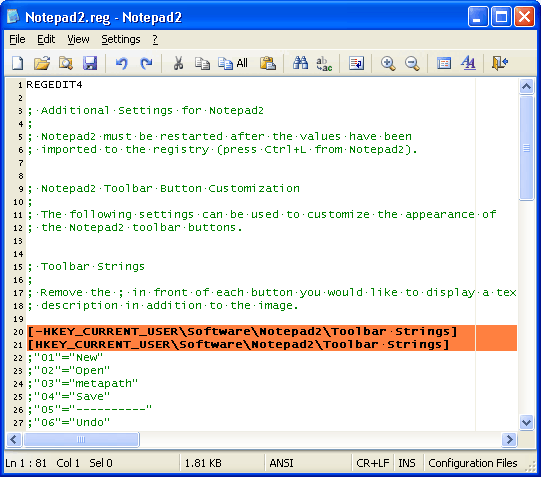
Notepad2 is another small, fast notepad replacement with some unusual features. It includes zoom, rectangular selection, regular expressions, and more.
Latest Reviews

anomoly reviewed v4.2.25-rc8 on Apr 19, 2011
I don't care for this all that much. Akelpad is more user friendly for me though that mod version works well with nfo's.
Nice review balderstrom.

Balderstrom reviewed v4.2.25-rc7 on Apr 15, 2011
While I do use this editor, it's certainly not my primary editor. And comparing Notepad2 to UltraEdit32 is one of the most ludicrous statements I've ever read.
The second-most ludicrous would be comparing to Notepad++ - which is a great feature-rich editor, that may or may not crash for no reason whatsoever. From VAX to Unix to DOS to Windows and Linux, I've used dozens upon dozens of Editors, and Notepad++ is the only one (of two) that has crashed.
Notepad2 is a decent 'quick-edit' feature-light editor that has a few annoying quirks that the dev doesn't want to fix, but at least it has never crashed. If you require heavy-lifting and extensive customization, you should look elsewhere. And if stability isn't important to you, but free is, go for Notepad++.
My full-featured editors of choice, EmEditor, and CodeLobster PHP.
Notepad-like editors: Notepad2, Ted's Notepad (v6 beta), and good-old Notepad.
For ~$40 EmEditor (perpetual license, so far) stomps all over (feature-wise) the outrageously priced UltraEdit32, and the "free" Notepad++.

Blaxima reviewed v4.2.25-rc6 on Mar 15, 2011
I use Notepad2-mod but either or are simply excellent

sweathog reviewed v4.2.25 RC2 on Feb 6, 2011
Unless you are hooked on tabs, this is the notepad to have. Lightening fast. Outstanding.

XhmikosR reviewed v4.1.24 on Nov 16, 2010
Notepad2-mod v4.1.24 with Kai Liu's patches and more:
http://code.google.com/p/notepad2-mod/

Plumber reviewed v4.1.24 on May 29, 2010
I've been using this more and more instead of UltraEdit simply because it launches so much faster, and has fewer annoying bugs. It doesn't have the nifty macro features but not being aggravated is very high on my "List of Important Things".

war593122 reviewed v4.1.24 on Mar 2, 2010
Simply the best.

Reverb reviewed v4.1.24-rc3 on Feb 8, 2010
I have to agree with the other reviewers here. Best notepad for Windows replacement. Like notepad, it is small, fast, and light but also portable. I too have replacled the native notepad app with this on all my Windows boxes and keep it handy on my USB flash drive.
Blaxima reviewed v4.1.24-rc3 on Feb 8, 2010
This and foobar are just two of a very small set of apps that I consider must haves for every windows user.
I just wish Kai Liu would update his version
New in Version 4.1.24-rc3 (released February 07, 2010)
- /z command line switch (support registry-based Notepad replacement)
- /u command line switch (launch Notepad2 with elevated privileges)
- Fixed some /p command line switch options not working properly
- Display more informative error messages for file operation failures
- Hotkey to copy pathname of current file to clipboard (Shift+F9)
- Window title indicator when running with elevated privileges
- Ini-options to control system MRU, taskbar and jump list behaviour
- Revised word wrap settings dialog and added more detailed options
- New style setting to control font smoothing (see FAQ on my website)
- New style setting to control size of visible white space dots
- Added new "HTML Element Text" and "XML Element Text" styles
- Improved default style utilization for HTML-embedded schemes
- Updated PowerShell keywords to version 2.0
- Updated Scintilla library to 2.02

gawd21 reviewed v4.0.24 RC1 on Dec 16, 2009
I am torn between this and Notepad ++ They are both great and I couldn't see getting by without one or the other on a daily basis.

anomoly reviewed v4.2.25-rc8 on Apr 19, 2011
I don't care for this all that much. Akelpad is more user friendly for me though that mod version works well with nfo's.
Nice review balderstrom.
Balderstrom reviewed v4.2.25-rc7 on Apr 15, 2011
While I do use this editor, it's certainly not my primary editor. And comparing Notepad2 to UltraEdit32 is one of the most ludicrous statements I've ever read.
The second-most ludicrous would be comparing to Notepad++ - which is a great feature-rich editor, that may or may not crash for no reason whatsoever. From VAX to Unix to DOS to Windows and Linux, I've used dozens upon dozens of Editors, and Notepad++ is the only one (of two) that has crashed.
Notepad2 is a decent 'quick-edit' feature-light editor that has a few annoying quirks that the dev doesn't want to fix, but at least it has never crashed. If you require heavy-lifting and extensive customization, you should look elsewhere. And if stability isn't important to you, but free is, go for Notepad++.
My full-featured editors of choice, EmEditor, and CodeLobster PHP.
Notepad-like editors: Notepad2, Ted's Notepad (v6 beta), and good-old Notepad.
For ~$40 EmEditor (perpetual license, so far) stomps all over (feature-wise) the outrageously priced UltraEdit32, and the "free" Notepad++.
Blaxima reviewed v4.2.25-rc6 on Mar 15, 2011
I use Notepad2-mod but either or are simply excellent
sweathog reviewed v4.2.25 RC2 on Feb 6, 2011
Unless you are hooked on tabs, this is the notepad to have. Lightening fast. Outstanding.
XhmikosR reviewed v4.1.24 on Nov 16, 2010
Notepad2-mod v4.1.24 with Kai Liu's patches and more:
http://code.google.com/p/notepad2-mod/
Plumber reviewed v4.1.24 on May 29, 2010
I've been using this more and more instead of UltraEdit simply because it launches so much faster, and has fewer annoying bugs. It doesn't have the nifty macro features but not being aggravated is very high on my "List of Important Things".
war593122 reviewed v4.1.24 on Mar 2, 2010
Simply the best.
Reverb reviewed v4.1.24-rc3 on Feb 8, 2010
I have to agree with the other reviewers here. Best notepad for Windows replacement. Like notepad, it is small, fast, and light but also portable. I too have replacled the native notepad app with this on all my Windows boxes and keep it handy on my USB flash drive.
Blaxima reviewed v4.1.24-rc3 on Feb 8, 2010
This and foobar are just two of a very small set of apps that I consider must haves for every windows user.
I just wish Kai Liu would update his version
New in Version 4.1.24-rc3 (released February 07, 2010)
- /z command line switch (support registry-based Notepad replacement)
- /u command line switch (launch Notepad2 with elevated privileges)
- Fixed some /p command line switch options not working properly
- Display more informative error messages for file operation failures
- Hotkey to copy pathname of current file to clipboard (Shift+F9)
- Window title indicator when running with elevated privileges
- Ini-options to control system MRU, taskbar and jump list behaviour
- Revised word wrap settings dialog and added more detailed options
- New style setting to control font smoothing (see FAQ on my website)
- New style setting to control size of visible white space dots
- Added new "HTML Element Text" and "XML Element Text" styles
- Improved default style utilization for HTML-embedded schemes
- Updated PowerShell keywords to version 2.0
- Updated Scintilla library to 2.02
gawd21 reviewed v4.0.24 RC1 on Dec 16, 2009
I am torn between this and Notepad ++ They are both great and I couldn't see getting by without one or the other on a daily basis.

emanresU deriseD reviewed v4.0.2.3 on Dec 9, 2009
I've replaced the native notepad.exe files with Notepad2, after renaming the latter's file to match (using WfpDeprotect, an awesome console app available from bitsum.com). Great replacement for all the aforementioned reasons.
XhmikosR reviewed v4.0.2.3 on Oct 12, 2009
@dhry: Unfortunately Kai Liu hasn't updated his builds for quite some time now.
Nevertheless, I agree Notepad2 is the best notepad replacement. Small and does what it has to very nicely.
If only Florian Balmer would use the installer Kai Liu has made. That would made things a lot easier for a lot of people.

dhry reviewed v4.0.2.3 on Oct 6, 2009
Absolutely brilliant. Loads in a flash, lots of great options, rock solid and has never crashed for me. And not as many bugs as Notepad++. God I hope the author doesn't turn it into bloatware. I hereby designate this an honorary Fileforum Pick.
Link to builds which incorporate code-folding functionality: http://code.kliu.org/misc/notepad2/