
File Details |
|
| File Size | 14.5 MB |
|---|---|
| License | Freeware |
| Operating System | Windows 7/8/10/2000/Vista/XP |
| Date Added | October 13, 2021 |
| Total Downloads | 8,221 |
| Publisher | Wiziple |
| Homepage | PicPick |
Publisher's Description
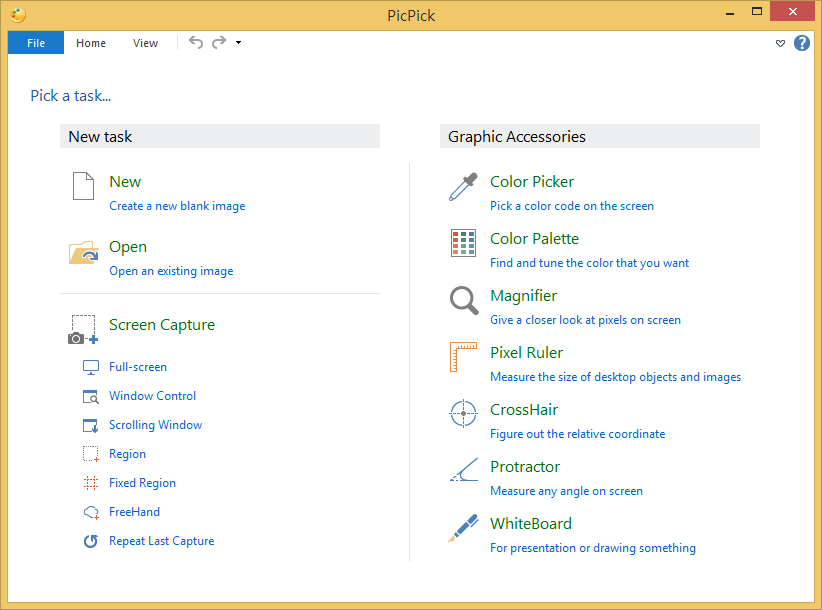
PicPick is an all-in-one software for software developers, graphic designers and home user. It has an intuitive interface and simple, elegant operation. After starting the software, you simply select one of the tool from the PicPick Tools trayicon menu when you want. It features a powerful capture tool, image editor, color picker, color palette, pixel ruler, protractor, crosshair, whiteboard and etc. You can use all these tools freely.
Latest Reviews

HetBeest reviewed v5.1.2 on Sep 26, 2020
For a free program, PicPick has more than enough possibilities and does its work very, VERY good (in my opinion).

allthebestnamesgone reviewed v5.0.2 on Sep 7, 2018
Best program of it's type that I found, but that highlighter bug makes me keep my eye open for alternative.

uberfly reviewed v4.1.4 on May 20, 2016
Nice features and free. Works well.

Karol Mily reviewed v3.4.1 on Aug 28, 2014
Not bad at first look. But needs a lot of work to use it most effectively.
Still very promising.

Hilbert reviewed v3.1.6 on Jun 28, 2012
PicPick is classy software, it's attractive to look at and fun to use. Its designer has an excellent graphic design sense and he's laid out the software in a neat and logical way and he's paid much attention to the program's ergonomics. The program has many features with screen capture and subsequent editing being strong.
Capturing images is as easy as hitting a function key. And it's gratifying to see a designer who provides the option to compress images on save but who also leaves the defaults on maximum (minimum compression). (Setting compression defaults to medium or low quality I consider particularly annoying.)
I found PicPick particularly useful as a quick aide memoire when reviewing software. I could print-screen a running app and scribble or type notes about it in big red letters then save the image to a file.
I agree with anomaly's comment about PicPick's thirsty juice requirements. I found it used 30-something MB standing still which easily nudged up to about 47MB with little coaxing.
For start-up or just print-screen use, it would be nice if unnecessary or infrequently-used modules could be swapped out or loaded on demand. For that reason I won't be abandoning my current (and longstanding) print-screen utility, PrintKey Pro. (Whilst a bit long in the tooth, PrintKey Pro uses only about one tenth [~4.5MB] the resources of PicPick and still does all the basic print-screen functions except capture the overlay hardware acceleration surface/layer used by movies.)
PicPick also clashes with PrintKey's function key allocation (and I'd imagine it also does so with other print-screen utilities), nevertheless it detects the clash, names the utility it's clashing with and provides the user with an intuitive way of reassigning the function keys.
My solution is to load it when needed. Despite foibles, I highly recommend PicPick.

anomoly reviewed v3.0.7 on Aug 25, 2011
Nice but it uses 40mb standing still. I decided to run it only when I actually use it and then kill it after.

reddy.shyam reviewed v3.0.6 on Jul 26, 2011
Great piece of freeware! Come up good.
v3.0.6 (2011-07-24)
- Added : JPEG Quality Configuration
- Added : Indonesian language
- Fixed : Capture Window bugs
- Fixed : Drawing Line, Arrow bugs
- Fixed : Add Frame bugs
- Small known bugs were fixed
reddy.shyam reviewed v3.0.5 on Jun 30, 2011
Show capture bar is a cool add on to this version though it cannot be stuck to horizontal edges. It would be nice if can be. At the moment, the bar is just vertical.

SineWave reviewed v3.0.4 on May 9, 2011
With version 3 they disabled a normal classic editor look and now you have to use the stupid MS style toolbar that totally unnecessarily takes almost 1/3 of the upper screen space. I can see no point to it. Also the app has grown from 4MB to 10MB and it's lacking editing features for a 10MB app. So I give 4 stars to 2.3.8 version and I'm staying with it forever if needs be. I find V3 not to be an improvement but "downprovement" ... so 3 stars, one too much probably...
reddy.shyam reviewed v3.0.2 on Mar 15, 2011
Excellent freeware for personal use. Maturing well with features added at regular intervals.

HetBeest reviewed v5.1.2 on Sep 26, 2020
Pros: My number one for screen capturing. The graphic accessories are great with 'CrossHair' and 'Protractor' as my two favorites
Cons: I have not found any yet - but then, I do not use everything PicPick has to offer.
Bottom Line: For a free program, PicPick has more than enough possibilities and does its work very, VERY good (in my opinion).
allthebestnamesgone reviewed v5.0.2 on Sep 7, 2018
Pros: Lots of features, tabs of images in editor
Cons: Very annoying bug with the marker pen function - every stroke of the pen dims the entire image by 1 level, it just gets darker & darker until the entire image is solid black.
Bottom Line: Best program of it's type that I found, but that highlighter bug makes me keep my eye open for alternative.
uberfly reviewed v4.1.4 on May 20, 2016
Nice features and free. Works well.
Karol Mily reviewed v3.4.1 on Aug 28, 2014
Not bad at first look. But needs a lot of work to use it most effectively.
Still very promising.
Hilbert reviewed v3.1.6 on Jun 28, 2012
PicPick is classy software, it's attractive to look at and fun to use. Its designer has an excellent graphic design sense and he's laid out the software in a neat and logical way and he's paid much attention to the program's ergonomics. The program has many features with screen capture and subsequent editing being strong.
Capturing images is as easy as hitting a function key. And it's gratifying to see a designer who provides the option to compress images on save but who also leaves the defaults on maximum (minimum compression). (Setting compression defaults to medium or low quality I consider particularly annoying.)
I found PicPick particularly useful as a quick aide memoire when reviewing software. I could print-screen a running app and scribble or type notes about it in big red letters then save the image to a file.
I agree with anomaly's comment about PicPick's thirsty juice requirements. I found it used 30-something MB standing still which easily nudged up to about 47MB with little coaxing.
For start-up or just print-screen use, it would be nice if unnecessary or infrequently-used modules could be swapped out or loaded on demand. For that reason I won't be abandoning my current (and longstanding) print-screen utility, PrintKey Pro. (Whilst a bit long in the tooth, PrintKey Pro uses only about one tenth [~4.5MB] the resources of PicPick and still does all the basic print-screen functions except capture the overlay hardware acceleration surface/layer used by movies.)
PicPick also clashes with PrintKey's function key allocation (and I'd imagine it also does so with other print-screen utilities), nevertheless it detects the clash, names the utility it's clashing with and provides the user with an intuitive way of reassigning the function keys.
My solution is to load it when needed. Despite foibles, I highly recommend PicPick.
anomoly reviewed v3.0.7 on Aug 25, 2011
Nice but it uses 40mb standing still. I decided to run it only when I actually use it and then kill it after.
reddy.shyam reviewed v3.0.6 on Jul 26, 2011
Great piece of freeware! Come up good.
v3.0.6 (2011-07-24)
- Added : JPEG Quality Configuration
- Added : Indonesian language
- Fixed : Capture Window bugs
- Fixed : Drawing Line, Arrow bugs
- Fixed : Add Frame bugs
- Small known bugs were fixed
reddy.shyam reviewed v3.0.5 on Jun 30, 2011
Show capture bar is a cool add on to this version though it cannot be stuck to horizontal edges. It would be nice if can be. At the moment, the bar is just vertical.
SineWave reviewed v3.0.4 on May 9, 2011
With version 3 they disabled a normal classic editor look and now you have to use the stupid MS style toolbar that totally unnecessarily takes almost 1/3 of the upper screen space. I can see no point to it. Also the app has grown from 4MB to 10MB and it's lacking editing features for a 10MB app. So I give 4 stars to 2.3.8 version and I'm staying with it forever if needs be. I find V3 not to be an improvement but "downprovement" ... so 3 stars, one too much probably...
reddy.shyam reviewed v3.0.2 on Mar 15, 2011
Excellent freeware for personal use. Maturing well with features added at regular intervals.

Ryusennin reviewed v2.3.6 on Dec 29, 2010
Apparently, Bobad is talking about an entirely different program. That, or he hasn't actually tried PicPick (or bothered to change the default settings).
anomoly reviewed v2.3.5 on Oct 12, 2010
If you set output to anything other than the editor it does not pop up at all.
As far as the ask toolbar bs, that's what uni extract is for. I don't even notice that part at all.
And as for little packages, there are a ton of free stuff that use that ploy, not just simple softwares either.

bobad reviewed v2.3.4 on Sep 15, 2010
You can capture a picture and automatically save it to a folder, but only 1 at a time now. That's because the editor pops up after each capture, and you have to dismiss it before you can capture another picture.
The little "package" you get with PicPick is annoying too. It tries to change the homepage for your web browser, change the default search engine for web browser, and to install ASK toolbar. None of these are necessary for the program to install or function, so do de-select them.