Playlist Creator 3.5.0
Publisher's Description:
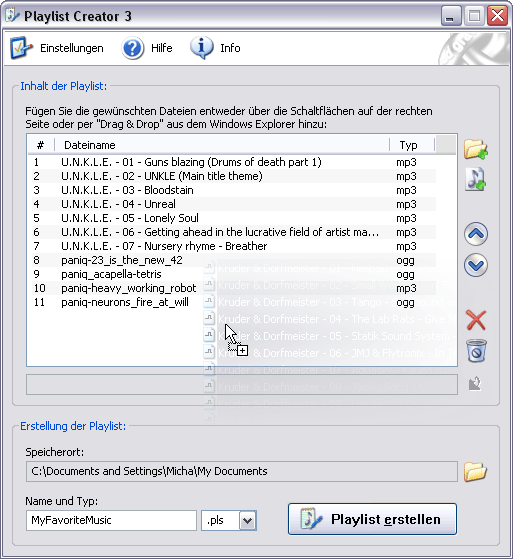
With Playlist Creator you can create playlists easily and quickly. The composition and creation of a playlist is done within seconds: Just add all desired files, enter the name of the playlist and select its save location and one moment later your first playlist is already done. The fastest and easiest method for adding files to the playlist is via drag and drop from Windows Explorer. The user can choose if the program should readout ID3tags and which data exactly should be extracted from the tags. Furthermore you can create dynamic titles using simple variables. You can add files of any file type to the playlist. After installation of the program you'll find many predefined file types. If the desired file type is missing you can easily add this type to the list. For compatibility with a wide variety of hardware and software Playlist Creator can create playlists either in PLS-format or M3U-format.
Latest Changes:
- New: Existing playlist files can be opened and modified
- New: Main dialog is resizable
- New: Folders can be added recursively (i.e. the selected folder and all subfolders)
- New: Multi-selection support for the playlist control (i.e. move / delete all selected items)
- New: The columns of the playlist control can be sorted by clicking on the column header
- New: The icon set was replaced with icons from Tango Desktop Project
- New: Main dialog can optionally snap to the screen border
- New: Playlist entries can be stored with forward or back slashes (can be combined with any save mode)
- New: Playlist items which refer to nonexistent files can optionally be highlighted
- New: List of active file types can optionally be applied when opening playlists
- New: Additional settings property page: User Interface
- New: Playlist control can optionally display gridlines
- New: The alternating row color of the playlist control can be changed or turned off
- New: It's possible to display the hidden messages again
- New: Additional toolbar button for creating a new empty playlist
- New: Drag and drop: The exact insertion point is displayed with an insertion line
- New: Buttons for moving the selected items to the top / bottom of the playlist
- New: Statusbar with resize gripper, showing the total number and the number of selected items
- New: A context menu pops up when right-clicking on the playlist control
- New: An input prompt is displayed in the playlist name editbox
- New: When the playlist is empty a message is displayed in the playlist control
- New: Additional keyboard shortcuts (e.g. select all, move to top / bottom)
- New: Buttons are disabled if the specific functionality is currently not available
- New: The lists of active / inactive file types can be resetted
- New: Added the file type 'flac' to the default active file types
- New: Settings dialog remembers the last active property page
- New: During playlist creation the currently processed step is displayed with bold font
- New: Tooltips are displayed for certain toolbar buttons
- Reworked: Improved user interface responsiveness when handling big playlists
- Changed: Moved 'Set as playlist save location' functionality to the context menu of the playlist control
- Changed: Playlist file types cannot be added to the active / inactive file types (they are handled internally)
- Changed: Some settings were moved to the new 'User Interface' properties page (e.g. single instance, transparency)
- Changed: The default file filter of the add files select dialog is now 'All files (*.*)'
- Fixed: Characters of playlist name textbox can become corrupted (thanks to Scott and Tony for testing!)
- Fixed: If playlist and tracks are located in the same folder the prefix '.\' is added to the filenames (some players don't like it)
- Fixed: When playlist folder doesn't exist, it's not possible to create a nested folder
- Fixed: Restoring the last position of the application window isn't multimonitor aware
- Fixed: The position of the drop graphic is not correct if the setting 'Show window contents while dragging' is off
- Fixed: Drop graphic is shown until all files have been added
- Fixed: The create playlist button loses its border when changing from XP styles to classic style
Screenshot:
Latest User Reviews:
| Reviewer: | Lusono | Aug 2, 2007 |
| Version: | 3.5.0 | |
| |
|
Great program! Simple, direct and to the point. The interface is laid out well, and it supports drag and drop. You can make .pls and .m3u playlists. We need more programmers making great freeware like this.
|
| Rating: |  |
|
| Reviewer: | speaker | May 15, 2005 |
| Version: | 3.0.1 | |
| |
|
An excellent little app that does what it's supposed to do and it does it well. It could be improved upon by adding a right-click context menu function, which is probably eventual.
|
| Rating: |  |
|
|
| Released: | July 31, 2007 |
| Publisher: | oddgravity |
| Homepage: | Playlist Creator |
|---|
| Downloads: | 2,512 |
| License: | Freeware |
| OS Support: | Windows 2000/9x/XP |
| Uninstaller?: | Yes |
|---|
| Skin Support?: | No; Supports XP Themes |
|---|
| Rating: | 4.1/5 (17 votes)
|
|