File Details |
|
| File Size | 1.4 MB |
|---|---|
| License | Open Source |
| Operating System | Windows 2000/9x/Server 2003/XP |
| Date Added | October 17, 2007 |
| Total Downloads | 3,876 |
| Publisher | Christian Huebner |
| Homepage | PopMan |
Publisher's Description
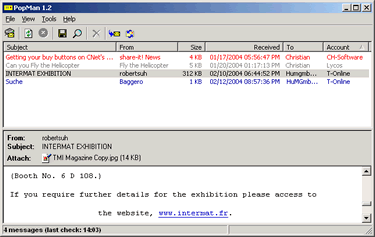
PopMan is a POP3 manager and notifier. It can be used to list all e-mails received on your incoming mail server (POP3 server), without having to load these mails completely. Unwanted e-mails can be deleted directly from the server. You can use it to check your e-mail accounts in the background. The number of waiting messages is displayed on the tray icon for each account.To show you whether e-mails contain useful information, or whether they are just spam, it provides a preview function. You can use this preview pane to read the text-based content of your e-mails - whether they are plain text or HTML. In contrast to most e-mail programs, reading mail with PopMan is absolutely secure. There is no threat of executing dangerous code or being infected with viruses. You can direct it to use local storage (settings are saved to an *.ini file), and save it to a floppy disk or USB memory stick. This means you can check your mail on any computer with internet access.
Latest Reviews

Cadillakin reviewed v1.3 Beta 17 on Oct 18, 2008
Very polished. I've looked at and used them all. Of the current leaders in the market, Magic Mail Monitor currently (Oct, 2008)has SSL login issues with my server (AT&T) and Poptray is slightly buggy and sports a somewhat archaic interface. So, I continued to look for something better.
Popman ably implements SSL, handles pop and web mail, and has many advanced configuration options for handling multiple accounts. It's only weakness is it's rather backwards implementation of spam rules. It took a couple of hours to study and write the rules necessary to block the porn and advertising prominent on the web.. For those not ready to write their own spam rules to the configuration file, white and black lists exist, to allow and block, as necessary.
It implements skins for those who like choices in the interface.. Advanced users can dig in and write more complex spam blocking rules. I did, and now Popman is completely the application I sought out, configured to my needs. All in all, a terrific addition to my desktop.
A thank you to the developer, Christian!

devilrider reviewed v1.3 Beta 12 on Apr 23, 2006
There are several good POP checker. This is one of them.
Personally I prefer POP Peeper. even it has 3 things that disturb me and one missing feature, but same thing with all other tools :)
Anyway 5/5 coz it's good.

Steve49 reviewed v1.3 Beta 11 on Apr 16, 2006
Hi Everyone
I am new to Beta news but I thought I should say something about pop man its great I have tried many other notifiers and they have never worked but pop man works great 10 out of 10 .

jasinwa reviewed v1.3 Beta 11 on Oct 23, 2005
Fantastic email checker that is very configurable. It has an intuitive interface where you can customize colors for different accounts to display in the tray and was one of the first to show actual numbers of emails (unread, total, etc depending on how you set it up). I don't understand some of the reviews offering a "1" - must be friends of the other sw authors!! : )
Indispensable - get it.

yleclerc reviewed v1.3 Beta 10 on May 8, 2005
Why bother with PopMan! Poptray was the original!!! Why else would several Poptray plug-ins be "ported" to this PopMan.
BTW: Poptry is also free and available in numerious languages!

E.T. reviewed v1.3 Beta 8 on Mar 26, 2005
What are you talking about? It's as easy to configure as any other POP3 mail client/notifier and it work perfectly fine with WindowsXP. I'd say it's a direct competitor to PopTray - the difference is that PopTray allows plugins; the rest is strictly personal preference...

SuperVegeta reviewed v1.3 Beta 8 on Mar 26, 2005
I have tried it on Windows XP and is completely not working.
I used it on Win 9x and is quite good, but extremely difficult to configure.

mjg reviewed v1.3 Beta 8 on Mar 26, 2005
This is an excellent program. It works in Linux through Wine as well, although the author has no plans for a full Linux version. Try the latest Beta version. It's a good work in progress if you like to check, delete and block messages before they hit your mail software.

baarsel reviewed v1.3 Beta 5 on Mar 21, 2005
At yleclerc: From 1.3 beta 6, each account can have it's own tab. Even better: you can combine tabs, so it's possible to create a tab for all your work accounts, and a tab for other accounts, or let each account have its own tab. I think Popman is by far the best pop3-checker I've used ... and I've used a lot of them! Okay, Poptray is nice, but not as attractive as this program.
yleclerc reviewed v1.3 Beta 5 on Feb 21, 2005
I been using POP3 notifiers for while. PopMan is not bad but PopTray is much better. In PopTray, each email account has its own "tab" so that you can keep each account separate. PopTray also has Blaklist/Whitelist support and individual account checking intervals.

Cadillakin reviewed v1.3 Beta 17 on Oct 18, 2008
Very polished. I've looked at and used them all. Of the current leaders in the market, Magic Mail Monitor currently (Oct, 2008)has SSL login issues with my server (AT&T) and Poptray is slightly buggy and sports a somewhat archaic interface. So, I continued to look for something better.
Popman ably implements SSL, handles pop and web mail, and has many advanced configuration options for handling multiple accounts. It's only weakness is it's rather backwards implementation of spam rules. It took a couple of hours to study and write the rules necessary to block the porn and advertising prominent on the web.. For those not ready to write their own spam rules to the configuration file, white and black lists exist, to allow and block, as necessary.
It implements skins for those who like choices in the interface.. Advanced users can dig in and write more complex spam blocking rules. I did, and now Popman is completely the application I sought out, configured to my needs. All in all, a terrific addition to my desktop.
A thank you to the developer, Christian!
devilrider reviewed v1.3 Beta 12 on Apr 23, 2006
There are several good POP checker. This is one of them.
Personally I prefer POP Peeper. even it has 3 things that disturb me and one missing feature, but same thing with all other tools :)
Anyway 5/5 coz it's good.
Steve49 reviewed v1.3 Beta 11 on Apr 16, 2006
Hi Everyone
I am new to Beta news but I thought I should say something about pop man its great I have tried many other notifiers and they have never worked but pop man works great 10 out of 10 .
jasinwa reviewed v1.3 Beta 11 on Oct 23, 2005
Fantastic email checker that is very configurable. It has an intuitive interface where you can customize colors for different accounts to display in the tray and was one of the first to show actual numbers of emails (unread, total, etc depending on how you set it up). I don't understand some of the reviews offering a "1" - must be friends of the other sw authors!! : )
Indispensable - get it.
yleclerc reviewed v1.3 Beta 10 on May 8, 2005
Why bother with PopMan! Poptray was the original!!! Why else would several Poptray plug-ins be "ported" to this PopMan.
BTW: Poptry is also free and available in numerious languages!
E.T. reviewed v1.3 Beta 8 on Mar 26, 2005
What are you talking about? It's as easy to configure as any other POP3 mail client/notifier and it work perfectly fine with WindowsXP. I'd say it's a direct competitor to PopTray - the difference is that PopTray allows plugins; the rest is strictly personal preference...
SuperVegeta reviewed v1.3 Beta 8 on Mar 26, 2005
I have tried it on Windows XP and is completely not working.
I used it on Win 9x and is quite good, but extremely difficult to configure.
mjg reviewed v1.3 Beta 8 on Mar 26, 2005
This is an excellent program. It works in Linux through Wine as well, although the author has no plans for a full Linux version. Try the latest Beta version. It's a good work in progress if you like to check, delete and block messages before they hit your mail software.
baarsel reviewed v1.3 Beta 5 on Mar 21, 2005
At yleclerc: From 1.3 beta 6, each account can have it's own tab. Even better: you can combine tabs, so it's possible to create a tab for all your work accounts, and a tab for other accounts, or let each account have its own tab. I think Popman is by far the best pop3-checker I've used ... and I've used a lot of them! Okay, Poptray is nice, but not as attractive as this program.
yleclerc reviewed v1.3 Beta 5 on Feb 21, 2005
I been using POP3 notifiers for while. PopMan is not bad but PopTray is much better. In PopTray, each email account has its own "tab" so that you can keep each account separate. PopTray also has Blaklist/Whitelist support and individual account checking intervals.

yuksel reviewed v1.2 on Dec 31, 2004
best email checker i saw (i mention about PopMan beta 1.3).
i dont know why betanews still keeps 1.2 and did not say anything about beta 1.3 which is great update.
PopMan beta 1.3 supports following mail protocols:
POP3, POP3 SSL, POP3 APOP+SSL, IMAP4, IMAP4 SSL
therefore i can check even gmails without any problem.
many thanks to author.
great work