
File Details |
|
| File Size | 39.9 MB |
|---|---|
| License | Shareware, $22.95 |
| Operating System | Windows 7/8/10/11 |
| Date Added | August 9, 2022 |
| Total Downloads | 2,782,578 |
| Publisher | ConeXware, Inc. |
| Homepage | PowerArchiver |
Publisher's Description
PowerArchiver is a professional 64-bit (and 32-bit) compression utility, with support for over 60 formats and exclusive Advanced Codec Pack - .PA format with strongest/fastest compression.
New .PA format has two modes - Optimized Strong and Optimized Fast. It offers best compression on the market due to specialized compressors for pdf/docx/jpeg/exe/text/image/sound formats. Overall .pa format is strongest/fastest format on the market today! Over 15 various codecs and filters work together to lower the size of your files. Exclusive PDF/DOCX/ZIP re-compression - up to 85% lower size. Special data de-duplication filter will significantly compress similar files.
PA is really simple to use, it automatically selects best mode for each file. Machine learning is used to optimize codecs for best speed/compression ratio.
Superior multicore, unlimited size ZIP and ZIPX format support compared to other archivers. Fully compatible with WinZip and SecureZip.
Support for PA, ZIP, RAR, ZIPX, 7-ZIP, CAB, PGP, TAR, XZ, GZIP, BZIP2, ISO (ISO9660 and UDF), ZPAQ, WIM, BH, LHA (LZH), XXE, UUE, yENC, MIME (Base 64), ARJ, ARC, ACE, MSI, NSIS, CHM, over 60 total.
PowerArchiver 256bit AES encryption is FIPS 140-2 validated for government use. Supports Volume Shadow Copy (VSS) and UAC elevation, so you can zip any file on your computer, even in use databases or Outlook PST files. Password Policies allow setup of a minimum password policy/rule, to force users to enter passwords w/proper length and mix of characters. File Wiping wipes your temporary files by using DoD 5220.22-M suggested methods for clearing & sanitizing information on writable media.
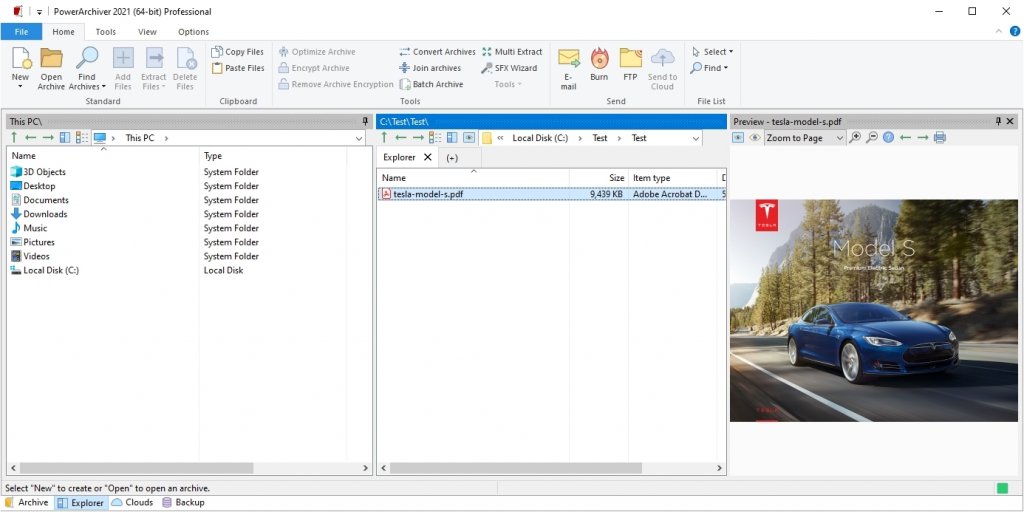
PowerArchiver has advanced GUI with beautiful skins, ability to chose many options. It fully supports 4K displays and large DPI. Touchscreen support!
Other features include Encryption with OpenPGP, Backup, Burner, Secure FTP, Convert, Repair, Batch Extract, Batch ZIP, SFX Tool, Compression Profiles, Preview, & much more.
Latest Reviews

Fafner76 reviewed v19.00.32 Preview on Mar 2, 2019
While they managed to make it quicker with the 2018 version, this one is an elephant. Takes more than 2 seconds to open, everything is laggy, I know it's a preview, but so far it's a desaster!

cyberguy reviewed v17.00.83 RC2 on Jul 8, 2017
Decent performance, but not a particularly good value for the price since there are free archivers that give you as much.

darkwzrd1 reviewed v16.00.61 Final on Feb 5, 2016
I pretty much gave up on PowerArchiver because of performance issues but with the release of 2016 that's completely changed This versions features have greatly improved over 2015. Also the Touch Screen Support is NICE and it supports ever format imaginable.

kstev99 reviewed v16.00.56 RC3 on Jan 22, 2016
I tried this, and while it is pretty good, things that I don't like are that in order to create RAR files, you must have WINRAR installed. If that is the case, why not just Use Winrar and 7zip?
Price seems a little steep... I mean ONE year of updates for $22 (Basic Version) when you can get lifetime updates of WINRAR for $21. I Own WINRAR and while I considered switching to this, I just don't see the point

Raimondas reviewed v15.00.28 Private Beta on Nov 1, 2014
Good archiver. Never had any problems. Support is also fine.
I guess PowerArchiver is the best archiver money can buy.

DKDude reviewed v15.00.28 Private Beta on Nov 1, 2014
Still the best and AWESOME support, both by email and forum.
Worth every single penny.

DrTeeth reviewed v14.06.02 on Oct 11, 2014
The best there is, PLUS excellent support via the forum.

guru_v reviewed v14.05.01 Beta on Apr 8, 2014
Up until version 9.2, this was a worthwhile addition to a toolkit. Since then, which coincides with the author's decision to make money the sole motivator [it had previously been utility to the average user] for the project, it is at best a poorly crafted, bloated helper for the seriously weak-minded.
Not useless, but not really necessary either.
DKDude reviewed v14.02.03 on Jan 8, 2014
Hands down, the best there is.

TC17 reviewed v14.00.17 Beta on Jul 6, 2013
The software really needs to change their policy about requiring a new serial number for every major update. Its just a hassle to people who have paid for it.

Fafner76 reviewed v19.00.32 Preview on Mar 2, 2019
Pros: Many options and customizations
Cons: Painfully slow to start
Bottom Line: While they managed to make it quicker with the 2018 version, this one is an elephant. Takes more than 2 seconds to open, everything is laggy, I know it's a preview, but so far it's a desaster!
cyberguy reviewed v17.00.83 RC2 on Jul 8, 2017
Pros: Good performance
Good archive extraction support
Cons: Licensing system sux. Why not a lifetime license for that price?
So-so archive creation support. Does not compress RAR. I can get the same level of support from a freebie like 7-Zip
Does not contain the level of features expected from a shareware archiver.
Bottom Line: Decent performance, but not a particularly good value for the price since there are free archivers that give you as much.
darkwzrd1 reviewed v16.00.61 Final on Feb 5, 2016
I pretty much gave up on PowerArchiver because of performance issues but with the release of 2016 that's completely changed This versions features have greatly improved over 2015. Also the Touch Screen Support is NICE and it supports ever format imaginable.
kstev99 reviewed v16.00.56 RC3 on Jan 22, 2016
I tried this, and while it is pretty good, things that I don't like are that in order to create RAR files, you must have WINRAR installed. If that is the case, why not just Use Winrar and 7zip?
Price seems a little steep... I mean ONE year of updates for $22 (Basic Version) when you can get lifetime updates of WINRAR for $21. I Own WINRAR and while I considered switching to this, I just don't see the point
Raimondas reviewed v15.00.28 Private Beta on Nov 1, 2014
Good archiver. Never had any problems. Support is also fine.
I guess PowerArchiver is the best archiver money can buy.
DKDude reviewed v15.00.28 Private Beta on Nov 1, 2014
Still the best and AWESOME support, both by email and forum.
Worth every single penny.
DrTeeth reviewed v14.06.02 on Oct 11, 2014
The best there is, PLUS excellent support via the forum.
guru_v reviewed v14.05.01 Beta on Apr 8, 2014
Up until version 9.2, this was a worthwhile addition to a toolkit. Since then, which coincides with the author's decision to make money the sole motivator [it had previously been utility to the average user] for the project, it is at best a poorly crafted, bloated helper for the seriously weak-minded.
Not useless, but not really necessary either.
DKDude reviewed v14.02.03 on Jan 8, 2014
Hands down, the best there is.
TC17 reviewed v14.00.17 Beta on Jul 6, 2013
The software really needs to change their policy about requiring a new serial number for every major update. Its just a hassle to people who have paid for it.

cetko reviewed v14.00.16 Beta 1 on Jul 5, 2013
THE BEST!
Raimondas reviewed v13.03.01 on Feb 25, 2013
Very good archiving program. I changed to PowerArchiver from WinZip Pro because WinZip charges user 10eur per year if you want to use latest version.
PowerArchiver provides lifetime upgrades but do not has 64 bit version.
Anyway, good work, keep it up!

Andem reviewed v13.01.04 Final on Sep 18, 2012
Superb file archiver. Fast and supports tons of different formats.