File Details |
|
| File Size | 3.3 MB |
|---|---|
| License | Freeware |
| Operating System | Windows (All) |
| Date Added | March 9, 2023 |
| Total Downloads | 64,720 |
| Publisher | Sysinternals |
| Homepage | Process Monitor |
Publisher's Description
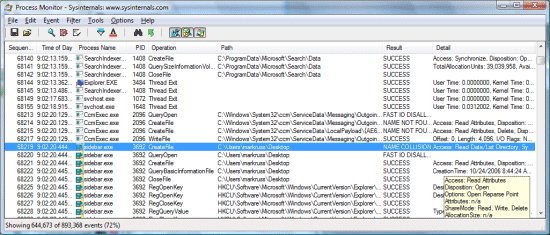
Process Monitor is an advanced monitoring tool that shows real-time file system, Registry and process/thread activity. It combines the features of two legacy Sysinternals utilities, Filemon and Regmon, and adds an extensive list of enhancements including rich and non-destructive filtering, comprehensive event properties such session IDs and user names, reliable process information, full thread stacks with integrated symbol support for each operation, simultaneous logging to a file, and much more. Its uniquely powerful features will make Process Monitor a core utility in your system troubleshooting and malware hunting toolkit.
Latest Reviews

sweathog reviewed v3.93 on Mar 10, 2023
I don't understand the adoration of SysInternals tools. Some are good; others are useless. All have very dated Windows 3.1 era GUIs. As for Process Monitor, I prefer ProcessHacker.

Music4Ever reviewed v3.02 on Jun 29, 2012
Another Sysinternals gem. Requires slight intelligence to use & can be most useful to see what's happening on a system - Another must have ~

jcollake reviewed v3.02 on Jun 28, 2012
One of those essential tools for any number of technical needs. Any time you need to know exactly what a process is accessing (registry, file, other I/O), this is your go to app. Of course, the sheer amount of information it collects means you will need to use filters, and know what you are doing in order to interpret the results. That is probably why there was user confusion. It is simply not a tool designed for end users, it is for technician level users and above.

rjparker1 reviewed v2.95 on Apr 13, 2011
-Starting this program will merely start harddisk and registry activity ad infinity by itself, thus it is worthless at actually finding out what is happening.-
Wilfried is a COMPLETE Idiot. Of course it wont do YOUR job for you, stupid ass, it's a TOOL you babbling baffoon. It is to diagnose read/writes. That is a GOOD place to start to find out what programs are causing system slow downs.
Despite what Wilfried the dork has to say, Sysinternals makes GREAT tools, no equal
Campaign to initiate deletion of stupid posts!

soldier1st reviewed v2.93 on Oct 2, 2010
A very good diagnostic type app but of course to make full use of it you need to know how to use it.

Sativarg reviewed v2.92 on Aug 31, 2010
RE: process monitors overhead "activity ad infinity"
The default filter settings remove "self" activity from the visable display. Yes Process Monitor has an impact as it works but the information it provides is well worth the slight impact it introduces.
RE:Process Monitor v2.92: This update adds a toolbar button that makes the process tree dialog more accessible. In order to make it easy to zoom in on a particular time range in a trace, it also introduces two quick-filter context menu items that enable you to filter out events before or after a selected event.

Wilfried reviewed v2.7 on Oct 5, 2009
Starting this program will merely start harddisk and registry activity ad infinity by itself, thus it is worthless at actually finding out what is happening.

tannenwheel reviewed v2.5 on Jul 26, 2009
wow, streamentry! makes live more interesting, immediately.

Undesired Username reviewed v2.02 on Oct 30, 2008
I use Filemon and Regmon as well, but only because they're much easier and faster to use when I only want to watch FSO or registry activity.

coolticker reviewed v2.01 on Oct 18, 2008
Very good and usefull !
But I still need to use the "old" FileMon and RegMon because ProcessMonitor now only work starting Win2K SP4 Rollup 1 (SP4 seems not enought) and it crashes on machines running Kaspersky anti-virus whenever you disable it, you must fully uninstall, may be because klif.sys driver is still started if you only disable/quit Kasperske (I have seen other poeple with same problem on sysinternals forum).

sweathog reviewed v3.93 on Mar 10, 2023
Pros: It is reliable software
Cons: GUI and breath of information displayed
Bottom Line: I don't understand the adoration of SysInternals tools. Some are good; others are useless. All have very dated Windows 3.1 era GUIs. As for Process Monitor, I prefer ProcessHacker.
Music4Ever reviewed v3.02 on Jun 29, 2012
Another Sysinternals gem. Requires slight intelligence to use & can be most useful to see what's happening on a system - Another must have ~
jcollake reviewed v3.02 on Jun 28, 2012
One of those essential tools for any number of technical needs. Any time you need to know exactly what a process is accessing (registry, file, other I/O), this is your go to app. Of course, the sheer amount of information it collects means you will need to use filters, and know what you are doing in order to interpret the results. That is probably why there was user confusion. It is simply not a tool designed for end users, it is for technician level users and above.
rjparker1 reviewed v2.95 on Apr 13, 2011
-Starting this program will merely start harddisk and registry activity ad infinity by itself, thus it is worthless at actually finding out what is happening.-
Wilfried is a COMPLETE Idiot. Of course it wont do YOUR job for you, stupid ass, it's a TOOL you babbling baffoon. It is to diagnose read/writes. That is a GOOD place to start to find out what programs are causing system slow downs.
Despite what Wilfried the dork has to say, Sysinternals makes GREAT tools, no equal
Campaign to initiate deletion of stupid posts!
soldier1st reviewed v2.93 on Oct 2, 2010
A very good diagnostic type app but of course to make full use of it you need to know how to use it.
Sativarg reviewed v2.92 on Aug 31, 2010
RE: process monitors overhead "activity ad infinity"
The default filter settings remove "self" activity from the visable display. Yes Process Monitor has an impact as it works but the information it provides is well worth the slight impact it introduces.
RE:Process Monitor v2.92: This update adds a toolbar button that makes the process tree dialog more accessible. In order to make it easy to zoom in on a particular time range in a trace, it also introduces two quick-filter context menu items that enable you to filter out events before or after a selected event.
Wilfried reviewed v2.7 on Oct 5, 2009
Starting this program will merely start harddisk and registry activity ad infinity by itself, thus it is worthless at actually finding out what is happening.
tannenwheel reviewed v2.5 on Jul 26, 2009
wow, streamentry! makes live more interesting, immediately.
Undesired Username reviewed v2.02 on Oct 30, 2008
I use Filemon and Regmon as well, but only because they're much easier and faster to use when I only want to watch FSO or registry activity.
coolticker reviewed v2.01 on Oct 18, 2008
Very good and usefull !
But I still need to use the "old" FileMon and RegMon because ProcessMonitor now only work starting Win2K SP4 Rollup 1 (SP4 seems not enought) and it crashes on machines running Kaspersky anti-virus whenever you disable it, you must fully uninstall, may be because klif.sys driver is still started if you only disable/quit Kasperske (I have seen other poeple with same problem on sysinternals forum).

italyx reviewed v2.01 on Oct 17, 2008
It just the answer to the question: what's going on right now?
Useful and indispensable.

poisonu reviewed v2.0 on Oct 1, 2008
Superb tool...
Btw, Process Monitor has Never supported Win 9x....

analphatester reviewed v1.35 on Jun 27, 2008
uuuuuh
win9x end ?
whyyyyyy ?