File Details |
|
| File Size | 3.2 MB |
|---|---|
| License | Freeware |
| Operating System | Windows (All) |
| Date Added | April 3, 2023 |
| Total Downloads | 159,205 |
| Publisher | Sysinternals |
| Homepage | Process Explorer |
Publisher's Description
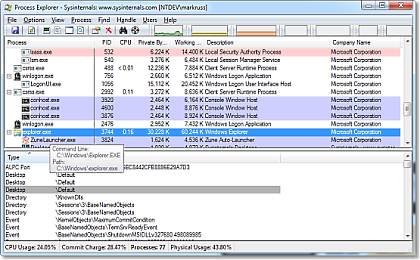
Process Explorer shows you information about which handles and DLLs processes have opened or loaded. The display consists of two sub-windows. The top always shows a list of the currently active processes, including the names of their owning accounts, whereas the information displayed in the bottom window depends on the mode that it is in. The unique capabilities make it useful for tracking down DLL-version problems or handle leaks, and provide insight into the way Windows and applications work.
Latest Reviews

roymccoy reviewed v16.1 on Jan 10, 2016
Process Explorer 16.1 changelog:
"Process Explorer now includes a column in the handle view that reports the text version of handle access masks, as well as several bug fixes including one that would result in the suspension of .NET threads when viewed via the stack dialog."

FatBastard reviewed v16.04 on Sep 12, 2014
Great program but why don't the idiots at Microsoft provide a changelog?

Andy Dean reviewed v16.03 on Aug 8, 2014
It's now been corrected. The download version is now 16.03, Autoruns has also been updated to v12.01.
Both worthy of 5 stars imo.

Zoroaster reviewed v16.03 on Aug 8, 2014
@FastBastadr : same here. In fact the developer's mistake, downloading from Sysinternals (I mean Microsoft) leads to the same 16.02 when 16.03 is displayed.
Otherwise, the Sysinternal's quality. Best Process Explorer I know.
FatBastard reviewed v16.03 on Aug 8, 2014
I love Process Explorer but when I download I get 16.02 instead of 16.03...

Blackholesun reviewed v16.01 on Feb 6, 2014
I think Process Hacker is better. Nevertheless it is still extremely good.

Yakumo reviewed v16.01 on Feb 5, 2014
Amazing app.
important fix in this version -
"This release fixes a bug that could cause a crash when the VirusTotal column is added to the process view, and another that could cause a crash when verifying digital signatures."

andi gjata reviewed v16.00 on Jan 29, 2014
Absolutely efficent and easy program to use.Developed by a trustworthy company such as Sysinternals.Recommend it using it over the standard task manager process explorer.

dhry reviewed v15.40 on Aug 2, 2013
Always used to love this program until I discovered System Explorer (http://systemexplorer.net/) a couple of years ago. The latter does everything PE does, plus a stack more - uses less memory and has a pretty neat fully configurable status window that appears when you hover over its tray icon.

allthebestnamesgone reviewed v15.31 on Jun 5, 2013
"This update fixes a bug with copying text from the process properties dialog and adds an option to disable the heatmap display in the process view."

roymccoy reviewed v16.1 on Jan 10, 2016
Process Explorer 16.1 changelog:
"Process Explorer now includes a column in the handle view that reports the text version of handle access masks, as well as several bug fixes including one that would result in the suspension of .NET threads when viewed via the stack dialog."
FatBastard reviewed v16.04 on Sep 12, 2014
Great program but why don't the idiots at Microsoft provide a changelog?
Andy Dean reviewed v16.03 on Aug 8, 2014
It's now been corrected. The download version is now 16.03, Autoruns has also been updated to v12.01.
Both worthy of 5 stars imo.
Zoroaster reviewed v16.03 on Aug 8, 2014
@FastBastadr : same here. In fact the developer's mistake, downloading from Sysinternals (I mean Microsoft) leads to the same 16.02 when 16.03 is displayed.
Otherwise, the Sysinternal's quality. Best Process Explorer I know.
FatBastard reviewed v16.03 on Aug 8, 2014
I love Process Explorer but when I download I get 16.02 instead of 16.03...
Blackholesun reviewed v16.01 on Feb 6, 2014
I think Process Hacker is better. Nevertheless it is still extremely good.
Yakumo reviewed v16.01 on Feb 5, 2014
Amazing app.
important fix in this version -
"This release fixes a bug that could cause a crash when the VirusTotal column is added to the process view, and another that could cause a crash when verifying digital signatures."
andi gjata reviewed v16.00 on Jan 29, 2014
Absolutely efficent and easy program to use.Developed by a trustworthy company such as Sysinternals.Recommend it using it over the standard task manager process explorer.
dhry reviewed v15.40 on Aug 2, 2013
Always used to love this program until I discovered System Explorer (http://systemexplorer.net/) a couple of years ago. The latter does everything PE does, plus a stack more - uses less memory and has a pretty neat fully configurable status window that appears when you hover over its tray icon.
allthebestnamesgone reviewed v15.31 on Jun 5, 2013
"This update fixes a bug with copying text from the process properties dialog and adds an option to disable the heatmap display in the process view."
FatBastard reviewed v15.31 on Jun 5, 2013
I'd be lost without this magnificent program.
allthebestnamesgone reviewed v15.3 on Feb 7, 2013
Process Explorer v15.3: This major Process Explorer release includes heat-map display for process CPU, private bytes, working set and GPU columns, sortable security groups in the process properties security page, and tooltip reporting of tasks executing in Windows 8 Taskhostex processes. It also creates dump files that match the bitness of the target process and works around a bug introduced in Windows 8 disk counter reporting.

JeremyP reviewed v15.23 on Oct 5, 2012
Kuhgi. Runs fine on this Win 7 64 bit machine, with admin privs. Indeed,.I have never had a problem running it. Sounds like your privileges are bunned.