
File Details |
|
| File Size | 62.1 MB |
|---|---|
| License | Commercial Demo, $79.99 |
| Operating System | Windows (All) |
| Date Added | December 30, 2020 |
| Total Downloads | 24,915 |
| Publisher | R-tools Technology Inc. |
| Homepage | R-Studio |
Publisher's Description
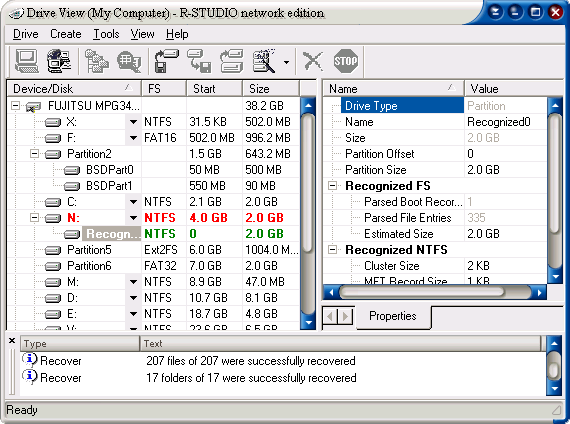
R-Studio is a comprehensive data recovery and undelete program renowned for its ability to recover mission-critical data lost to viruses, malicious attacks, and hardware failures or operating system crashes. It supports FAT/NTFS (Windows), exFAT(WinMobile, Windows Vista and Windows 7), HFS/HFS+ (Mac), UFS1/UFS2 & Ext2FS/3FS file systems and functions on local and network disks, even if partitions are formatted, damaged or deleted. 64-bit Windows versions are supported. Additional file recovery algorithm increases the quality of file recovery and recovers files not recognized in file system metadata. Dynamic disk and RAID (including RAID 6) are supported as well as recovering encrypted files, compressed files and alternative data streams. Files and file systems structures (NTFS/FAT boot sectors, MFT file record, MBR, LDM structures, etc) can be viewed and edited in the professional disk hex editor. In addition to byte to byte copy of any object visible in the Drives panel, smart copy of partitions and hard drives with size and offset adjustment is available. Extended Viewer Plugin allows viewing a content of the found files to estimate recovery chances prior to purchasing. Flexible parameter settings give you absolute control over data recovery.
Latest Reviews

ghammer reviewed v7.7 Build 159213 on Jul 28, 2015
Still the best after all these years. Nothing else comes close when you REALLY need your files, don't waste time, get this and recover whatever you need.
No peer for this one app.

some guy reviewed v7.2 Build 155152 on Jul 9, 2014
so much negativity from the developers, never seen your name on any other reviews, it almost like your rating your own software tusk tusk oh and Recuva does a better job

Karol Mily reviewed v7.2 Build 155117 on Jun 9, 2014
Still one of the best in class.
Worth of money.
I am a long years user on Windows XP and Windows 7 Pro. Using regulary on deleted files and partitions or reformated HDs.

Artem S. Tashkinov reviewed v6.0 Build 152012 on Jul 20, 2012
@some guy
Can you post a real review instead of throwing baseless accusations?
Have you even used this application? I am sure you haven't, so why are you here?
ghammer reviewed v6.0 build 151275 on Jun 8, 2012
Just to counter the no review of some g**, er, guy.
Whatever.
This is the finest drive/file recovery tool going.
Find a better one if you're gonna rate this one low. Or, didn't you have the cash to buy it?
ghammer reviewed v5.3 Build 132947 on Oct 7, 2010
In short, this works when other recovery apps throw in the towel.
In fact, I've never had this tool fail to recover files for me.

Chrisyboy reviewed v5.2 Build 130701 on Apr 28, 2010
The interface is a bit clunky, but I've tried a lot of different file recovery programs and this is the one I always turn to. Deleted files, corrupt filesystems, damaged drives; R-Studio recovers data where other programs can't even detect it. Highly recommended.
Artem S. Tashkinov reviewed v5.2 Build 130695 on Mar 26, 2010
Changelog:
Improvements:
* The legend in the Raid control hides automatically if there is not enough space for more important elements.
* A new folder/file path widget is added.
* Validation for folder/file paths is improved where it applicable.
* Text/hexadecimal editor: hints are added to the status bar for the Stop and Auto flow buttons
* Text/hexadecimal editor: Data view pane is better displayed.
* Menu items belonging to inactive panels are blocked.
* A confirmation message for deleting a remote computer contains now the name of the computer to be deleted.
* File names in the Forensic Log dialog box are checked for their consistency.
* Characters entered into the Rename and change all invalid symbols to field are checked for their consistency.
= Changes
= Existing image files are re-written in the image file creation task rather than in the image file creation dialog box.
= The Recover dialog box requires that the path for recovered files be full.
Fixed:
- It was possible to enter 0MB and 0GB into the Size field on the Scan dialog box and start scanning. Fixed.
- When files were marked on the Find Results panel using the Mark command on the shortcut menu, the files were not immediately marked. Fixed.
- When the RAID control was resized, some internal controls might have invalid sizes. Fixed.
- If an image file is to be overwritten, no warning was shown and the files was overwritten. Fixed.
- Scan progress was not shown in the Simple mode. Fixed.
- There was no warning message if an incorrect path for recovered files was entered into the Output folder field on the Recover dialog box.
- The Remote Computer radio button appeared on the Recover dialog box when files from an open *.arc image file were saved. Fixed.
- The Open Image File dialog box (instead of the Save Image File one) appeared when an image file was to be saved. Fixed.
- If a file extension was removed on the Create Image dialog box, the file extension was not added automatically when the file type was changed. Fixed.
- There were errors when valid XML files were loaded. Fixed.
- An empty error message appeared when any value was completely deleted on the Properties pane in the debug mode. Fixed.
- File recovery errors were logged two times. Fixed.
- Text/hexadecimal editor could be opened from the Scan Information panel while scanning. Fixed.
Text/hexadecimal editor:
- Data was edited incorrectly outside 32-bit offsets.
- The Tools/Enable Write menu was active when read-only files (or files on CD discs) were opened. Fixed.
- Files not always could be changed. Fixed.
- Corrections in searches for template signatures.
- Corrections in jumps to the position necessary to display data when a template parameter is clicked.
- Corrections in jumps to the position displayed in Template offset on the Templates pane.
Artem S. Tashkinov reviewed v5.2 Build 130690 on Mar 10, 2010
New features:
+ In-place saving of recovered files on a remote computer. When recovering data on a remote computer over network, R-Studio can now save recovered files on another disk of the same remote computer, on an external USB hard drive, for example. Moreover, such remote computer can be connected to the Internet rather than to a local network. This feature is especially useful for data recovery technicians and corporations who can now serve their clients truly remotely over the Internet and do not need to transfer large volumes of data over network. In addition, files recovered from a remote compute can be saved on a local computer or on another internet-connected remote computer with R-Studio Agent running.
+ Forensic mode (Technician version only). In this mode R-Studio generates a forensic data collection audit log that can be presented at court hearings. This log includes information about a hardware configuration on which the forensic data collection takes place and MD5 for recovered files.
+ Clickable links in Text/hexadecimal editor. Those links provide direct jumps to important parts of objects being analyzed and edited.
Improvements:
* The file recovery over network is optimized to make it faster.
* More recovery statistics is added to Log.
* R-Studio constantly updates marked file statistics while recovering files.
* The RAID View top hint can be hidden to save extra space in low resolution environments
* Search performance is improved in Text/Hexadecimal editor.
* Data validators are added to many dialog boxes.
Changes:
= When remote computers are connected, the Recover dialog is changed to reflect the new network file recovery features.
= If Restore from root is not selected, R-Studio creates the recovered folder structure starting from the folders below the lowest common folder.
= All log files are saved using the UTF-8 encoding.
Bugfixes:
- Recognized partitions are removed from the destination device tree in Drive Copy Wizard.
- Sometimes R-Studio might crash after a disk scan (Windows Vista and Server 2008 were especially affected). Fixed.
- Sometimes R-Studio might crash when files were recovered from FAT32 under Windows XP. Fixed.
- Sometimes R-Studio might crash when recovering files with bad sectors if Skip files with bad sectors was selected. Fixed.
- Sometimes the There is not enough space on the disk message might appear when recovered files were saved to a flash or network drive. Fixed.
- Scan information might disappear after switching to another tab on Property View and switching back to the Scan Information tab. Fixed.
- Sometimes R-Studio unexpectedly might stop searching for files. Fixed.
- Sometimes Open Drive Files showed no files. Fixed
- Sector size was incorrectly displayed on the Properties panel if View as sectors was selected. Fixed.
- Multiple cosmetic bugs are fixed.
Text/hexadecimal editor:
- Multiple bugs are fixed in the Search process. That includes search parameter handling, unexpected search stops, the Continue Find command didn't work in the Find Results panel, and many others.
- Cursor might be placed incorrectly when its position was changed. Fixed.
- There was no warning if an out-of-range value was entered into the Go filed. Fixed.
- The Copy command worked incorrectly. Fixed.
- Data was incorrectly displayed when the ANSI, OEM, UNICODE, UNICODE+ columns were turned on/off. Fixed.
- Copying of large amount of data was incorrect. Fixed.
- An area was selected if Shift-F3 were used during a search. Fixed.
Artem S. Tashkinov reviewed v5.1 Build 130037 on Dec 17, 2009
Changelogs are published here: http://forum.r-tt.com/viewforum.php?f=5
Here's a changelog for R-Studio v5.1 Build 130037:
New features:
+ A name of a remote computer as now shown as a label in the Drives pane.
+ A confirmation is required to delete a node in the Drives pane
+ Some headers are resizable (Bookmarks view, Scan Information dialog, Scan Dialog Advanced)
+ Now the log shows the number of successfully unsuccessfully recovered files.
Improvements:
* Text/hexadecimal editor: Both text and binary data are copied now.
Changes:
= An internal XML parser works correctly with the UTF-8 encoding.
= Text/hexadecimal editor: The Find Results pane is changed.
= FS snapshots can be created for recognized partitions.
Bugfixes
- Invalid characters can now be edited in the Broken file name dialog box.
- Files with bad sectors are correctly recovered now.
- Actions in the Find Results pane are disabled now when some other tasks are being performed.
- R-Studio now recovers files under Windows 98.
- Command states (Enabled/disabled) are now updated in the menu.
- Extra found files and Recognized partitions are removed from the Copy to… wizard.
- No more possible crashes during scan progress display.
- Text/hexadecimal editor: No more crashes when no fill pattern is specified in the Fill dialog box.
- Text/hexadecimal editor: The MFT file record template works now correctly.
- Text/hexadecimal editor: The Save changes button works now after a Copy/Paste operation.

ghammer reviewed v7.7 Build 159213 on Jul 28, 2015
Still the best after all these years. Nothing else comes close when you REALLY need your files, don't waste time, get this and recover whatever you need.
No peer for this one app.
some guy reviewed v7.2 Build 155152 on Jul 9, 2014
so much negativity from the developers, never seen your name on any other reviews, it almost like your rating your own software tusk tusk oh and Recuva does a better job
Karol Mily reviewed v7.2 Build 155117 on Jun 9, 2014
Still one of the best in class.
Worth of money.
I am a long years user on Windows XP and Windows 7 Pro. Using regulary on deleted files and partitions or reformated HDs.
Artem S. Tashkinov reviewed v6.0 Build 152012 on Jul 20, 2012
@some guy
Can you post a real review instead of throwing baseless accusations?
Have you even used this application? I am sure you haven't, so why are you here?
ghammer reviewed v6.0 build 151275 on Jun 8, 2012
Just to counter the no review of some g**, er, guy.
Whatever.
This is the finest drive/file recovery tool going.
Find a better one if you're gonna rate this one low. Or, didn't you have the cash to buy it?
ghammer reviewed v5.3 Build 132947 on Oct 7, 2010
In short, this works when other recovery apps throw in the towel.
In fact, I've never had this tool fail to recover files for me.
Chrisyboy reviewed v5.2 Build 130701 on Apr 28, 2010
The interface is a bit clunky, but I've tried a lot of different file recovery programs and this is the one I always turn to. Deleted files, corrupt filesystems, damaged drives; R-Studio recovers data where other programs can't even detect it. Highly recommended.
Artem S. Tashkinov reviewed v5.2 Build 130695 on Mar 26, 2010
Changelog:
Improvements:
* The legend in the Raid control hides automatically if there is not enough space for more important elements.
* A new folder/file path widget is added.
* Validation for folder/file paths is improved where it applicable.
* Text/hexadecimal editor: hints are added to the status bar for the Stop and Auto flow buttons
* Text/hexadecimal editor: Data view pane is better displayed.
* Menu items belonging to inactive panels are blocked.
* A confirmation message for deleting a remote computer contains now the name of the computer to be deleted.
* File names in the Forensic Log dialog box are checked for their consistency.
* Characters entered into the Rename and change all invalid symbols to field are checked for their consistency.
= Changes
= Existing image files are re-written in the image file creation task rather than in the image file creation dialog box.
= The Recover dialog box requires that the path for recovered files be full.
Fixed:
- It was possible to enter 0MB and 0GB into the Size field on the Scan dialog box and start scanning. Fixed.
- When files were marked on the Find Results panel using the Mark command on the shortcut menu, the files were not immediately marked. Fixed.
- When the RAID control was resized, some internal controls might have invalid sizes. Fixed.
- If an image file is to be overwritten, no warning was shown and the files was overwritten. Fixed.
- Scan progress was not shown in the Simple mode. Fixed.
- There was no warning message if an incorrect path for recovered files was entered into the Output folder field on the Recover dialog box.
- The Remote Computer radio button appeared on the Recover dialog box when files from an open *.arc image file were saved. Fixed.
- The Open Image File dialog box (instead of the Save Image File one) appeared when an image file was to be saved. Fixed.
- If a file extension was removed on the Create Image dialog box, the file extension was not added automatically when the file type was changed. Fixed.
- There were errors when valid XML files were loaded. Fixed.
- An empty error message appeared when any value was completely deleted on the Properties pane in the debug mode. Fixed.
- File recovery errors were logged two times. Fixed.
- Text/hexadecimal editor could be opened from the Scan Information panel while scanning. Fixed.
Text/hexadecimal editor:
- Data was edited incorrectly outside 32-bit offsets.
- The Tools/Enable Write menu was active when read-only files (or files on CD discs) were opened. Fixed.
- Files not always could be changed. Fixed.
- Corrections in searches for template signatures.
- Corrections in jumps to the position necessary to display data when a template parameter is clicked.
- Corrections in jumps to the position displayed in Template offset on the Templates pane.
Artem S. Tashkinov reviewed v5.2 Build 130690 on Mar 10, 2010
New features:
+ In-place saving of recovered files on a remote computer. When recovering data on a remote computer over network, R-Studio can now save recovered files on another disk of the same remote computer, on an external USB hard drive, for example. Moreover, such remote computer can be connected to the Internet rather than to a local network. This feature is especially useful for data recovery technicians and corporations who can now serve their clients truly remotely over the Internet and do not need to transfer large volumes of data over network. In addition, files recovered from a remote compute can be saved on a local computer or on another internet-connected remote computer with R-Studio Agent running.
+ Forensic mode (Technician version only). In this mode R-Studio generates a forensic data collection audit log that can be presented at court hearings. This log includes information about a hardware configuration on which the forensic data collection takes place and MD5 for recovered files.
+ Clickable links in Text/hexadecimal editor. Those links provide direct jumps to important parts of objects being analyzed and edited.
Improvements:
* The file recovery over network is optimized to make it faster.
* More recovery statistics is added to Log.
* R-Studio constantly updates marked file statistics while recovering files.
* The RAID View top hint can be hidden to save extra space in low resolution environments
* Search performance is improved in Text/Hexadecimal editor.
* Data validators are added to many dialog boxes.
Changes:
= When remote computers are connected, the Recover dialog is changed to reflect the new network file recovery features.
= If Restore from root is not selected, R-Studio creates the recovered folder structure starting from the folders below the lowest common folder.
= All log files are saved using the UTF-8 encoding.
Bugfixes:
- Recognized partitions are removed from the destination device tree in Drive Copy Wizard.
- Sometimes R-Studio might crash after a disk scan (Windows Vista and Server 2008 were especially affected). Fixed.
- Sometimes R-Studio might crash when files were recovered from FAT32 under Windows XP. Fixed.
- Sometimes R-Studio might crash when recovering files with bad sectors if Skip files with bad sectors was selected. Fixed.
- Sometimes the There is not enough space on the disk message might appear when recovered files were saved to a flash or network drive. Fixed.
- Scan information might disappear after switching to another tab on Property View and switching back to the Scan Information tab. Fixed.
- Sometimes R-Studio unexpectedly might stop searching for files. Fixed.
- Sometimes Open Drive Files showed no files. Fixed
- Sector size was incorrectly displayed on the Properties panel if View as sectors was selected. Fixed.
- Multiple cosmetic bugs are fixed.
Text/hexadecimal editor:
- Multiple bugs are fixed in the Search process. That includes search parameter handling, unexpected search stops, the Continue Find command didn't work in the Find Results panel, and many others.
- Cursor might be placed incorrectly when its position was changed. Fixed.
- There was no warning if an out-of-range value was entered into the Go filed. Fixed.
- The Copy command worked incorrectly. Fixed.
- Data was incorrectly displayed when the ANSI, OEM, UNICODE, UNICODE+ columns were turned on/off. Fixed.
- Copying of large amount of data was incorrect. Fixed.
- An area was selected if Shift-F3 were used during a search. Fixed.
Artem S. Tashkinov reviewed v5.1 Build 130037 on Dec 17, 2009
Changelogs are published here: http://forum.r-tt.com/viewforum.php?f=5
Here's a changelog for R-Studio v5.1 Build 130037:
New features:
+ A name of a remote computer as now shown as a label in the Drives pane.
+ A confirmation is required to delete a node in the Drives pane
+ Some headers are resizable (Bookmarks view, Scan Information dialog, Scan Dialog Advanced)
+ Now the log shows the number of successfully unsuccessfully recovered files.
Improvements:
* Text/hexadecimal editor: Both text and binary data are copied now.
Changes:
= An internal XML parser works correctly with the UTF-8 encoding.
= Text/hexadecimal editor: The Find Results pane is changed.
= FS snapshots can be created for recognized partitions.
Bugfixes
- Invalid characters can now be edited in the Broken file name dialog box.
- Files with bad sectors are correctly recovered now.
- Actions in the Find Results pane are disabled now when some other tasks are being performed.
- R-Studio now recovers files under Windows 98.
- Command states (Enabled/disabled) are now updated in the menu.
- Extra found files and Recognized partitions are removed from the Copy to… wizard.
- No more possible crashes during scan progress display.
- Text/hexadecimal editor: No more crashes when no fill pattern is specified in the Fill dialog box.
- Text/hexadecimal editor: The MFT file record template works now correctly.
- Text/hexadecimal editor: The Save changes button works now after a Copy/Paste operation.

jojobah reviewed v5.1 Build 130027 on Nov 14, 2009
This utility simply works. I tried other recovery programs when my hard drive failed with 80,000+ music files. R-Studio was the only one that recovered them all.

ravemanson reviewed v4.6 Build 128035 on Jun 15, 2009
This is the ONLY recovery application of all the dozens i've tried that first of all doesn't make me feel like a total idiot using it, and that actually DOES find all those lost files with a simple and very quick scan of the drive, which presents the found files in a windows-like tree. 6 / 5 (Beyond compare)

plasticpig72 reviewed v4.6 Build 127539 on Feb 13, 2009
This is the best recovery program I have ever used. I have recovered files from damaged disks that programs have even failed to recognise the existence of the disk that the files are on.