File Details |
|
| File Size | 3.7 MB |
|---|---|
| License | Freeware |
| Operating System | Windows (All) |
| Date Added | May 29, 2019 |
| Total Downloads | 19,268 |
| Publisher | Denis Kozlov |
| Homepage | ReNamer |
Publisher's Description
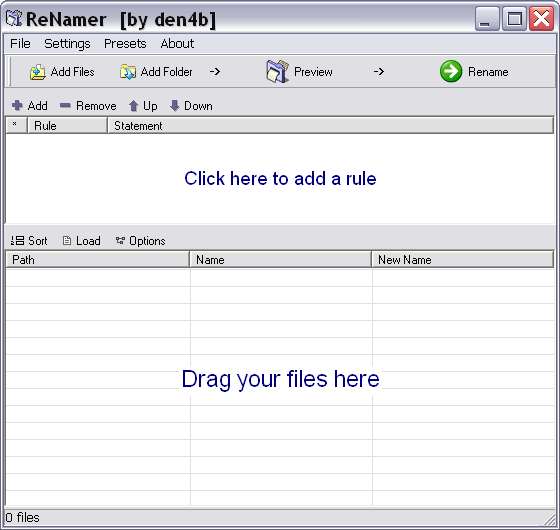
ReNamer is a very powerful and flexible file renaming tool, which offers all the standard renaming procedures, including prefixes, suffixes, replacements, case changes, as well as removing contents of brackets, adding number sequences, changing file extensions, etc. For advanced users there is support for Regular Expressions and a PascalScript rule, which lets users program their very own renaming rule.
Program allows you to combine multiple renaming actions as a rule set, applying each action in a logical sequence, which can be saved, loaded, and managed within the program. In addition, it has an ability to rename folders, process regular expressions, Unicode capable, and supports variety of meta tags, such as: ID3v1, ID3v2, EXIF, OLE, AVI, MD5, CRC32, and SHA1.
Latest Reviews

Antichrist reviewed v6.2 on May 7, 2015
I don't like the limit on the free version so I'm still using the last fully free version. I'll probably pay for the pro version one day, I can't begrudge the dude for wanting to make money off his work. I've tried a lot of renaming programs, but after becoming familiar with this one I just don't like any others, and using presets in this one is great. It makes things as simple as it can but it's really powerful.

davidpaine reviewed v5.75.2 Beta on May 9, 2014
I have used ReNamer for a long time and in some tricky situations. It has served me well, saved me a lot of time, and saved me from errors I might have made manually renaming lots of files.
I had expected to someday donate money to the program author. With the split between the Lite and Pro versions, it was time to follow through on my good intentions and pay for the product. I am finding the Pro version even better than the free version that I had been using.
David P

darkNiGHTS reviewed v5.74 on Mar 26, 2014
Crippleware as detailed on their website. Not paying $20 just to have unlimited presets, there are definitely better options for that price (or comparable for free).

OverBurn65 reviewed v5.74 on Jan 30, 2014
Was my favorite free file renamer, but after version 5.70 it's crippled and not even worth downloading now. If you want a pay version better options are available.

krgood reviewed v5.74 on Dec 27, 2013
Listing crippleware as freeware is the ultimate insult. No matter how "good" a product is, to milead users with something like this is beyond reproach. I think Betanews should require the true nature of all products offered here.
I understand that developers want to be compensated for their work and have no problem with that. What I despise is situations like this and will not use a program that is crippled with the intent of getting paid. You will get a better acceptance with a full working copy with a time limit (30 days etc). I stopped using any program that requires me to "rebuy" it every time they feel like changing the version number and make some simple change just to get additional funds..
If you are a photographer (as I am) and want a good rename program for your thunbnails, then try ThumbsPlus. It is trial ware and gives you the time to see how it works and is reasonably priced. Works well and is well worth the money..

BANDIT- reviewed v5.73 on Nov 6, 2013
@den4b. A nice little Forum you've got there my Friend. I looked at the Lite version. The Lite version is TOO LITE. -http://www.den4b.com/?x=compare
Here's some Competition. http://fileforum.betanew...ed-Renamer/1206818555/1
Sorry M8..!! ...... Only 2*

den4b reviewed v5.73 on Nov 5, 2013
ReNamer has split up into Lite and Pro editions, where Lite is limited to non-commercial usage and has limit of a maximum of 5 rules and 5 presets at a time (you can still remove them and create new once endlessly).
The project simply could no longer survive without financial support, in order maintain the development. There is a full explanation and reasoning behind this unfortunate but a necessary move published on the forum, please read it here: http://www.den4b.com/forum/viewtopic.php?id=1851
In regards to "OAKsider" and "smaragdus" comments. I am very sorry to hear about your disappointment, but I hope that it will be compensated by the continued development and support for years to come, rather than a dead project and complete abandonment of all products.

OAKsider reviewed v5.72.5 Beta on Oct 11, 2013
Thanks for the news, smaragdus. You are absolutely correct, sadly. The new Lite (freeware) version is limited to 5 presets and 5 rules, which is a significant downgrade (if not unusable) for many users of ReNamer. The Pro version is over $20. I believe I've donated to the author at least once, but don't expect that to go towards a Pro license.

smaragdus reviewed v5.72.5 Beta on Oct 11, 2013
The last free version of ReNamer was 5.71. Since then ReNamer exists in two versions- Lite, which is a severely crippled Demo, and Pro- which is the ReNamer prior to version 5.72 but costs 14.95 EUR. The Lite is absolutely useless while there are really good and even better alternatives to Pro.
OAKsider reviewed v5.50 on May 5, 2011
Totally, absolutely, positively excellent. Tiny, infinitely customizable ReNamer that does it all. Just try it.

Antichrist reviewed v6.2 on May 7, 2015
I don't like the limit on the free version so I'm still using the last fully free version. I'll probably pay for the pro version one day, I can't begrudge the dude for wanting to make money off his work. I've tried a lot of renaming programs, but after becoming familiar with this one I just don't like any others, and using presets in this one is great. It makes things as simple as it can but it's really powerful.
davidpaine reviewed v5.75.2 Beta on May 9, 2014
I have used ReNamer for a long time and in some tricky situations. It has served me well, saved me a lot of time, and saved me from errors I might have made manually renaming lots of files.
I had expected to someday donate money to the program author. With the split between the Lite and Pro versions, it was time to follow through on my good intentions and pay for the product. I am finding the Pro version even better than the free version that I had been using.
David P
darkNiGHTS reviewed v5.74 on Mar 26, 2014
Crippleware as detailed on their website. Not paying $20 just to have unlimited presets, there are definitely better options for that price (or comparable for free).
OverBurn65 reviewed v5.74 on Jan 30, 2014
Was my favorite free file renamer, but after version 5.70 it's crippled and not even worth downloading now. If you want a pay version better options are available.
krgood reviewed v5.74 on Dec 27, 2013
Listing crippleware as freeware is the ultimate insult. No matter how "good" a product is, to milead users with something like this is beyond reproach. I think Betanews should require the true nature of all products offered here.
I understand that developers want to be compensated for their work and have no problem with that. What I despise is situations like this and will not use a program that is crippled with the intent of getting paid. You will get a better acceptance with a full working copy with a time limit (30 days etc). I stopped using any program that requires me to "rebuy" it every time they feel like changing the version number and make some simple change just to get additional funds..
If you are a photographer (as I am) and want a good rename program for your thunbnails, then try ThumbsPlus. It is trial ware and gives you the time to see how it works and is reasonably priced. Works well and is well worth the money..
BANDIT- reviewed v5.73 on Nov 6, 2013
@den4b. A nice little Forum you've got there my Friend. I looked at the Lite version. The Lite version is TOO LITE. -http://www.den4b.com/?x=compare
Here's some Competition. http://fileforum.betanew...ed-Renamer/1206818555/1
Sorry M8..!! ...... Only 2*
den4b reviewed v5.73 on Nov 5, 2013
ReNamer has split up into Lite and Pro editions, where Lite is limited to non-commercial usage and has limit of a maximum of 5 rules and 5 presets at a time (you can still remove them and create new once endlessly).
The project simply could no longer survive without financial support, in order maintain the development. There is a full explanation and reasoning behind this unfortunate but a necessary move published on the forum, please read it here: http://www.den4b.com/forum/viewtopic.php?id=1851
In regards to "OAKsider" and "smaragdus" comments. I am very sorry to hear about your disappointment, but I hope that it will be compensated by the continued development and support for years to come, rather than a dead project and complete abandonment of all products.
OAKsider reviewed v5.72.5 Beta on Oct 11, 2013
Thanks for the news, smaragdus. You are absolutely correct, sadly. The new Lite (freeware) version is limited to 5 presets and 5 rules, which is a significant downgrade (if not unusable) for many users of ReNamer. The Pro version is over $20. I believe I've donated to the author at least once, but don't expect that to go towards a Pro license.
smaragdus reviewed v5.72.5 Beta on Oct 11, 2013
The last free version of ReNamer was 5.71. Since then ReNamer exists in two versions- Lite, which is a severely crippled Demo, and Pro- which is the ReNamer prior to version 5.72 but costs 14.95 EUR. The Lite is absolutely useless while there are really good and even better alternatives to Pro.
OAKsider reviewed v5.50 on May 5, 2011
Totally, absolutely, positively excellent. Tiny, infinitely customizable ReNamer that does it all. Just try it.

Raysy reviewed v14Jan2009 Beta on Nov 12, 2009
Great app, easy to use but with powerful features! And free:-)

phersh reviewed v14Jan2009 Beta on Jun 1, 2009
It takes just a very few minutes to understand this great piece of software, but it is well worth it. It is powerful and useful.

aloishammer reviewed v5Dec2008 Beta on Jan 18, 2009
Just about the perfect app. Every feature I could possibly want, and darned small.