
File Details |
|
| File Size | 1.0 MB |
|---|---|
| License | Freeware |
| Operating System | Windows 7/8/10/Vista/XP |
| Date Added | May 13, 2018 |
| Total Downloads | 2,267,879 |
| Publisher | Hover Inc. |
| Homepage | RegSeeker |
Publisher's Description
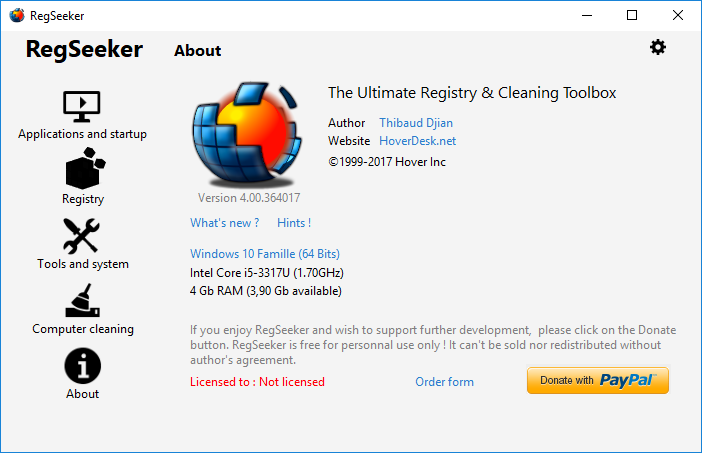
RegSeeker is the all-in-one toolbox for your Windows. It includes a powerful registry search and cleaner tool. Take full control of your startup entries, services, drivers, histories, junk files (protect your privacy), installed applications, browsers extensions, and more. With RegSeeker you'll exactly know what is installed and running on your PC.
Latest Reviews

BANDIT- reviewed v2.57 on Mar 20, 2014
#NOT TESTED#
I'm not gonna test this App because I've looked at the screenshots @Homepage, & I've seen it all before. The same sort of UI. The same Old tools.. Yawn..!! .... However. There's a very mixed bag of opinions in the reviews. I've gotta tag along with the critics rather than the high raters.
I picked up on a couple of various points, So here comes my (1p peneth).
System restore is NO use whatsoever if your system crashes due to Registry Errors. A backup of the Registry is neither use nor ornament if it isn't Exported as "Hive" files. A backup saved as (*.reg) will NOT overwrite corruption, whereas "Hive" files will. I'm not getting into the ethics tho.
If you're an avid user of registry cleaners... Try this.
Start>>Run ... & type ... Eventvwr .. Click OK.
Application. Security. System. In the Left panel.
Click on them one at a time... IF, you're loaded up with REDS in the Right panel. A lot of that "Can be" due to Registry cleaners, Improper Shutdowns,
BSOD's, and many .. many other Issues. Corruption mounts up.
Finally. Anyone who thinks a Reg Cleaner will BOOST, or make their system super FAST, is living in a world of "Make believe". Those words are selling points. Making your system faster by Reg Cleaning OR Reg hacking is a myth.
"Faster".... Is measured in MilliSeconds, So you wouldn't even know.
A good registry is an Untouched one. BUT..!! .. Viruses/Trojans will add & delete keys. So It's all a bit Dodgy. "Roundabouts & Swings". Here's a starter for anyone who wants to know a bit about the "Heart" of their System. @http://support.microsoft.com/kb/256986 ...... Keep Safe... ~_^

barrytbutler reviewed v2.55 on Jan 29, 2014
i hate the fact that delta tool bar comes with this thing, so sneaky.

harrydevlin reviewed v2.55 on Oct 6, 2013
"Clean the Registry" always fails at 11% with a "type de donnes incorrectes pour" error, whatever that means.
From doing a Google search, it appears that users of RegSeeker have been having this issue with this program for more than a decade, and it still isn't fixed, nor is there any explanation of what causes it or how to get around it..

olivergiving reviewed v2.55 on Sep 25, 2013
cool!

Lsavagejt reviewed v2.55 on Jul 26, 2013
Deceptively bundled with Delta toolbar. Loads BHO's. RegSeeker will not remove Delta toolbar reg keys. BitDefender flags this garbage.

gatorfan95 reviewed v2.5 on May 6, 2013
Like all registry cleaners, don't use that feature unless you know what you are doing, eventually you will regret it., The rest of the program seems pretty solid, 4 stars for the over all program, minus one star for implying anyone can use it to clean their registry without caution.

dubstepmaker reviewed v2.1 on Feb 14, 2013
definitely dont use the cleaner part, the rest of the program is great though.

nvic reviewed v2.1 on Jan 3, 2013
Works, but wouldn't recommend the cleaner part. I tried it on a few VMs letting it fix everything it finds: Trashed 2, broke a few programs on 1, and no issue on 3 others.
The "Find in Registry" tool is invaluable though when removing leftovers. It makes cleaning up messy apps like AOL and Symantec products easy if you know what you're looking for and actually understand the results. Makes regedit's search look like junk.

solant reviewed v2.1 on Jan 3, 2013
I have used this app for many yrs and the only time my PC got hosed after using this is when I got stupid and started blasting everything pretty much blindly.

Zootopia3001 reviewed v2.1 Beta on Dec 28, 2012
@Music4Ever..."A registry backup is of no value in a non booting PC which is a likely conclusion if you use this program"
Not really so. There are many ways to restore a corrupt PC registry. My choice: Creating a System State backup of the registry using MS's Backup Utility 'Advanced' mode. That way I can boot into 'Repair' mode if need be and the registry backup will be used for restoring the PC to its last backed up registry state. ERUNT(Emergency Recovery Utility NT) also provides a method to restore via DOS mode. Windows System Restore would be another way in some situations, though I don't like Windows System Restore(I disable it personally).
Overall, I don't recommend regcleaners. Only for folks that are very PC savvy, having much experience in restoring PC's and fixing problems on their own. However, Windows Vista and Windows 7 are a more tricky situation(ERUNT has documentation on this for a workaround).
Update: @Music4Ever... For me, with all the software I try, uninstall later on if I don't like or find I don't really use anymore, bad or unwanted updates, stuff maybe installed by mistake by others in the family and whatever other reason, I find the need to clean that registry out from time to time due to a good many uninstallers being so, so sloppy that they leave oodles and oodles of garbage left behind in the registry. But, that's just me. It seems you would like to see regcleaners banned for all. That's as bad as others wanting to see your TOR use banned. To each his own. It's a free country brother. We ain't China, at least not yet. BTW, if I were to recommend a regcleaner, the only one I would trust would be from Macecraft(jv16 Powertools). However, even theirs has gotten overly aggressive over the years, but they do have an option for a 'Normal' mode(now called 'Safe' mode), of which I would only recommend with their new versions. These makers of regcleaners ran afoul when each was trying to outdo the other by saying theirs cleaned more than their competitor(s). That's really where the problems lies with regcleaners these days... Trying to be the biggest and baddest on the block and ending up possibly ruining systems in the process. I'll give this particular regcleaner 1 star just to make you happy. Really don't matter to me. I don't use it and never will.

BANDIT- reviewed v2.57 on Mar 20, 2014
#NOT TESTED#
I'm not gonna test this App because I've looked at the screenshots @Homepage, & I've seen it all before. The same sort of UI. The same Old tools.. Yawn..!! .... However. There's a very mixed bag of opinions in the reviews. I've gotta tag along with the critics rather than the high raters.
I picked up on a couple of various points, So here comes my (1p peneth).
System restore is NO use whatsoever if your system crashes due to Registry Errors. A backup of the Registry is neither use nor ornament if it isn't Exported as "Hive" files. A backup saved as (*.reg) will NOT overwrite corruption, whereas "Hive" files will. I'm not getting into the ethics tho.
If you're an avid user of registry cleaners... Try this.
Start>>Run ... & type ... Eventvwr .. Click OK.
Application. Security. System. In the Left panel.
Click on them one at a time... IF, you're loaded up with REDS in the Right panel. A lot of that "Can be" due to Registry cleaners, Improper Shutdowns,
BSOD's, and many .. many other Issues. Corruption mounts up.
Finally. Anyone who thinks a Reg Cleaner will BOOST, or make their system super FAST, is living in a world of "Make believe". Those words are selling points. Making your system faster by Reg Cleaning OR Reg hacking is a myth.
"Faster".... Is measured in MilliSeconds, So you wouldn't even know.
A good registry is an Untouched one. BUT..!! .. Viruses/Trojans will add & delete keys. So It's all a bit Dodgy. "Roundabouts & Swings". Here's a starter for anyone who wants to know a bit about the "Heart" of their System. @http://support.microsoft.com/kb/256986 ...... Keep Safe... ~_^
barrytbutler reviewed v2.55 on Jan 29, 2014
i hate the fact that delta tool bar comes with this thing, so sneaky.
harrydevlin reviewed v2.55 on Oct 6, 2013
"Clean the Registry" always fails at 11% with a "type de donnes incorrectes pour" error, whatever that means.
From doing a Google search, it appears that users of RegSeeker have been having this issue with this program for more than a decade, and it still isn't fixed, nor is there any explanation of what causes it or how to get around it..
olivergiving reviewed v2.55 on Sep 25, 2013
cool!
Lsavagejt reviewed v2.55 on Jul 26, 2013
Deceptively bundled with Delta toolbar. Loads BHO's. RegSeeker will not remove Delta toolbar reg keys. BitDefender flags this garbage.
gatorfan95 reviewed v2.5 on May 6, 2013
Like all registry cleaners, don't use that feature unless you know what you are doing, eventually you will regret it., The rest of the program seems pretty solid, 4 stars for the over all program, minus one star for implying anyone can use it to clean their registry without caution.
dubstepmaker reviewed v2.1 on Feb 14, 2013
definitely dont use the cleaner part, the rest of the program is great though.
nvic reviewed v2.1 on Jan 3, 2013
Works, but wouldn't recommend the cleaner part. I tried it on a few VMs letting it fix everything it finds: Trashed 2, broke a few programs on 1, and no issue on 3 others.
The "Find in Registry" tool is invaluable though when removing leftovers. It makes cleaning up messy apps like AOL and Symantec products easy if you know what you're looking for and actually understand the results. Makes regedit's search look like junk.
solant reviewed v2.1 on Jan 3, 2013
I have used this app for many yrs and the only time my PC got hosed after using this is when I got stupid and started blasting everything pretty much blindly.
Zootopia3001 reviewed v2.1 Beta on Dec 28, 2012
@Music4Ever..."A registry backup is of no value in a non booting PC which is a likely conclusion if you use this program"
Not really so. There are many ways to restore a corrupt PC registry. My choice: Creating a System State backup of the registry using MS's Backup Utility 'Advanced' mode. That way I can boot into 'Repair' mode if need be and the registry backup will be used for restoring the PC to its last backed up registry state. ERUNT(Emergency Recovery Utility NT) also provides a method to restore via DOS mode. Windows System Restore would be another way in some situations, though I don't like Windows System Restore(I disable it personally).
Overall, I don't recommend regcleaners. Only for folks that are very PC savvy, having much experience in restoring PC's and fixing problems on their own. However, Windows Vista and Windows 7 are a more tricky situation(ERUNT has documentation on this for a workaround).
Update: @Music4Ever... For me, with all the software I try, uninstall later on if I don't like or find I don't really use anymore, bad or unwanted updates, stuff maybe installed by mistake by others in the family and whatever other reason, I find the need to clean that registry out from time to time due to a good many uninstallers being so, so sloppy that they leave oodles and oodles of garbage left behind in the registry. But, that's just me. It seems you would like to see regcleaners banned for all. That's as bad as others wanting to see your TOR use banned. To each his own. It's a free country brother. We ain't China, at least not yet. BTW, if I were to recommend a regcleaner, the only one I would trust would be from Macecraft(jv16 Powertools). However, even theirs has gotten overly aggressive over the years, but they do have an option for a 'Normal' mode(now called 'Safe' mode), of which I would only recommend with their new versions. These makers of regcleaners ran afoul when each was trying to outdo the other by saying theirs cleaned more than their competitor(s). That's really where the problems lies with regcleaners these days... Trying to be the biggest and baddest on the block and ending up possibly ruining systems in the process. I'll give this particular regcleaner 1 star just to make you happy. Really don't matter to me. I don't use it and never will.

Music4Ever reviewed v2.1 Beta on Dec 27, 2012
@BlackDragon64 - Only fools type in uppercase as they assume wrongly that this adds validity to their comments.
Actually if you do know about the registry you will be editing it manually & or certainly not using this (beta) program to do it - That much is certain ~
This program has been around for many years, & have used it in the past, you are best leaving the registry well alone unless you know what 'you' (not a program) are doing - it’s not a case of if you will have an issue but when if you use a so called registry cleaner - My review stands.
Looking at your other 'reviews' it seems you type in uppercase often & seem to mistakenly feel you know about PC's & MS Windows - You don't - Add to the fact you can neither spell or use basic punctuation you have to understand I don't rate your review highly ~
You trashed an install using 'Advanced System Care' yet seemed not to have learned your lesson regarding cleaners?
@Zootopia3001 - Yes, I too am able to get just about any PC booting, on all the PC's I maintain all have multiple images - I also can restore boot sectors on any OS without problems - My point is 95% + of people who use registry cleaners don't have C:\ images, or the understanding of MS Windows to restore a registry backup when faced with a blank screen on boot. There never has been any independent evidence to show that registry cleaners actually make any difference to the speed of a PC that an 'average' person uses. Regseeker is not aimed at savvy as you put it PC users.
There are heaps of free ISO's based on Linux for example that will get you out of trouble but users of a program such as RegSeeker are unlikely to have or know how to use them. Sometimes I think you argue points for the sake of it & at the end you have still given it 2 stars? I edit the registry often but I can fix anything that goes wrong, most can't & few have any restoration system, I too disable 'System Restore' as it's all but useless & can't be relied on as a safe disaster recovery system ~
Your own words 'Overall, I don't recommend regcleaners' then argue the point that they are OK in a review of a Registry Cleaner' does not make any sense? As for what BlackDragon64 is on about I have no idea?
Edit to Edit :-)
No it's not a case of wanting them banned, it's a case of seeing many people losing data, ending up re installing Windows & me often picking up the pieces from the many Utility programs around, actually I had just 2 days ago a guy with a half working PC because a 'Uniniblue' utility program that stopped his sound & most of his Control Panel working - The required Backup' he tried didn't restore - In the end I fixed it, several .dll files had become unregistered.
My point is & always will be if you want to mess with the registry & I do often (every-time I remove a program) have a good backup system. If you look on the main screen of this program it does point out the potential issues of using it - if you can't restore a PC from a blank screen on boot avoid these programs - If you can that's fine, but you can have a false sense of security in thinking as the program has made a registry backup you are OK whatever you do, but you may not be when you get a blue screen on boot?
I have a lifetime licence for JV16, but IMHO if you want the safest reg cleaner around the Wise one I think is the most conservative - I think RegSeeker is particularly aggressive which is why I wrote the review just to save some people a bit of grief, that's all :-)

BlackDragon64 reviewed v2.1 Beta on Dec 27, 2012
Excellent program.Period.
ALWAYS has been excellent.
The programs does NOT "break computers", USERS break computer, especially users who KNOW NOTHING ABOUT THE REGISTRY.
I have always had a basic principle, and have taught it to many.
And that is thus: "IF you DO NOT know what the registry entry does, then LEAVE IT BLOODY WELL ALONE".
ALWAYS will save you issues, as well as "broken computers".
PLEASE stop blaming an excellent program for USER STUPIDITY.
Thank you.
Have used for MANY years with ABSOLUTELY NO ISSUES EVER!

dejavu reviewed v2.0b on Dec 8, 2012
Finally an update! Thanks for this excellent freeware!