File Details |
|
| File Size | 0.2 MB |
|---|---|
| License | Freeware |
| Operating System | Windows (All) |
| Date Added | June 9, 2014 |
| Total Downloads | 13,860 |
| Publisher | Olzen |
| Homepage | Remove Fake Antivirus |
Publisher's Description
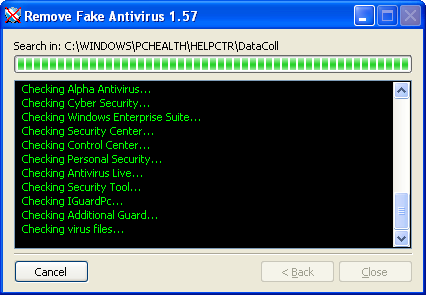
Remove Fake Antivirus is used to remove the most popular fake antiviruses. What is fake antivirus? This is a type of virus/malwares which disguises itself to be an antivirus. It infects your computer when you accidentally click a link in a website which will download the malware into your computer and run automatically when your windows boot. It scan the infected computer and produces fake alert warnings. It convinces you that your computer is in danger and urge you to purchase a useless copy of the fake antivirus. These fake antiviruses must be removed immediately.
Latest Reviews

SuzzyWoozy reviewed v1.95 on Nov 30, 2013
BANDIT-, -LORD- - nice comments! I believe you are some sort of computer god, living under the illusion that everyone else is some sort of Neo is disguise, LOL.
In nowadays OS there is little chance to get infected without the user consent (yes, you can disablethe download of IE); unfortunately, some of the average computer users - the vast majority of those using a computer, gets tricked into downloading "antivirus" programs all the time - this is how you get it on your computer and is kind of late to think about disabling IE download then, isn't' it?
Most probably they don;t even have a proper antivirus and is kind of late to install that too - your fake antivirus will prevent the installation of anything useful at that point.
The purpose of this program is NOT to over real-time, proactive protection, but to offer you some post-mortem comfort. It does this pretty well, taking into consideration it runs AFTER you got the malware.
I have used it in one occasion, I know what I'm taking about.

CyberDoc999 reviewed v1.94 on Oct 10, 2013
BANDIT- does not make sense to the average person
-Lord- does not make sense to the average person
This is a good program.

BANDIT- reviewed v1.94 on Oct 9, 2013
IE users..........
Internet Properties > Custom level > Downloads
- Automatic prompting for file downloads = ENABLE
- File download = DISABLE
- Font download = DISABLE
You aint gettin Jack. Unless you ENABLE File download.
If you click a HOTlink, Auto prompt will Pop-Up.
Make a ("Enable" Download) & a ("Disable" Download)
Registry key using Export in Regedit.
[HKEY_CURRENT_USER\Software\Microsoft\Windows\CurrentVersion\Internet Settings\Zones]
Place shortcuts to them in your taskbar, & use accordingly.
If you don't understand the last paragraph, Use an App..!!
0* .. 1º (moon) ...... ( _ º _ )

-Lord- reviewed v1.87 on Jul 9, 2012
salim.... your translator is broken or you have the wrong one.
you need one that translates from your language into ENGLISH not Engrish.
This software is still junk

salim74 reviewed v1.86 on Jun 17, 2012
Fake Antivirus was not my idea. I'm very happy to say Antivirus software about "Remove Fake Antivirus" for me.Tips to learn about the various Antivirus engines charge you for the Google Search the site. This is about a lot of experience. I wrote about your site Fake Antivirus. Great post! I can write better! The eye - thanks!
-Lord- reviewed v1.86 on May 2, 2012
This software is pointless. Here's why:
1. It only releases updates AFTER methods for eliminating malware are published and widely known
2. It doesn't release updates nearly often enough
3. other methods of removal are far more effective
I've cleaned these things in safe mode and it can be effective that way, but you can also miss a few steps. The best way is psychlone's method of a PE disk loaded with software that can be updated. I used a modified BartPE disk which loads WinXP as PE. I can load the BartPE either direct from CD, or via USB. I have several versions of it including slim GUI, and full blown "just like normal windows" GUI, and a mostly command line interface. On them, there are a number of utils that I use. Malware Bytes Anti Malware, CCleaner, AdAware, and several AV packages that can update definitions to the RAM drive, but my favorite is Eset which also has an online scanner. After it's cleaned while in the PE environment, THEN i boot to safe mode, check my msconfig, startup folder. temp folders, and services that run at boot to make sure the offending crapware is disabled/quarantined/deleted. THEN, I boot to normal. BartPE has not failed me one single time in the 8 years I've been using it, and my cleaning practices have been 100% to date.
Avoid this junk.

Input Overload reviewed v1.83 on Jan 9, 2012
I too have removed a fake AV from a friends PC recently using similar steps to Psychlone.
I still & will always maintain keeping such things off your PC as dvijaydev46 says is by far the best policy.
Buying the full version of Malwarebytes is about the cheapest & best way of doing this. Why people do not learn & do this is beyond my comprehension.
Also using an imaging program can also save a lot of heartache & hours re-installing, sadly people only learn this & a regular backup routine AFTER data loss.
While evil people make software to destroy hard work you need more than ever to Backup - Backup - & Backup.

dvijaydev46 reviewed v1.76 on Jun 20, 2011
In my opinion, Malwarebytes' Antimalware can remove fake antivirus software without any user intervention if you have purchased it. If you use the free version, it can remove most of the rouge apps after an on-demand scan.

some guy reviewed v1.74 on Feb 1, 2011
failed to remove Antivirus.net

Psychlone reviewed v1.74 on Jan 31, 2011
@dssdbs: Clearly you don't have any qualification to tell people to just format and install their OS from scratch, especially considering the fact that some malware will hide in the boot sector and there's nothing short of a DBAN/LLF that will eradicate it.
This program is OK for what it does.
I've eradicated literally thousands of computers of malware, especially the new breed of FAKEAV/Thinkpoint/etc.
This is how it goes for me:
1) Boot to a PE disk (OR run RKILL from within Windows where possible)
2) Use Malwarebytes
3) Run Combofix (where applicable)
4) Reboot
If this utility were to have better detection and SOME FORM of removal, it would be worth it's weight in internets...but it's not there yet.
All I see this as, is a new, automated version of RKILL that shuts down the virus processes for you...nothing more.
I still prefer to get rid of viruses BEFORE Windows loads - this way, they can't hide from you...

SuzzyWoozy reviewed v1.95 on Nov 30, 2013
BANDIT-, -LORD- - nice comments! I believe you are some sort of computer god, living under the illusion that everyone else is some sort of Neo is disguise, LOL.
In nowadays OS there is little chance to get infected without the user consent (yes, you can disablethe download of IE); unfortunately, some of the average computer users - the vast majority of those using a computer, gets tricked into downloading "antivirus" programs all the time - this is how you get it on your computer and is kind of late to think about disabling IE download then, isn't' it?
Most probably they don;t even have a proper antivirus and is kind of late to install that too - your fake antivirus will prevent the installation of anything useful at that point.
The purpose of this program is NOT to over real-time, proactive protection, but to offer you some post-mortem comfort. It does this pretty well, taking into consideration it runs AFTER you got the malware.
I have used it in one occasion, I know what I'm taking about.
CyberDoc999 reviewed v1.94 on Oct 10, 2013
BANDIT- does not make sense to the average person
-Lord- does not make sense to the average person
This is a good program.
BANDIT- reviewed v1.94 on Oct 9, 2013
IE users..........
Internet Properties > Custom level > Downloads
- Automatic prompting for file downloads = ENABLE
- File download = DISABLE
- Font download = DISABLE
You aint gettin Jack. Unless you ENABLE File download.
If you click a HOTlink, Auto prompt will Pop-Up.
Make a ("Enable" Download) & a ("Disable" Download)
Registry key using Export in Regedit.
[HKEY_CURRENT_USER\Software\Microsoft\Windows\CurrentVersion\Internet Settings\Zones]
Place shortcuts to them in your taskbar, & use accordingly.
If you don't understand the last paragraph, Use an App..!!
0* .. 1º (moon) ...... ( _ º _ )
-Lord- reviewed v1.87 on Jul 9, 2012
salim.... your translator is broken or you have the wrong one.
you need one that translates from your language into ENGLISH not Engrish.
This software is still junk
salim74 reviewed v1.86 on Jun 17, 2012
Fake Antivirus was not my idea. I'm very happy to say Antivirus software about "Remove Fake Antivirus" for me.Tips to learn about the various Antivirus engines charge you for the Google Search the site. This is about a lot of experience. I wrote about your site Fake Antivirus. Great post! I can write better! The eye - thanks!
-Lord- reviewed v1.86 on May 2, 2012
This software is pointless. Here's why:
1. It only releases updates AFTER methods for eliminating malware are published and widely known
2. It doesn't release updates nearly often enough
3. other methods of removal are far more effective
I've cleaned these things in safe mode and it can be effective that way, but you can also miss a few steps. The best way is psychlone's method of a PE disk loaded with software that can be updated. I used a modified BartPE disk which loads WinXP as PE. I can load the BartPE either direct from CD, or via USB. I have several versions of it including slim GUI, and full blown "just like normal windows" GUI, and a mostly command line interface. On them, there are a number of utils that I use. Malware Bytes Anti Malware, CCleaner, AdAware, and several AV packages that can update definitions to the RAM drive, but my favorite is Eset which also has an online scanner. After it's cleaned while in the PE environment, THEN i boot to safe mode, check my msconfig, startup folder. temp folders, and services that run at boot to make sure the offending crapware is disabled/quarantined/deleted. THEN, I boot to normal. BartPE has not failed me one single time in the 8 years I've been using it, and my cleaning practices have been 100% to date.
Avoid this junk.
Input Overload reviewed v1.83 on Jan 9, 2012
I too have removed a fake AV from a friends PC recently using similar steps to Psychlone.
I still & will always maintain keeping such things off your PC as dvijaydev46 says is by far the best policy.
Buying the full version of Malwarebytes is about the cheapest & best way of doing this. Why people do not learn & do this is beyond my comprehension.
Also using an imaging program can also save a lot of heartache & hours re-installing, sadly people only learn this & a regular backup routine AFTER data loss.
While evil people make software to destroy hard work you need more than ever to Backup - Backup - & Backup.
dvijaydev46 reviewed v1.76 on Jun 20, 2011
In my opinion, Malwarebytes' Antimalware can remove fake antivirus software without any user intervention if you have purchased it. If you use the free version, it can remove most of the rouge apps after an on-demand scan.
some guy reviewed v1.74 on Feb 1, 2011
failed to remove Antivirus.net
Psychlone reviewed v1.74 on Jan 31, 2011
@dssdbs: Clearly you don't have any qualification to tell people to just format and install their OS from scratch, especially considering the fact that some malware will hide in the boot sector and there's nothing short of a DBAN/LLF that will eradicate it.
This program is OK for what it does.
I've eradicated literally thousands of computers of malware, especially the new breed of FAKEAV/Thinkpoint/etc.
This is how it goes for me:
1) Boot to a PE disk (OR run RKILL from within Windows where possible)
2) Use Malwarebytes
3) Run Combofix (where applicable)
4) Reboot
If this utility were to have better detection and SOME FORM of removal, it would be worth it's weight in internets...but it's not there yet.
All I see this as, is a new, automated version of RKILL that shuts down the virus processes for you...nothing more.
I still prefer to get rid of viruses BEFORE Windows loads - this way, they can't hide from you...
Input Overload reviewed v1.73 on Jan 10, 2011
A good program for those new to PC's although if you have the full version of Malwarebytes/Prevx running you won't get infected in the first place. I sent the link of this program to a few of my friends. (Might cut down on the phone calls)
dssdbs, If you do a new full install & use 'Acronis True Image' it's a matter of 6 minutes to restore an image you took days or even weeks ago with everything intact & working. It would take me days to do a full re-install as I have many specialist programs on. Sorry for digressing.

war593122 reviewed v1.72 on Dec 3, 2010
Excellent tool. If only I had it yesterday, had to remove ThinkPoint of clients laptop (Microsoft Security Essentials Fix It Right Up. But this would have been a lot quicker, seeing as the scan took over 2 hours (old laptop obviously!).
Can you please provide a change-log?

Banquo reviewed v1.72 on Dec 2, 2010
dssdbs, that's nonsense. You obviously don't know much about computers.