
File Details |
|
| File Size | 23.5 MB |
|---|---|
| License | Subscription, $19.95 |
| Operating System | Windows 7/8/10/Server 2003/Vista/XP |
| Date Added | November 5, 2021 |
| Total Downloads | 56,822 |
| Publisher | Siber Systems, Inc. |
| Homepage | RoboForm |
Publisher's Description
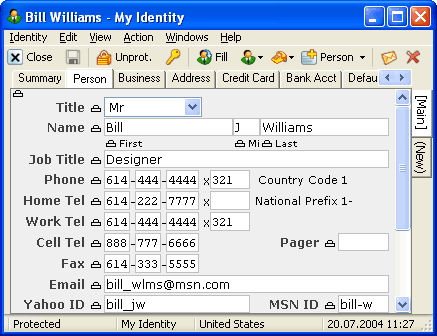
RoboForm is a password manager and one-click web form filler with some serious Artificial Intelligence inside. Just enter your personal information and the program securely stores it for future reference. It is well-behaved and includes no adware or spyware. Works as an add-on to Microsoft Internet Explorer or Netscape web browsers.
Latest Reviews

kstev99 reviewed v8.5.4 on Sep 24, 2018
Although I like the autofill feature of Roboform much better than Lastpass, where I had to click through menus to get forms to fill, I must subtract stars for the fact that RoboForm cannot be ran as a TRUE portable app.
The fact is that if you are only using the browser extension on a computer such as a work computer where you cannot install the entire program, its features are extremely limited. forms will not fill automatically and the toolbar, and keyboard shortcuts are missing.
Works great IF you have the desktop program installed. Technical Support is out of touch and when you try to explain an issue I swear that none of the support staff have ever used the program themselves. For now, I'll keep it on an yearly basis UNTIL something better comes along.
kstev99 reviewed v8.4.1 on Sep 11, 2017
Recently switched to this after using Lastpass for years. Lastpass no longer autofilled pages and tech support was not helpful.
I am very impressed so far. It's a great password manager, and it seems that the form filling function is superior to Lastpass. There is however, some issues with the Firefox Extension. Context menu in forms does not work, and because of Mozilla's new Web Extensions, you can no longer have a toolbar at the top.
Overall, very stable, and I think it's a keeper

lg reviewed v8.2.8.8 on Jan 10, 2017
Lousy with Edge. Must pay for web access to share passwords. No option to use Dropbox, OneDrive, etc. No option for local use of sharing passwords between computers. Many other options are available, some free.
Also see discussions.

cyberguy reviewed v8.2.1 Beta on Dec 15, 2016
I've always found roboform's usability better than Lastpass.
Version 8+ adds unlimited local logins for free. There are pluses and minuses to that. To keep from shooting themselves in the foot they have removed the ability to set your password data location and there is/will be no portable version of Roboform 8.
To use the same passwords across devices, you need to upgrade to the 'everywhere' pay service (something that Lastpass gives you for free). While I don't fault them for that, I do not like having to pay on an ongoing basis for that feature.
I'm rating it as a 4 (subtracting 1 for the lack of a free portability)

AthleticLatino reviewed v7.9.8.5 on Jun 25, 2014
LastPass all the way. I also don't like the greediness of the company.

ghammer reviewed v7.9.7 on May 20, 2014
RoboForm lost me as a customer when competition arrived.
LastPass works fine for what I use a password manager for, web browsers. Don't want and don't need a tool for application logins and it is quite annoying.
Plus RoboForm has too many issues with fast moving browsers. I can sympathize, but not accept that as a customer.
I'm firmly in the RoboForm camp now across all my devices and browsers.

Uriel reviewed v7.9.3.9 on Feb 4, 2014
I liked it better than Lastpass but it is not compatible across platforms and so I cannot sync to the cloud all platforms like Lastpass. In Linux they expect me to enable third party cookies to use their extension. And forget it if you own a Blackberry Q10. If they pick up the ball I would likely return.

Ball Sacks reviewed v7.9.3.3 on Jan 31, 2014
not free chrome is free and does all this s*** for free!

truthbetold reviewed v7.9.0.0 on Jun 26, 2013
Totally unnecessary with Win 8. Always causes problems with Firefox.
lg reviewed v7.8.8.5 on Mar 27, 2013
They lost me as a customer long ago.

kstev99 reviewed v8.5.4 on Sep 24, 2018
Pros: Better than Lastpass
Cons: Cannot run as a TRUE Portable application
Bottom Line: Although I like the autofill feature of Roboform much better than Lastpass, where I had to click through menus to get forms to fill, I must subtract stars for the fact that RoboForm cannot be ran as a TRUE portable app.
The fact is that if you are only using the browser extension on a computer such as a work computer where you cannot install the entire program, its features are extremely limited. forms will not fill automatically and the toolbar, and keyboard shortcuts are missing.
Works great IF you have the desktop program installed. Technical Support is out of touch and when you try to explain an issue I swear that none of the support staff have ever used the program themselves. For now, I'll keep it on an yearly basis UNTIL something better comes along.
kstev99 reviewed v8.4.1 on Sep 11, 2017
Pros: Only have to remember ONE Password
Cons: Firefox extension lacks context menu and bottom/top toolbar (Mozilla's fault)
Bottom Line: Recently switched to this after using Lastpass for years. Lastpass no longer autofilled pages and tech support was not helpful.
I am very impressed so far. It's a great password manager, and it seems that the form filling function is superior to Lastpass. There is however, some issues with the Firefox Extension. Context menu in forms does not work, and because of Mozilla's new Web Extensions, you can no longer have a toolbar at the top.
Overall, very stable, and I think it's a keeper
lg reviewed v8.2.8.8 on Jan 10, 2017
Lousy with Edge. Must pay for web access to share passwords. No option to use Dropbox, OneDrive, etc. No option for local use of sharing passwords between computers. Many other options are available, some free.
Also see discussions.
cyberguy reviewed v8.2.1 Beta on Dec 15, 2016
I've always found roboform's usability better than Lastpass.
Version 8+ adds unlimited local logins for free. There are pluses and minuses to that. To keep from shooting themselves in the foot they have removed the ability to set your password data location and there is/will be no portable version of Roboform 8.
To use the same passwords across devices, you need to upgrade to the 'everywhere' pay service (something that Lastpass gives you for free). While I don't fault them for that, I do not like having to pay on an ongoing basis for that feature.
I'm rating it as a 4 (subtracting 1 for the lack of a free portability)
AthleticLatino reviewed v7.9.8.5 on Jun 25, 2014
LastPass all the way. I also don't like the greediness of the company.
ghammer reviewed v7.9.7 on May 20, 2014
RoboForm lost me as a customer when competition arrived.
LastPass works fine for what I use a password manager for, web browsers. Don't want and don't need a tool for application logins and it is quite annoying.
Plus RoboForm has too many issues with fast moving browsers. I can sympathize, but not accept that as a customer.
I'm firmly in the RoboForm camp now across all my devices and browsers.
Uriel reviewed v7.9.3.9 on Feb 4, 2014
I liked it better than Lastpass but it is not compatible across platforms and so I cannot sync to the cloud all platforms like Lastpass. In Linux they expect me to enable third party cookies to use their extension. And forget it if you own a Blackberry Q10. If they pick up the ball I would likely return.
Ball Sacks reviewed v7.9.3.3 on Jan 31, 2014
not free chrome is free and does all this s*** for free!
truthbetold reviewed v7.9.0.0 on Jun 26, 2013
Totally unnecessary with Win 8. Always causes problems with Firefox.
lg reviewed v7.8.8.5 on Mar 27, 2013
They lost me as a customer long ago.

SoundMix reviewed v7.8.8.5 on Mar 27, 2013
Here we go again....this company has LOST it's Better Business Bureau approval and now has an "F" rating with TOO MANY complaints. If you want to take a chance with a company that was removed from the BBB go for it. For me they would need to make amends and get back on the list with an "A" or "B"..
See below for more BBB info.
Uriel reviewed v7.8.8.5 on Mar 26, 2013
I have subscriptions to both Roboform and Lastpass and I prefer Roboform over Lastpass. The only reason I have Lastpass is for Linux Mint. Roboform has an extension for Firefox in Linux Mint but I have to enable third party cookies to use it which is a no no in my world. Roboform is a better app all around though in my opinion.

ecvogel reviewed v7.8.7.5 on Mar 12, 2013
Persistant Bugs that are never fixed. Did not grandfather people who were promised lifetime upgrades and updates.
Here is a app close to it and is free today.
http://giveaway.glarysof...m/stickypassword6.0-129/
Website http://www.stickypassword.com/