File Details |
|
| File Size | 0.2 MB |
|---|---|
| License | Freeware |
| Operating System | Windows 2000/Server 2003/XP |
| Date Added | November 1, 2006 |
| Total Downloads | 24,497 |
| Publisher | Sysinternals |
| Homepage | RootkitRevealer |
Publisher's Description
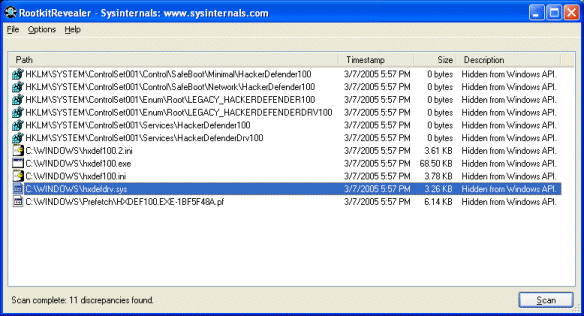
RootkitRevealer is an advanced root kit detection utility. Its output lists Registry and file system API discrepancies that may indicate the presence of a user-mode or kernel-mode rootkit. It successfully detects all persistent rootkits including AFX, Vanquish and HackerDefender (note: RootkitRevealer is not intended to detect memory-based rootkits like Fu that don't survive reboots).
Latest Reviews

walruz reviewed v1.71 on Nov 12, 2006
Gotta love RootkitRevealer. You should download it now, before M$ starts using WGA on it.. :(

c4p0ne reviewed v1.71 on Nov 12, 2006
Still labeled "1.7" in the help|about.

Canuckistani reviewed v1.7 on Feb 3, 2006
Mikko Hyppönen, the Chief Research Officer at F-Secure, does not think Blacklight a replacement for Rootkit Revealer. But, it is a quick and simple way to help stem the tide of infection and every little bit helps. Mikko has a great deal of respect for Sysinternals and Mark Russinovich. The advantage of Blacklight is in the results. For a not so computer savvy user the results from Rootkit Revealer may be confusing. Blacklight just gives a yes or no answer but, doesn't give any clues about what it might have missed.

jordenpro reviewed v1.7 on Feb 3, 2006
Great Program!!
Please don't say 'blacklight' is better. If your serious about detecting rootkits, you'll use more than one for detection.
RootkitRevealer
Blacklight
IceSword
And if you really want to know the best, it's IceSword. ;)

nefarious1 reviewed v1.7 on Feb 3, 2006
@veeoh:
F-Secure BlackLight is simpler to use, for sure, but why is it "better"? Does it work better? I have no reason to think it does. And it is only free to use while in beta--it will be shareware once final.
@devilrider:
Ignoring drives and/or directories would defeat the purpose of finding rootkits, because they can be hidden anywhere.
Priority doesn't matter, because you are supposed to run RKR on an idle system, as the documentation clearly states. I have quite a loaded system, but RKR takes only a few minutes to run.
You aren't supposed to surf the web while running RKR. If you do, then new files are added while RKR is scanning, and that's why it finds those file system objects. It is a user issue, not a software issue.
-------
RKR is a valuable tool. Not infallible, but valuable. Every Windows system should run it occasionally.

devilrider reviewed v1.7 on Feb 3, 2006
Was nice when it was new, but its bugged, memory eating, slow and not tweaked.
a) add option to ignore directories
b) add option to ignore drives
c) Write/flush fix for Log File noone nowadays writes all in one Flush.
d) allow Priority change, 5 Hours 99% cpu usage suxx, could at last Websurf if it would not eat all memory and cpu.
This thingy finds way to much stuff thats actually ok (like whole firefox stuff). 65k + Entries and no option to tweak on that so it finds only whats of interest.
I scanned my 900 gig of software (most time comsumes all the Source stuff and SDK's). just as info i have 6541 Programs installed MS Studio 2005 Express and most SDK's fom M$ and Local copys from allot of SourceForge projects i'm involved or personally interested in.
Scan took about 5 Hours, saveing Log File i aborted after 3 hours waiting, RootKitRevealer dropt from over 200 meg Mem-usage and 99% CPU usage to 54k memusage and 0% CPU usage for 30 mins and still no LogFile saved.
So you see why i request for those options to be implemented, could skip 500 GIG of source files and own Compiled stuff.
Maybe i test on a Non-Working machine with only few programs installed, and update this post after that.
nefarious1:
IT ran on idle system, running while i sleep I call idle. Maybe you mean run in savemode with all services and tasks stopped ?

bourgeoisdude reviewed v1.60 on Dec 9, 2005
If there's one positive outcome from sony's mistakes, it's that more and more people will download this program! Works great, finds the Sony BMG rootkit...

olorinpc reviewed v1.60 on Dec 9, 2005
vanleeuwen: Did you actually download the program and test it before reviewing? If you go to help > about and look at the version number, it is 1.60.
Program works well and pics up some interesting things.

vanleeuwen reviewed v1.60 on Dec 8, 2005
Good program but this is not v1.6 its still v1.56 there web site is also only v1.56 ??

ZenWarrior reviewed v1.60 on Dec 8, 2005
To: mike_loldrup
I bet SONY BMG thinks this little jewel is *too* good. It certainly nailed them! ;)

walruz reviewed v1.71 on Nov 12, 2006
Gotta love RootkitRevealer. You should download it now, before M$ starts using WGA on it.. :(
c4p0ne reviewed v1.71 on Nov 12, 2006
Still labeled "1.7" in the help|about.
Canuckistani reviewed v1.7 on Feb 3, 2006
Mikko Hyppönen, the Chief Research Officer at F-Secure, does not think Blacklight a replacement for Rootkit Revealer. But, it is a quick and simple way to help stem the tide of infection and every little bit helps. Mikko has a great deal of respect for Sysinternals and Mark Russinovich. The advantage of Blacklight is in the results. For a not so computer savvy user the results from Rootkit Revealer may be confusing. Blacklight just gives a yes or no answer but, doesn't give any clues about what it might have missed.
jordenpro reviewed v1.7 on Feb 3, 2006
Great Program!!
Please don't say 'blacklight' is better. If your serious about detecting rootkits, you'll use more than one for detection.
RootkitRevealer
Blacklight
IceSword
And if you really want to know the best, it's IceSword. ;)
nefarious1 reviewed v1.7 on Feb 3, 2006
@veeoh:
F-Secure BlackLight is simpler to use, for sure, but why is it "better"? Does it work better? I have no reason to think it does. And it is only free to use while in beta--it will be shareware once final.
@devilrider:
Ignoring drives and/or directories would defeat the purpose of finding rootkits, because they can be hidden anywhere.
Priority doesn't matter, because you are supposed to run RKR on an idle system, as the documentation clearly states. I have quite a loaded system, but RKR takes only a few minutes to run.
You aren't supposed to surf the web while running RKR. If you do, then new files are added while RKR is scanning, and that's why it finds those file system objects. It is a user issue, not a software issue.
-------
RKR is a valuable tool. Not infallible, but valuable. Every Windows system should run it occasionally.
devilrider reviewed v1.7 on Feb 3, 2006
Was nice when it was new, but its bugged, memory eating, slow and not tweaked.
a) add option to ignore directories
b) add option to ignore drives
c) Write/flush fix for Log File noone nowadays writes all in one Flush.
d) allow Priority change, 5 Hours 99% cpu usage suxx, could at last Websurf if it would not eat all memory and cpu.
This thingy finds way to much stuff thats actually ok (like whole firefox stuff). 65k + Entries and no option to tweak on that so it finds only whats of interest.
I scanned my 900 gig of software (most time comsumes all the Source stuff and SDK's). just as info i have 6541 Programs installed MS Studio 2005 Express and most SDK's fom M$ and Local copys from allot of SourceForge projects i'm involved or personally interested in.
Scan took about 5 Hours, saveing Log File i aborted after 3 hours waiting, RootKitRevealer dropt from over 200 meg Mem-usage and 99% CPU usage to 54k memusage and 0% CPU usage for 30 mins and still no LogFile saved.
So you see why i request for those options to be implemented, could skip 500 GIG of source files and own Compiled stuff.
Maybe i test on a Non-Working machine with only few programs installed, and update this post after that.
nefarious1:
IT ran on idle system, running while i sleep I call idle. Maybe you mean run in savemode with all services and tasks stopped ?
bourgeoisdude reviewed v1.60 on Dec 9, 2005
If there's one positive outcome from sony's mistakes, it's that more and more people will download this program! Works great, finds the Sony BMG rootkit...
olorinpc reviewed v1.60 on Dec 9, 2005
vanleeuwen: Did you actually download the program and test it before reviewing? If you go to help > about and look at the version number, it is 1.60.
Program works well and pics up some interesting things.
vanleeuwen reviewed v1.60 on Dec 8, 2005
Good program but this is not v1.6 its still v1.56 there web site is also only v1.56 ??
ZenWarrior reviewed v1.60 on Dec 8, 2005
To: mike_loldrup
I bet SONY BMG thinks this little jewel is *too* good. It certainly nailed them! ;)

robmanic44 reviewed v1.60 on Dec 8, 2005
As someone who suffers from brain damage I resent this sort of I'm more computer literate than you attitude. I have managed to consruct my own desktop by carefully determining programs that do what I want them to do and not relying on "so called" experts.

Kramy reviewed v1.60 on Dec 8, 2005
If you get a rootkit and don't discover it because you don't use this tool, then if you lose everything you deserved it.*
*does not apply to people that did not read this.
I think I'll keep this around just incase. You never know what's going to be put in CD's in the near future.

httpd.confused reviewed v1.56 on Nov 21, 2005
You guys are insane. Everyone should use this utility. Read the docs; it's not hard. Too many people shy away from using more than 2% of their brain capacity, as if they'll suffer some sort of brain meltdown.
And what's this whining? This is a good utility. Could be improved, could support offline mode, but overall it's pretty good at what it does.
And I'll say it again: If you have a rootkit on your system, REFORMAT, because you cannot be sure you removed the entire rootkit!