
File Details |
|
| File Size | 157.6 MB |
|---|---|
| License | Freeware |
| Operating System | Windows (All) |
| Date Added | January 29, 2021 |
| Total Downloads | 99,851 |
| Publisher | SUPERAntiSpyware.com |
| Homepage | SUPERAntiSpyware |
Publisher's Description
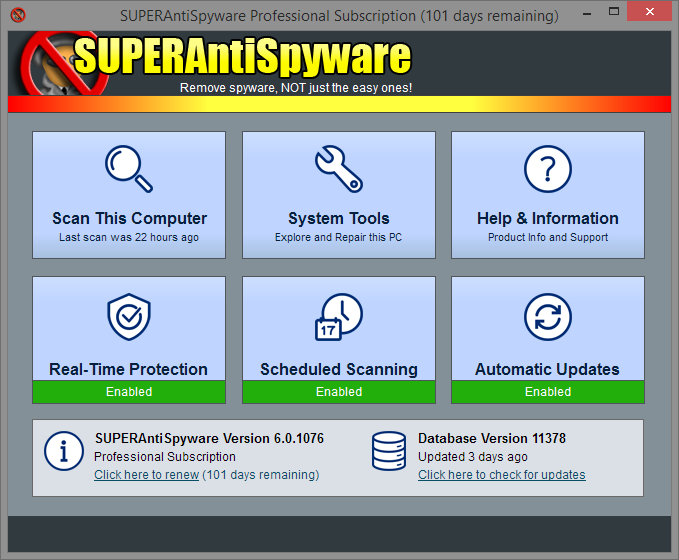
SUPERAntiSpyware is the most thorough scanner on the market. Our Multi-Dimensional Scanning and Process Interrogation Technology will detect spyware other products miss. Easily remove pests such as WinFixer, SpyAxe, SpyFalcon, and thousands more. Repair broken Internet Connections, Desktops, Registry Editing and more with our unique Repair System. Dedicated Threat Research Team scours the web for new threats and provides daily definition updates.
SUPERAntiSpyware Free Edition does not include real-time blocking or scheduled scanning.
Latest Reviews

Slug_Coordinator reviewed v6.0.1230 on Dec 7, 2016
I use to love this software till the updates took forever and it was installing other things bogging down system resources and Malwarevytes kept identifying Malware being installed from this.
Later I also confirmed that with Hitman Pro and Bitdefender products

CyberDoc999 reviewed v6.0.1206 on Sep 26, 2015
poor at finding spyware.
CyberDoc999 reviewed v6.0.1206 on Sep 26, 2015
poor at finding spyware.

tomkelly reviewed v5.6.1032 on Aug 22, 2013
top notch anti spyware

Music4Ever reviewed v5.6.1030 on Aug 15, 2013
Interface getting on - Not too god at finding malware - Go for the free version & run on demand, I feel Malwarebytes is way ahead of this though.
Music4Ever reviewed v5.6.1016 on May 8, 2013
This program badly needs an total interface update, what's with the ‘Use XP Style Menus’, & integrate into ‘Vista Security Centre’? It doesn't do well in catching malware either, I have a lifetime subscription so I do run it from time to time but it's far behind Mbam for example.

Zootopia3001 reviewed v5.6.1010 on Oct 10, 2012
@coolticker, if you got the memory, why should you care how much it uses during scanning? It's 330mb's for me as well on my 2GB memory PC. I'd rather it have all the memory it wants while scanning for speed and accuracy. You'll get the memory back afterwards anyway. Just sayin'. I usually use it to full scan on every patch Tuesday, otherwise I just use the right click properties to scan individual files I might happen to download.

coolticker reviewed v5.6.1010 on Oct 9, 2012
It uses 330MB RAM when scanning my XP machine ... far too much !

psycros reviewed v5.6.1010 on Oct 9, 2012
Sadly, not really worth buying since its real-time shield catches almost nothing. Its scanner, however, finds a TON of crap the others don't. Most typical A/Vs don't even look at tracking cookies, web bugs, etc. That's where this program shines. It also seems to work very well alongside your primary antivirus.
Music4Ever reviewed v5.5.1012 on Jul 26, 2012
When a security application starts adding browsers as a basically hidden function it's time to start looking elsewhere - I really do not agree with hidden installs. It's now off my recommendation list, also recent tests I've looked at show it to be pretty poor at finding spyware.
@gatorfan95 - Agree 100%

Slug_Coordinator reviewed v6.0.1230 on Dec 7, 2016
I use to love this software till the updates took forever and it was installing other things bogging down system resources and Malwarevytes kept identifying Malware being installed from this.
Later I also confirmed that with Hitman Pro and Bitdefender products
CyberDoc999 reviewed v6.0.1206 on Sep 26, 2015
poor at finding spyware.
CyberDoc999 reviewed v6.0.1206 on Sep 26, 2015
poor at finding spyware.
tomkelly reviewed v5.6.1032 on Aug 22, 2013
top notch anti spyware
Music4Ever reviewed v5.6.1030 on Aug 15, 2013
Interface getting on - Not too god at finding malware - Go for the free version & run on demand, I feel Malwarebytes is way ahead of this though.
Music4Ever reviewed v5.6.1016 on May 8, 2013
This program badly needs an total interface update, what's with the ‘Use XP Style Menus’, & integrate into ‘Vista Security Centre’? It doesn't do well in catching malware either, I have a lifetime subscription so I do run it from time to time but it's far behind Mbam for example.
Zootopia3001 reviewed v5.6.1010 on Oct 10, 2012
@coolticker, if you got the memory, why should you care how much it uses during scanning? It's 330mb's for me as well on my 2GB memory PC. I'd rather it have all the memory it wants while scanning for speed and accuracy. You'll get the memory back afterwards anyway. Just sayin'. I usually use it to full scan on every patch Tuesday, otherwise I just use the right click properties to scan individual files I might happen to download.
coolticker reviewed v5.6.1010 on Oct 9, 2012
It uses 330MB RAM when scanning my XP machine ... far too much !
psycros reviewed v5.6.1010 on Oct 9, 2012
Sadly, not really worth buying since its real-time shield catches almost nothing. Its scanner, however, finds a TON of crap the others don't. Most typical A/Vs don't even look at tracking cookies, web bugs, etc. That's where this program shines. It also seems to work very well alongside your primary antivirus.
Music4Ever reviewed v5.5.1012 on Jul 26, 2012
When a security application starts adding browsers as a basically hidden function it's time to start looking elsewhere - I really do not agree with hidden installs. It's now off my recommendation list, also recent tests I've looked at show it to be pretty poor at finding spyware.
@gatorfan95 - Agree 100%
Zootopia3001 reviewed v5.5.1012 on Jul 23, 2012
Use SUPERAntiSpyware as passive along with Malwarebytes' Anti-Malware and ClamWin Antivirus to have a right click properties context menu to scan downloaded files.
As with any security scanning software, none will be 100% effective.
@gatorfan95... I didn't get the Chrome install on SAS's custom install. However, I did not allow the installer any internet access via my firewall(Comodo firewall). Maybe that's the reason.
Update: gatorfan95, OK, I gotcha now. Yea, an 'Express' install in this case would not be recommended. Avast AV was another that was installing Chrome without knowledge. Happened to me on version 7 when I gave it a try. I still like SAS regardless. I'll just have to be extra extra careful about installing ANY software nowadays.

gatorfan95 reviewed v5.5.1012 on Jul 23, 2012
This is the last version I will download. The splash screen gives you a big green "Button" that says "Express Install". On a hunch I hit the much smaller, link like, "custom install" and sure enough, that piece of crap Google Chrome was hidden in there as an automatic install. This is a fairly nice little malware removal tool, however, I hate deceptive tactics used to trick you into installing a program you do not use or want. SHAME on the developers for doing this.
@ Zootopia3001: I didn't get it either, I refused to install the program after looking at the "custom install". My point is, they hid the fact that "Express Install" would put Chrome on your machine. I wont use their software again, as I have with other installers that try to pull this crap.

HeilNizar reviewed v5.5.1006 on Jun 28, 2012
-Infested with nag about how good is the pro version in blow job.
-Portable version is 400 miles away from real portable.