File Details |
|
| File Size | 7.5 MB |
|---|---|
| License | Freeware |
| Operating System | Windows 7/8/10/Vista/XP |
| Date Added | November 20, 2020 |
| Total Downloads | 3,543 |
| Publisher | Bartels Media GmbH |
| Homepage | ShareMouse |
Publisher's Description
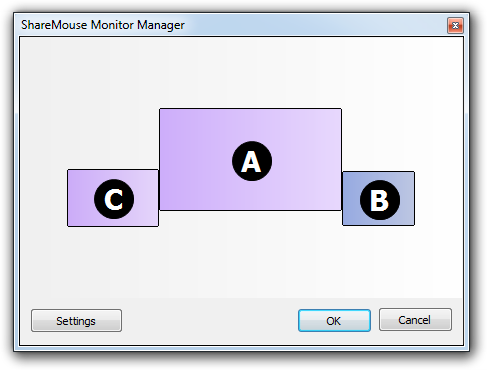
ShareMouse lets you share your mouse and keyboard with multiple networked computers. Just move the mouse pointer to the computer you wish to control. When you reach the border of the monitor, the mouse cursor magically jumps to the neighboring monitor and you can then control that computer.
Latest Reviews

Morningdove reviewed v4.0.32 on Aug 31, 2017
Portable version tips the scales from Mouse Without Borders to ShareMouse.

VictorAnderson reviewed v3.0.52 on Sep 18, 2016
Mouse without Borders is better - a Microsoft product - and free www.microsoft.com/en-us/...d/details.aspx?id=35460
...but this program works well - so I'm still going to give it a 3 - but no way I would every pay for this thing.

kstev99 reviewed v3.0.36 on Feb 10, 2016
This is OK, but I prefer Mouse Without Borders, which is 100% free and doesn't try to get you to purchase a paid version.

vodimitriy reviewed v1.0.90 on May 28, 2012
Very goog idea!

minklein reviewed v1.0.58 Beta on Nov 18, 2011
I tried Synergy but found it had some minor problems. I went back to my KVM. Mouseshare appears to work great, no problem so far. I am using one monitor and two computers. One input is on HDMI and the other is DVI. Push the button on the LCD to change, perfect. Nice peice of software.
Running Win7 64 bit.
There is one problem over running a KVM. My primary Sytem has the Mouse and KB plugged into it. When both systems are running all works perfectly. If I want to start the secondary system by itself, of course the share does not work. That is where a KVM comes in, each share is independent via the KVM button.

OldGeek reviewed v1.0.58 Beta on Nov 17, 2011
It is very good, but it has one major drawback over Synergy, no linux version, so that makes it useless to me. I have no issues with synergy and I can move from linux to windows. I have no doubt this will get better with time.

Nighted reviewed v1.0.57 Beta on Nov 14, 2011
WOW!
No messing around to config like with Synergy. You can drag and drop from one machine to the next? Beautiful!
Plus there's a portable version. All I did was unzip on both machines and it was working without even opening the settings!
kstev99 reviewed v1.0.52 Beta on Nov 6, 2011
I decided to try this as I am setting up a new laptop sitting just to the left of my main PC. I am really impressed. Simply move the mouse to the left side of the screen and you have instant control of the laptop using the PC's mouse and keyboard. Saves a lot of time. Just drag the files from the PC to the laptop. Simple to set up.

Morningdove reviewed v4.0.32 on Aug 31, 2017
Pros:
Cons:
Bottom Line: Portable version tips the scales from Mouse Without Borders to ShareMouse.
VictorAnderson reviewed v3.0.52 on Sep 18, 2016
Mouse without Borders is better - a Microsoft product - and free www.microsoft.com/en-us/...d/details.aspx?id=35460
...but this program works well - so I'm still going to give it a 3 - but no way I would every pay for this thing.
kstev99 reviewed v3.0.36 on Feb 10, 2016
This is OK, but I prefer Mouse Without Borders, which is 100% free and doesn't try to get you to purchase a paid version.
vodimitriy reviewed v1.0.90 on May 28, 2012
Very goog idea!
minklein reviewed v1.0.58 Beta on Nov 18, 2011
I tried Synergy but found it had some minor problems. I went back to my KVM. Mouseshare appears to work great, no problem so far. I am using one monitor and two computers. One input is on HDMI and the other is DVI. Push the button on the LCD to change, perfect. Nice peice of software.
Running Win7 64 bit.
There is one problem over running a KVM. My primary Sytem has the Mouse and KB plugged into it. When both systems are running all works perfectly. If I want to start the secondary system by itself, of course the share does not work. That is where a KVM comes in, each share is independent via the KVM button.
OldGeek reviewed v1.0.58 Beta on Nov 17, 2011
It is very good, but it has one major drawback over Synergy, no linux version, so that makes it useless to me. I have no issues with synergy and I can move from linux to windows. I have no doubt this will get better with time.
Nighted reviewed v1.0.57 Beta on Nov 14, 2011
WOW!
No messing around to config like with Synergy. You can drag and drop from one machine to the next? Beautiful!
Plus there's a portable version. All I did was unzip on both machines and it was working without even opening the settings!
kstev99 reviewed v1.0.52 Beta on Nov 6, 2011
I decided to try this as I am setting up a new laptop sitting just to the left of my main PC. I am really impressed. Simply move the mouse to the left side of the screen and you have instant control of the laptop using the PC's mouse and keyboard. Saves a lot of time. Just drag the files from the PC to the laptop. Simple to set up.